
What does project management without the management mean?
Project management without the management means the software does the upkeep that managing usually takes. It works out progress, gathers deadlines, counts how long a reply has waited, records scope changes and keeps the client informed. You still decide the work, the dates and the priorities. You stop maintaining a second system about the work.
Here are the chores that stop being yours. Each one has its own section below, on real Noddis screens.
| The management chore | The usual way | In Noddis |
|---|---|---|
| Working out progress | Count tasks, or keep a formula alive | Calculated for every project, in every workspace |
| Weighting the big tasks | A weighted average in a spreadsheet | Weighted mode: you give the shares, Noddis does the maths |
| Finding what is due | Open each project, or build a filter | Upcoming lists every deadline in date order |
| Chasing replies | Memory, flags or a separate tracker | Follow-Up counts the days on every open ask |
| Tracking scope changes | A change log someone has to keep | Drift compares today's work with the agreed baseline |
| Getting requests in | Retype the text or the email as a task | Text a shortcut, or forward the email |
| Planning the work | Sketch it in another app, then retype the plan | Whiteboard with live project cards |
| Updating the client | Write a status email | A live, read-only client portal |
| Building the views | Design boards, fields and dashboards | The workspaces already exist |
Progress you can see the moment you open it
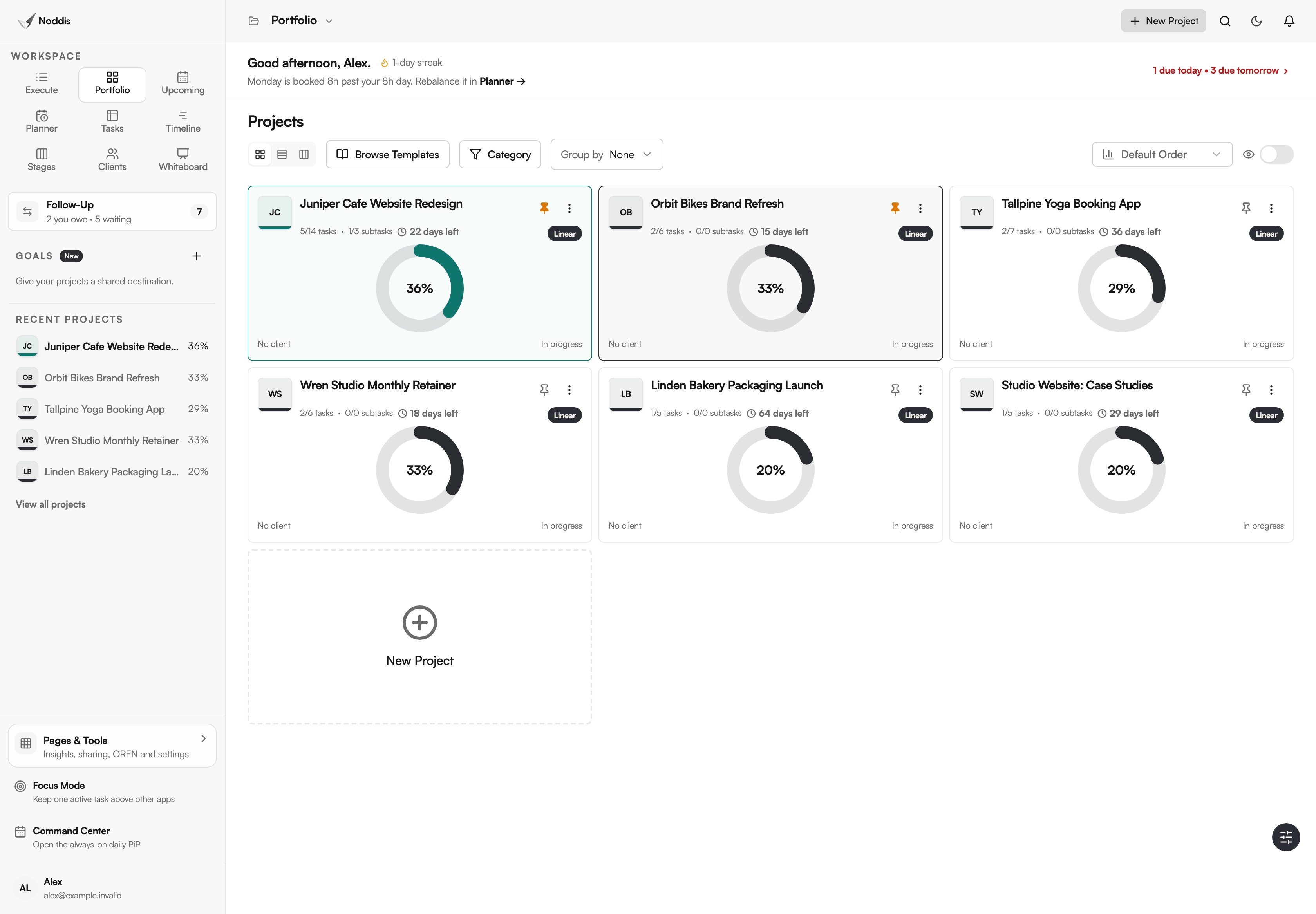
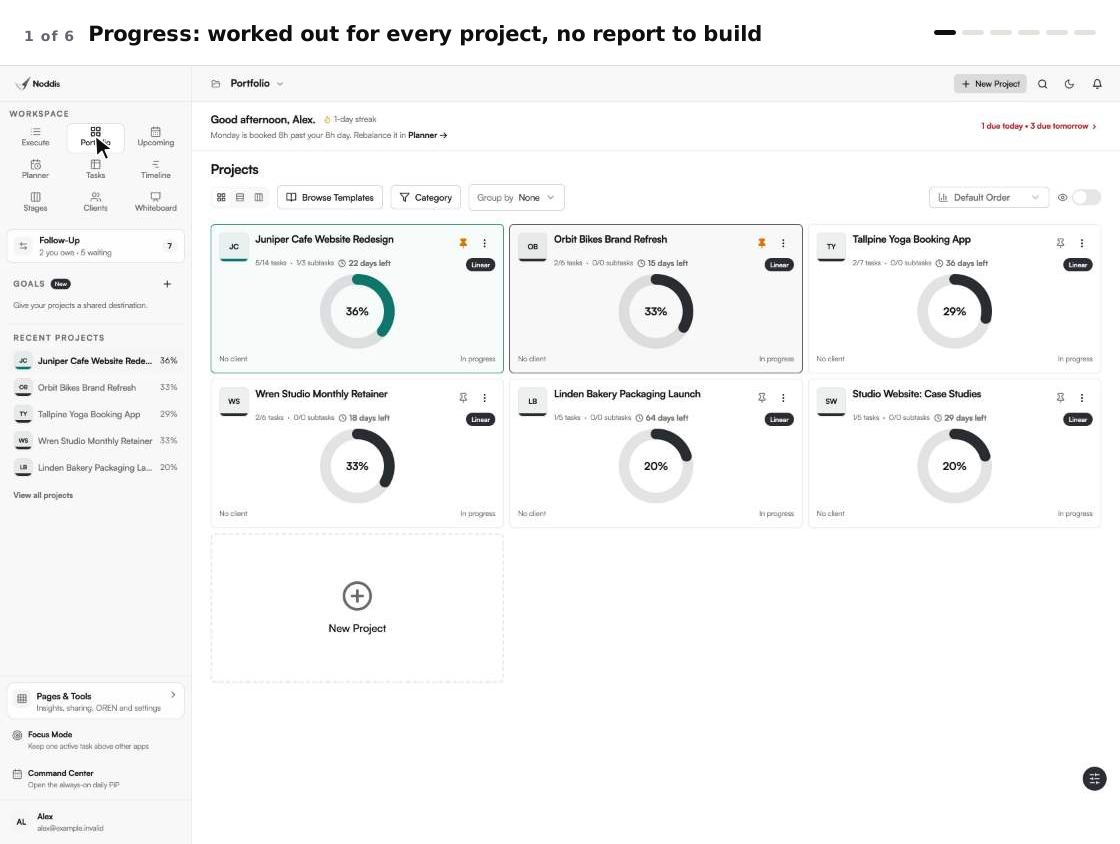
Open Portfolio and every project already shows how far along it is. Each card has a progress ring, the tasks finished out of the total, and the days left. Noddis works the number out from the work you tick off. You never type a percentage, and you never update a status report.
The same number follows the project everywhere. It is on the sidebar, in Execute, in Stages and on the page your client sees.
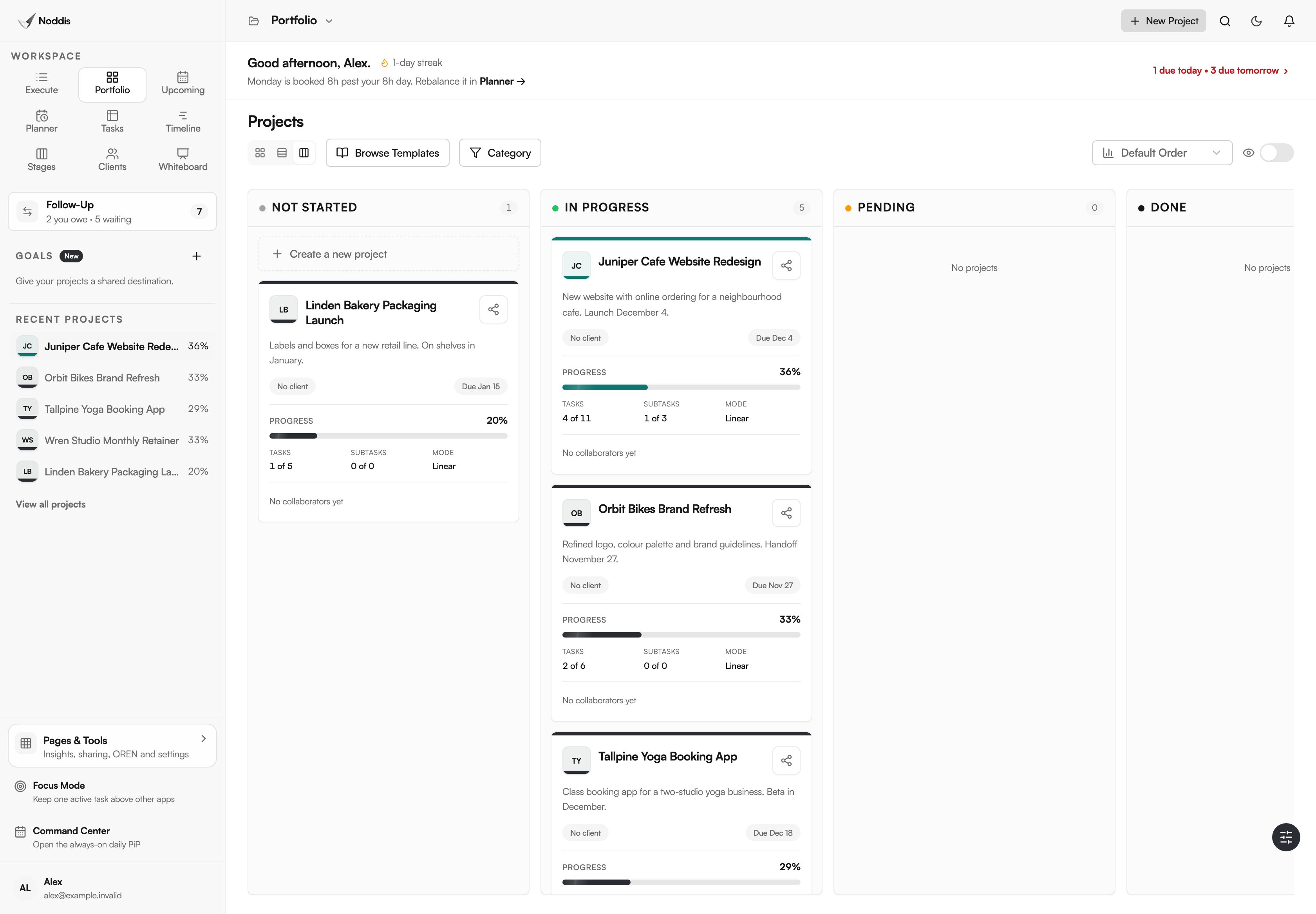
Portfolio is on the Free plan. It has three modes: cards, a list and a board.
Linear or Weighted progress, with no calculations
A percentage is only useful if it is honest. Noddis gives every project two ways to count, and both are on the Free plan.
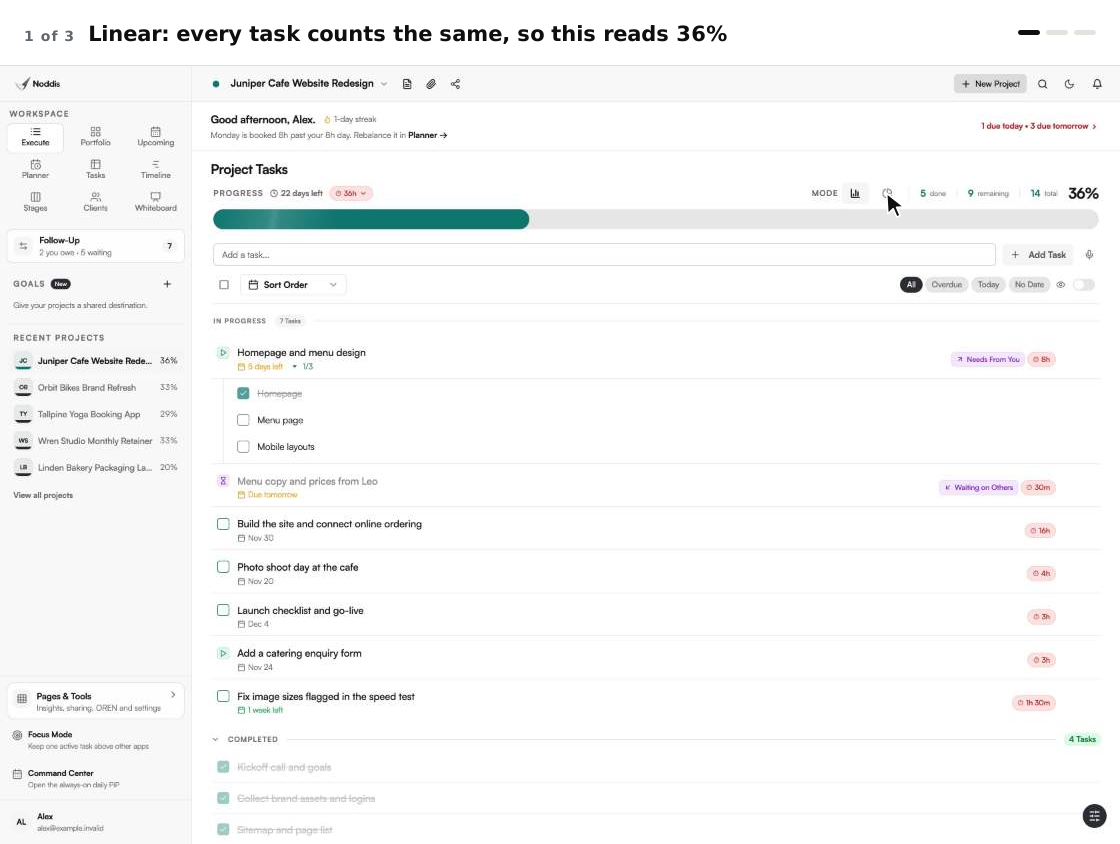
Linear counts every task and subtask the same. In the website project below, five of fourteen items are finished, so it reads 36%. That is fine when tasks are about the same size.
Weighted is for when they are not. Here the four finished tasks are small ones: a kickoff call, collecting logins, a sitemap and a wireframe. The design and the build are most of the job and have barely started. So you give each top-level task a share. Noddis turns the shares into percentages that add up to 100, splits each task's share among its subtasks, and counts only finished work. The same project now reads 23%, which is the truer number.
SAME PROJECT, SAME DAY
Linear: 36%. Weighted: 23%. Nothing was recalculated by hand. Only the way of counting changed.
There is no formula to write and nothing to recalculate when a task is added. If you do not want to choose the shares yourself, the same dialog can suggest them for you to review. For more on choosing a mode, read linear vs weighted project progress.
Follow-ups that count the days for you
A lot of managing is remembering who owes what. Follow-Up keeps that list so your head does not have to. It has two columns: Needs From You for what you promised, and Waiting on Others for what you are waiting to receive. Every item shows how many days it has been open, and a Longest wait counter at the top shows the oldest.
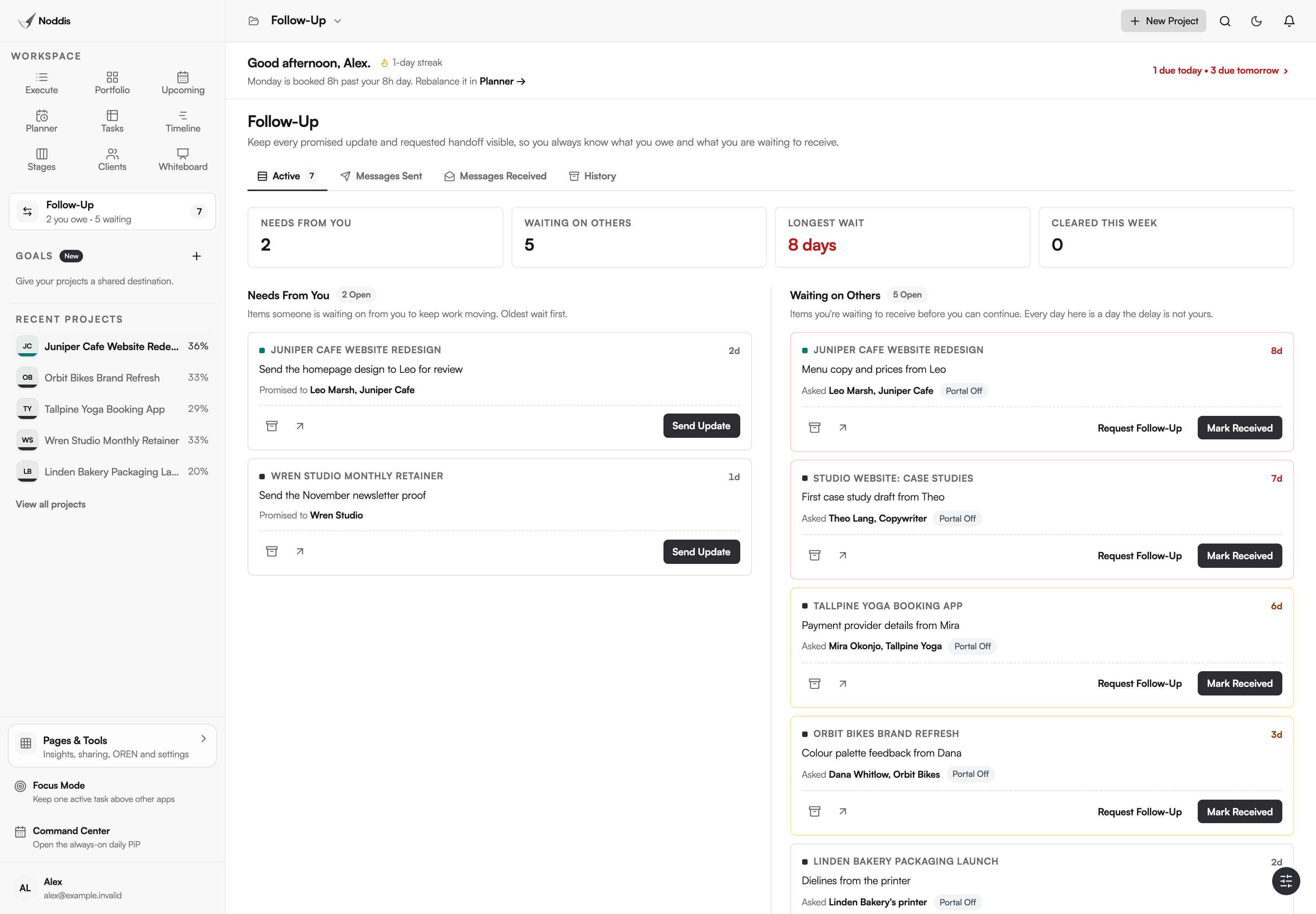
You do not build a tracker or add up dates. You record the ask once, on the task it belongs to, and Noddis does the counting. Follow-Up covers one project on Free and every project on Pro. On Pro you can also email a follow-up from Noddis, and the reply returns to the same thread. See how to keep track of client follow-ups for the method behind it.
Scope changes that record themselves
Scope creep is hard to talk about because nobody kept the list. Drift keeps it. Set the agreed scope as the baseline, and from then on every new task is an addition. Each one is marked as requested by the client, added by you, or not yet classified.
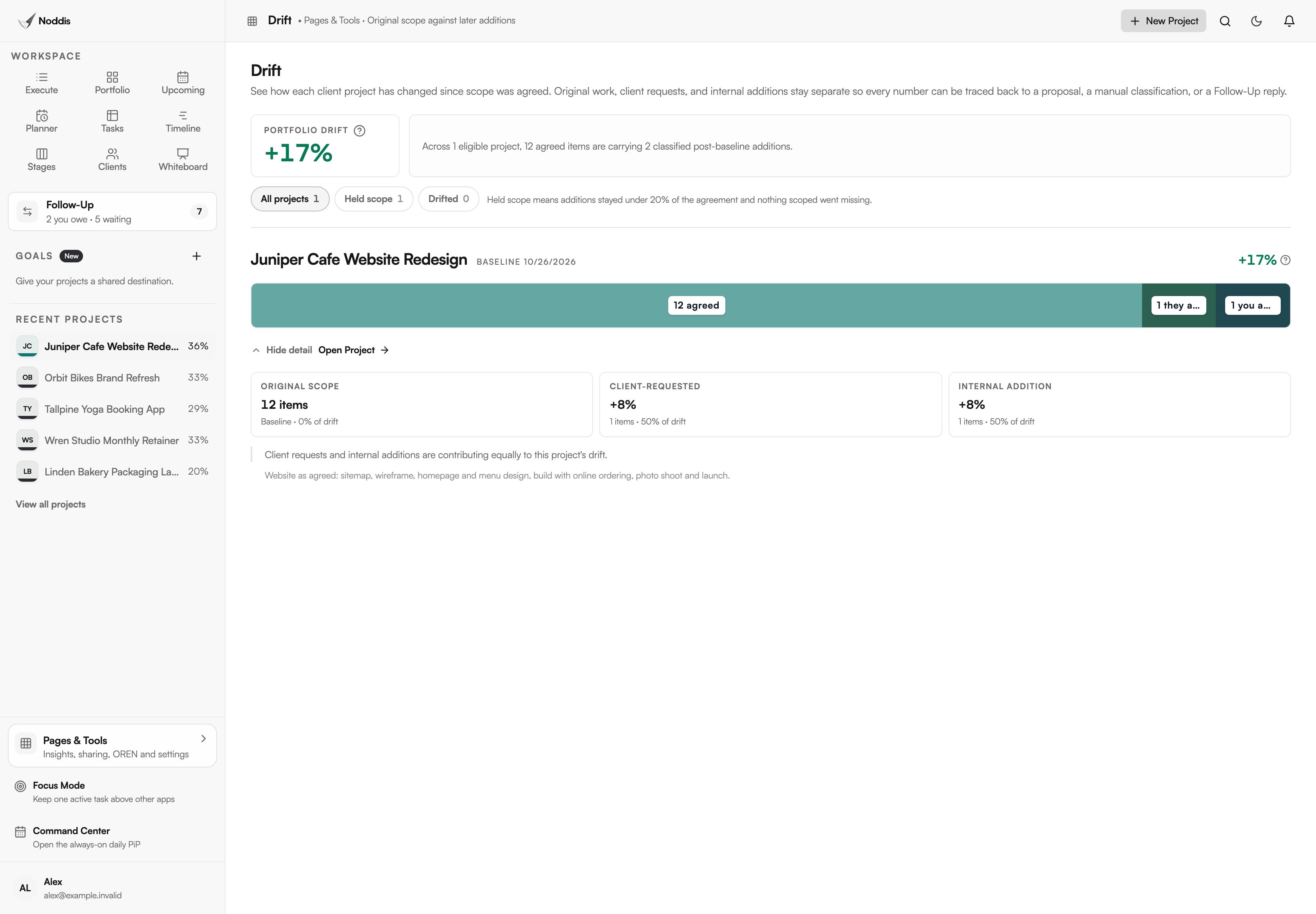
When the client asks why the project grew, the list is already on screen. Drift counts items, not money or hours, so pricing the change is still your call. It covers one project on Free and every project on Pro. For the early signs to watch, read project drift: 7 early signs.
Text it or forward it, and it becomes a task
Requests arrive by text and email, usually when you are away from your desk. Retyping them later is admin. In Noddis you send them in.
- Text a shortcut. Text
/task @Project nameand what needs doing. Noddis files the task in that project straight away./projectstarts a new project and/noteadds to a project's notes. - Text anything else. A plain message waits in Capture Inbox. Noddis suggests the project and the tasks it found.
- Forward an email. Send a client email to your private Noddis address. It waits in Capture Inbox the same way, with the original message kept.
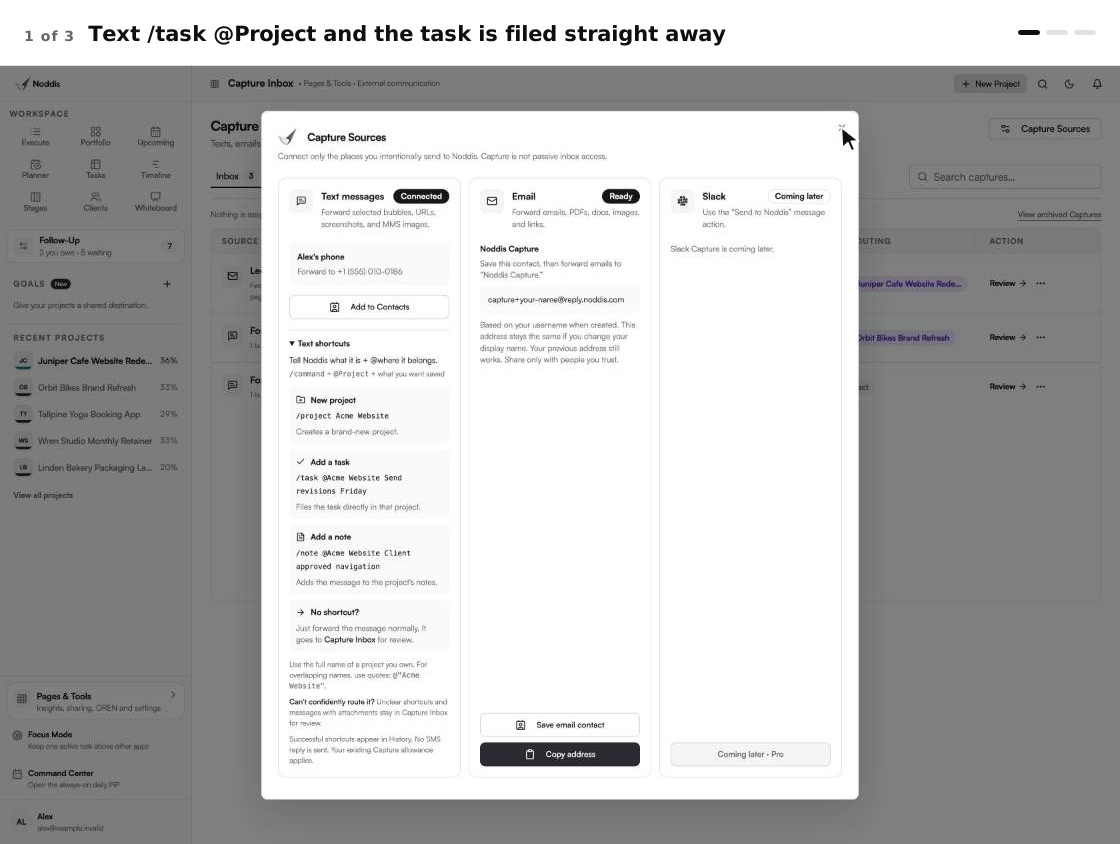
Only a shortcut skips the inbox. Everything else waits for you: nothing becomes project work until you approve it. Capture only receives what you send it. It does not read your inbox, and Noddis never texts back. Free includes your first five received texts. Email capture is on Pro. The full walk-through is in how to turn client emails and texts into tasks.
A client update nobody has to write
The status email is the most repeated chore in client work. A client portal replaces it with a page. You choose which tasks the client can see, copy the link and send it once. The page shows progress, the stage the work is in and the open tasks, and it stays current on its own as work gets done.
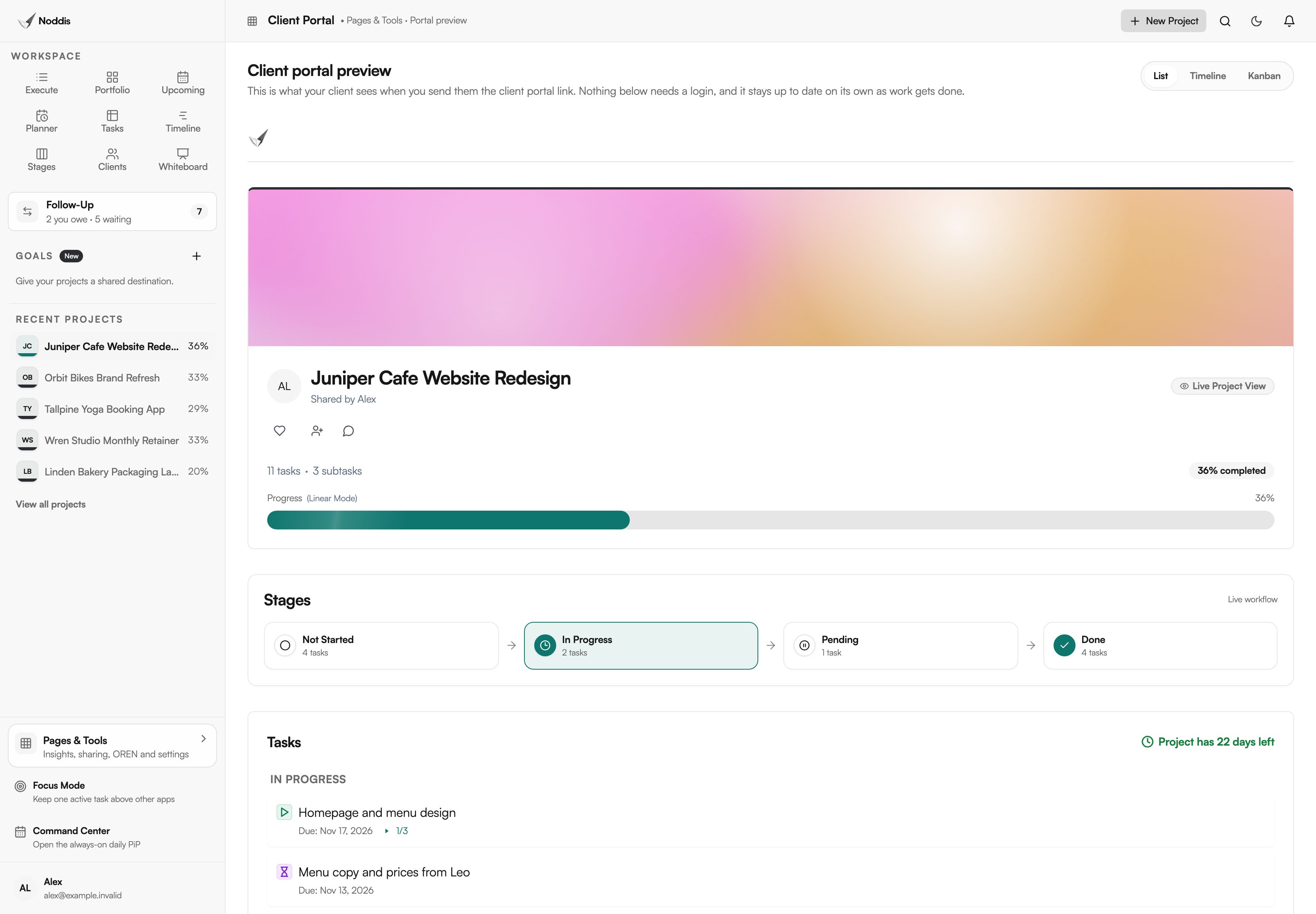
Your client needs no account to read it and cannot edit your tasks. Internal tasks and notes stay private unless you share them. Client portals are on Pro, and the people you share with never pay. If you are weighing this up, what is a client portal covers what to share and what to keep internal.
A whiteboard that stays connected to the work
Planning usually happens somewhere else: a slide, a document, a whiteboard app. Then someone retypes the plan as tasks, and the two drift apart. In Noddis the Whiteboard is part of the workspace. Put notes, checklists, tables, images and links on a canvas, then add a live project card beside them.
The card is the real project. Its progress, due date and next tasks come from the same saved work as Execute, so nobody redraws the status after a meeting.
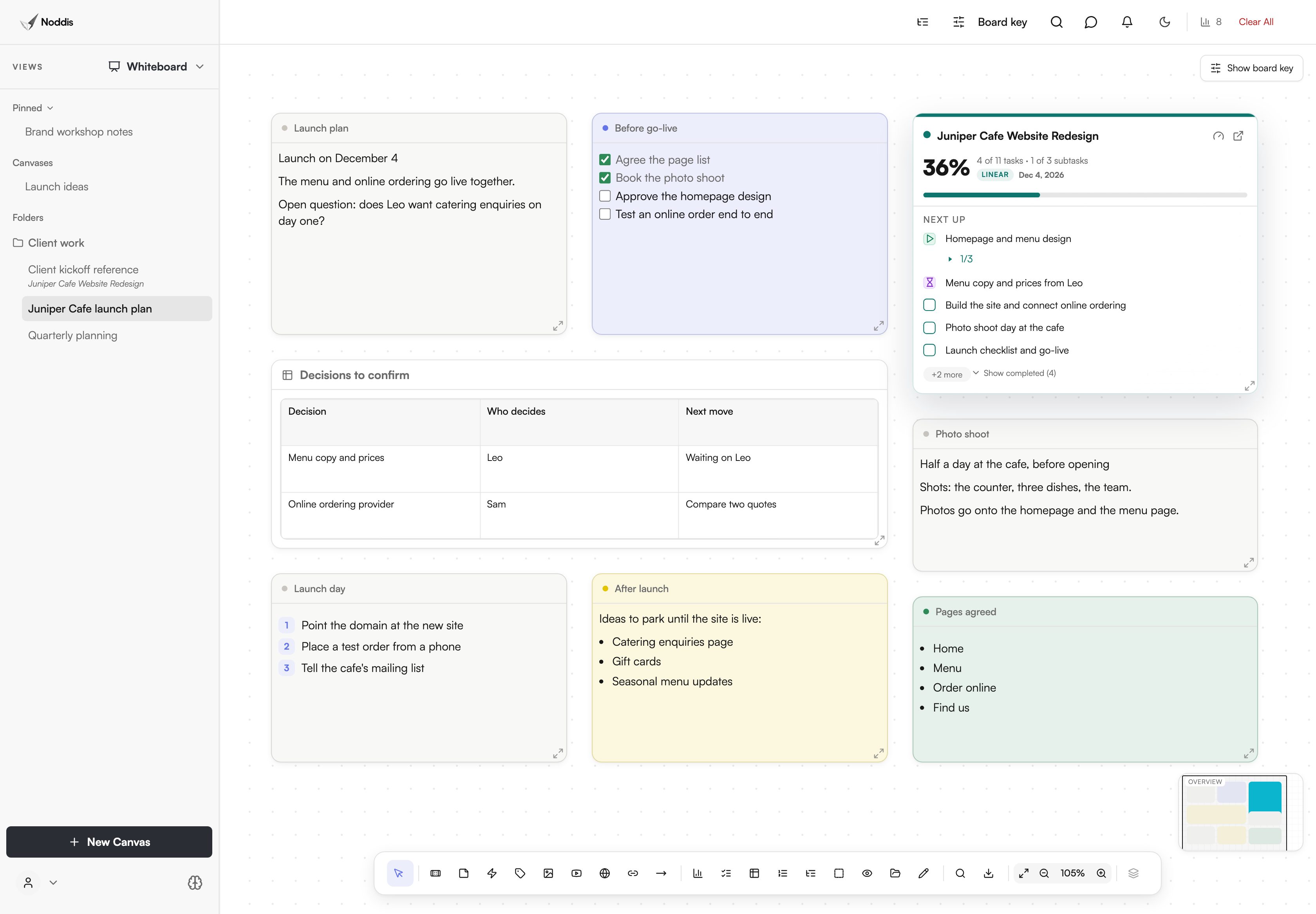
You can link a canvas to its project and share a canvas by link when a client needs to see the thinking. A note does not turn into a task on its own. You add the agreed next steps to the project, and the card shows them straight away. Whiteboard is on Pro. For a planning routine built on it, read plan a client project on a whiteboard.
Ready-made workspaces: nothing to build first
Flexible tools start as an empty canvas. Before you can see anything, you choose fields, design statuses, write formulas and assemble a dashboard. Then you keep all of it working. Noddis is opinionated on purpose: the workspaces are already built, and a new project appears in every one of them as soon as it has tasks.
| Workspace | The question it answers | Plan |
|---|---|---|
| Portfolio | How is every project doing? | Free |
| Execute | What do I do next on this project? | Free |
| Upcoming | What is due across everything? | Free |
| Planner | What fits in today and this week? | Free |
| Tasks | Where is every task, in one table? | Free |
| Timeline | How do this project's tasks fall by date? | Pro |
| Stages | What is not started, in progress and pending? | Pro |
| Whiteboard | Where do we think it through, beside the real work? | Pro |
| Follow-Up | Who owes what, and for how long? | One project on Free, all on Pro |
| Drift | What changed since we agreed the scope? | One project on Free, all on Pro |
| Client portal | What can the client see for themselves? | Pro |
Each name above opens a page that shows that workspace on real screens. All nine are on the workspaces overview, and the live progress embed shows a project's progress bar moving by itself on a Notion page or a website.
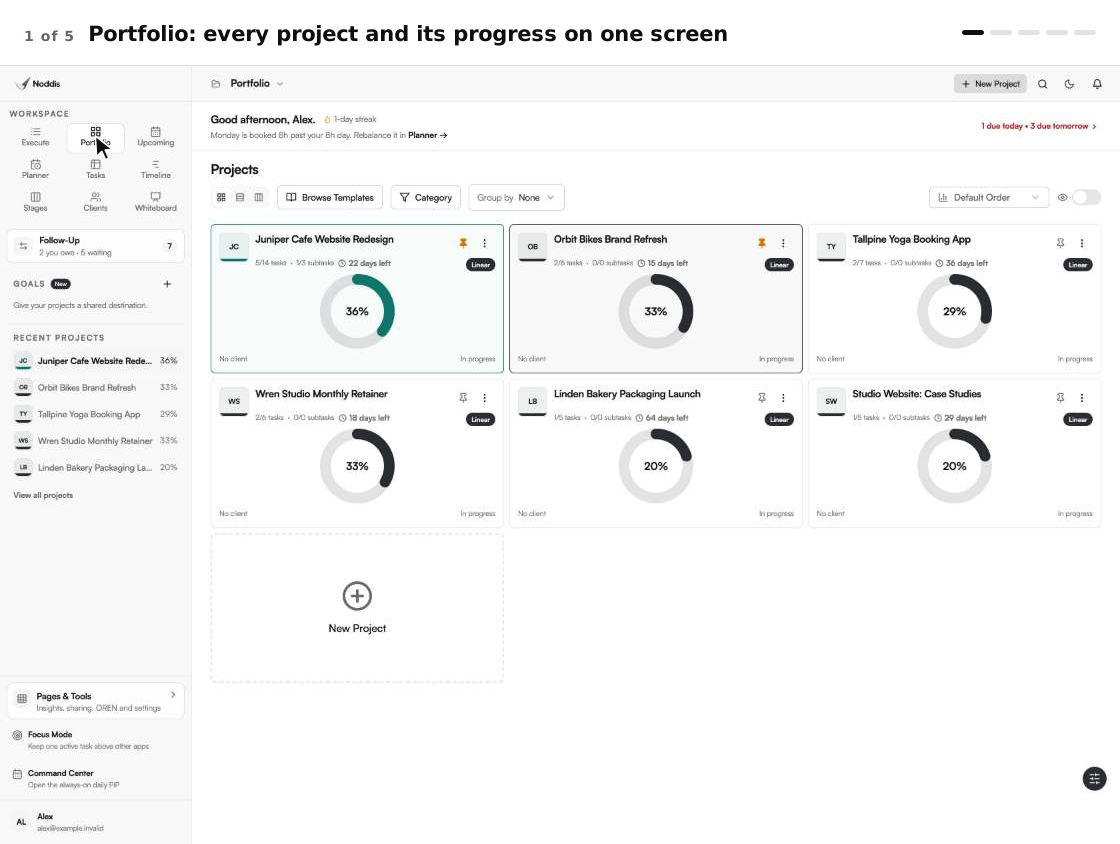
Here is what you never have to build or maintain:
What stays yours is the part that needs judgment: the tasks, the owners, the dates, the priorities, the weights and what a client sees. For what each workspace is for, read the Noddis workspaces, explained.
What Noddis does not do
Noddis removes upkeep. It does not remove decisions, and it is not the right tool for every team.
- It does not run the project for you. You still enter the work and choose what matters. Nothing is filed, sent or changed without you.
- It is not a build-your-own platform. If your process depends on custom fields, custom statuses or automation rules, a configurable tool will fit better.
- It does not do the money. There are no budgets, time sheets or job costing. Drift counts items, not dollars.
- It is not enterprise portfolio software. It has no resource planning across departments and no approval gates.
If you want to compare, the best tools for managing multiple projects sets eight tools side by side, including the ones built for heavy customizing.
What it costs to try
The Free plan includes three active projects with Portfolio, Execute, Upcoming, Planner, Tasks, both progress modes and importing from a spreadsheet or another tool. Follow-Up and Drift work on one project. Pro is $15 a month and adds unlimited projects, Timeline, Stages, Whiteboard, Follow-Up and Drift across every project, email capture and client portals. Check the current plans before you decide.
For the method without the software, read project management without the management: a lighter system for client work. For the same idea across many projects, see multi-project management software for small teams. For where this approach sits among older tools, read next-gen project management: what it means and what actually changes.
Frequently asked questions
Does "without the management" mean Noddis manages the project for me?
No. It means Noddis does the upkeep: the progress maths, the deadline list, the day count on follow-ups, the scope record and the client's status page. You still decide the tasks, dates and priorities, and you approve anything a message turns into.
Do I have to set anything up before the workspaces work?
No. Add a project and its tasks, or import them from a spreadsheet or another tool. Portfolio, Execute, Upcoming, Planner and Tasks show that work straight away. There are no fields, formulas or dashboards to build first.
Can I customize the workspaces?
Not in the build-your-own sense, and that is deliberate. You choose the tasks, dates, priorities, weights, project colours and what each client sees. You cannot add custom fields, rename statuses or design new dashboards. If you need those, compare a configurable tool.
Is Noddis only for client work?
No. The same workspaces serve in-house teams running several projects, such as marketing, proposals and purchasing. Client portals and Drift are most useful for client work. Portfolio, Upcoming, Follow-Up and the progress modes fit any set of projects.
How is this different from a simple to-do app?
A to-do app lists tasks. Noddis connects them: tasks roll up into project progress, deadlines from every project gather in one list, promises carry an age, and additions are compared with the agreed scope. That is the managing a list leaves to you.
Add the work. Skip the management.
Start with one real project. Add its tasks, tick one off and watch the progress, the deadlines and the client's page update without another step.