
Short answer
The best tools for managing multiple projects make it possible to compare progress, deadlines and blocked work without opening every project individually. For freelancers and small agencies, Noddis is worth evaluating for its ready-made portfolio and connected client follow-ups. ClickUp and monday.com offer broader configuration, while Asana, Teamwork and other tools serve different team needs.
About this comparison
Editorial note: Noddis publishes this comparison. We have an interest in the outcome, so the descriptions are based on publicly available vendor documentation, not a claim that we independently benchmarked every app. Competitor capabilities and plan access were reviewed on October 31, 2026. Check the linked vendors' documentation before purchasing.
Short answer: which tools should you shortlist?
| Tool | Best fit to evaluate | How you see several projects | Main tradeoff |
|---|---|---|---|
| Noddis | Freelancers and small studios delivering projects for several clients | Built-in Portfolio and cross-project Upcoming/Tasks views | A defined system may not suit teams wanting to design every workflow |
| ClickUp | Teams that want to configure one platform for many types of work | Portfolios, Dashboards and customizable hierarchy | More setup decisions if your team uses many custom fields and views |
| Asana | Cross-functional teams coordinating initiatives | Portfolios, progress, timelines and workload on eligible plans | Full portfolio functionality sits on higher plans |
| Teamwork.com | Client-service agencies with billable work | Project Health, Clients and Everything views | Financial and resource depth can exceed a solo freelancer's needs |
| monday.com | Teams building configurable project processes | Connected boards and portfolio dashboards | Some dedicated portfolio capabilities require specific plans |
| Notion | Documentation-heavy projects and custom databases | Linked databases, filtered views and charts | Someone needs to design and maintain the underlying system |
| Trello | Simple visual work tracking | Boards; additional Workspace/Table/Dashboard views on eligible plans | Cross-board reporting may require an upgraded plan or another approach |
| Basecamp | Teams valuing project conversations and fewer tools | Separate projects with to-dos, updates and reports | Different emphasis from metrics-heavy portfolio management |
These are fit recommendations, not a numerical ranking or a claim that we tested all eight tools under identical conditions. Price, availability, permissions and integrations should be checked for the plan you intend to use.
See how Noddis connects multiple client projects, or try the live demo.
What should software for multiple projects actually show?
The first test is not how many views a tool offers. It is whether you can answer these questions without reconstructing the current state from email, notes and separate boards:
- Which projects have deadlines approaching?
- Which project is waiting on a teammate, a client or another dependency?
- What work is due across all projects, regardless of who owns each one?
- Which projects have had new requests or a change in scope?
- Where should you spend the next hour?
Imagine a freelancer running a website redesign, a recurring content retainer, a branding project and a product launch. A dashboard that shows four project titles is helpful. A view that reveals the website is waiting on approval, the retainer renews tomorrow and the branding handoff is overdue is more actionable.
The right tool keeps that information accurate while the work is being done. A dashboard that someone updates every Friday can be useful, but it is a different experience from connected project data that updates as tasks change.
How the eight tools differ
Noddis: built-in visibility for client-project delivery
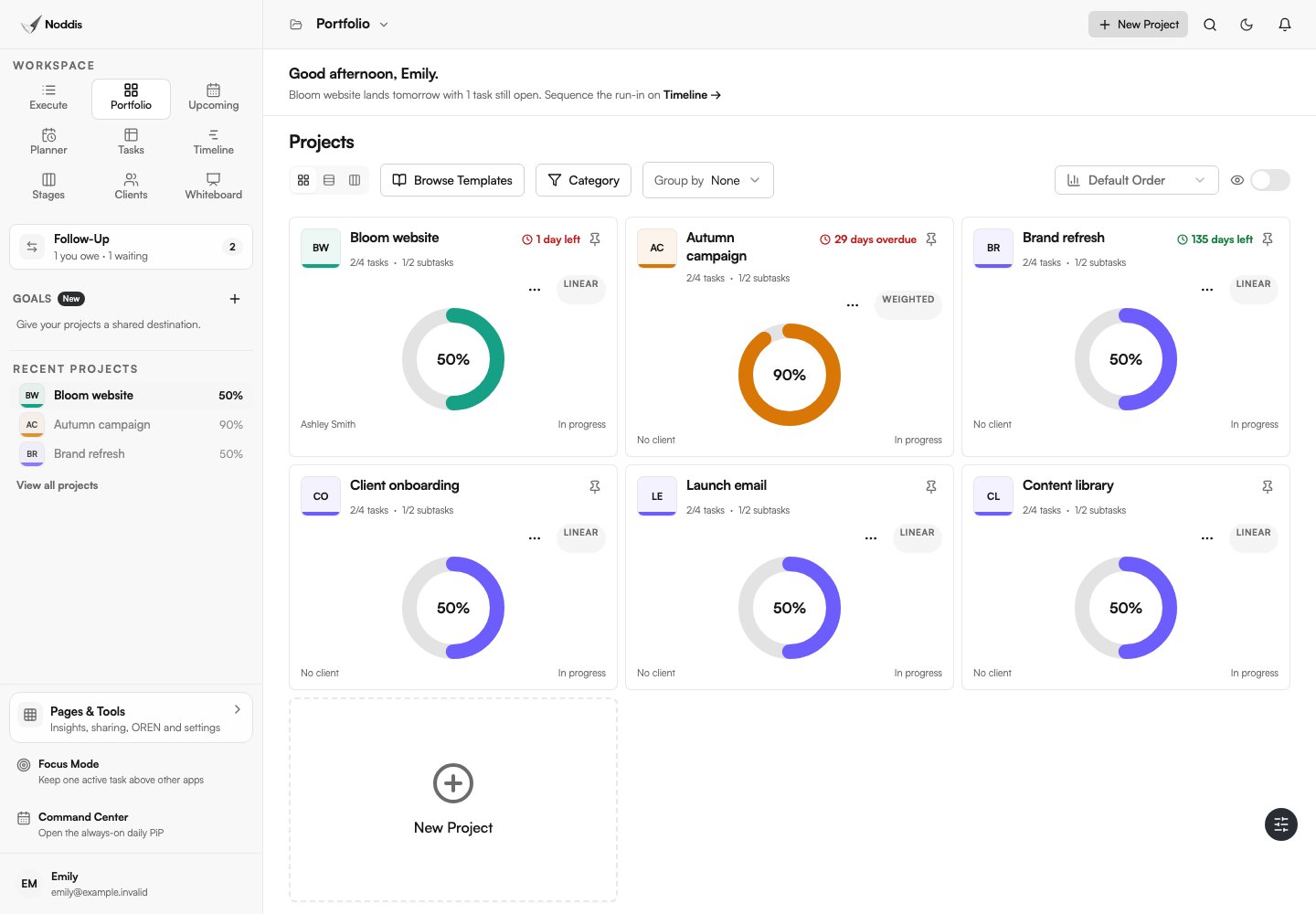
Noddis is purpose-built project management software for freelancers, agencies and small businesses that manage several projects at once. Portfolio compares projects in one place, Execute focuses on the tasks of one selected project, and Upcoming shows work due across projects. Follow-Up distinguishes commitments you owe from replies or inputs you are waiting to receive. Drift is designed to help review changes against the project's agreed scope.
That combination is useful when your coordination challenge is between clients, not just inside a task list. Noddis gives you opinionated workspaces so you can get to work without designing a database or assembling a custom dashboard first.
Choose Noddis if: you're running several client projects and want cross-project progress, next actions and client commitments connected by default.
Look elsewhere if: deep enterprise governance, complex finance operations or extremely customizable reporting is a must-have. Verify any required integration, automation, permission or plan limit in the current feature inventory and pricing.
Explore the visitor demo to see how the same project appears in more than one workspace.
ClickUp: broad functionality and customizable reporting
ClickUp offers a flexible project hierarchy, tasks, documents, time tracking, dashboards, portfolios and custom fields. Its portfolio feature can group initiatives and show project progress; the project-management setup guide explains how views, fields, templates and automation can be configured.
Choose ClickUp if: different teams need markedly different workflows, or you want extensive task, document and reporting customization in one product. The tradeoff is the time required to choose a sensible structure and keep it consistent. That time can be worthwhile when the flexibility serves a real need.
Asana: structured teamwork and portfolio oversight
Asana offers projects, ownership, dependencies, reporting and multi-project portfolios. Its portfolio documentation explains progress, milestones, status and workload across related projects. Asana currently lists portfolios on Advanced and eligible enterprise plans.
Choose Asana if: you coordinate a team across initiatives and need status updates, ownership and workload views. Check the actual plan containing the portfolio features you intend to use, especially if you're buying it as a solo freelancer.
Teamwork.com: client delivery plus financial operations
Teamwork.com is designed around client work. Its product overview describes project-health reporting, client overviews, time tracking, budgets, profitability and client access. This can be valuable for agencies that need to connect delivery to billable hours and margins.
Choose Teamwork if: client projects, capacity and project finances need to live together. If you mainly want to know what needs attention across three or four active projects, verify whether the extra financial and resource capabilities justify the cost and complexity.
monday.com: flexible boards and portfolio reporting
monday.com supports configurable work boards and cross-project reporting. Its All Projects Dashboard documentation shows how a portfolio dashboard consolidates data from connected projects. The cited feature is listed for an Enterprise plan, so do not assume it's included in an entry plan.
Choose monday.com if: you want flexible operational processes across departments and are comfortable defining board structures and connections.
Notion: a project system built around documents and databases
Notion's projects overview describes configurable databases, timeline and board views, dependencies, tasks and project documents. It is particularly useful when your work depends on detailed briefs, meeting notes and documentation.
Choose Notion if: you enjoy designing a system around your process. Ask who will maintain properties, templates, permissions and linked views after the initial build.
Trello: a straightforward visual starting point
Trello's cards and boards make work easy to visualize. According to Trello's views overview, additional Timeline, Table, Dashboard and Workspace views are available on Premium or Enterprise plans rather than across all plans.
Choose Trello if: a small number of clear Kanban boards is sufficient. For many concurrent projects, test how often you need to switch boards to build the overall picture.
Basecamp: conversations, to-dos and project records together
Basecamp puts to-dos, discussions, files, scheduling and automatic check-ins in a project. Its agency client-work example shows the approach for creative delivery.
Choose Basecamp if: keeping conversations and documents together matters more than elaborate portfolio metrics. Test whether its style of project summaries answers the multi-project questions your team asks each week.
How should you test software for multiple projects?
Set up the same realistic scenario in two shortlisted apps. Don't test with three perfect tasks and an empty calendar.
| Scenario | What a good tool should make clear |
|---|---|
| Four active projects | Status and deadlines can be compared without opening every project |
| Client approval delayed | The next person responsible and follow-up date remain clear |
| One urgent task across projects | You can identify it from a cross-project view |
| Mid-project extra request | There is a visible place to record its scope and schedule impact |
| Client wants an update | You can share an accurate summary without exposing private internal notes |
| Project completed | You can close it without losing its useful history |
Try this on one realistic but nonconfidential project before migrating every client. Record the number of screens and manual updates needed to answer the questions. Your own workflow is more useful than a general-purpose star rating.
Which tool is right for you?
If you want a highly tailored workspace for many departments, begin with ClickUp or monday.com. For portfolio oversight in a structured cross-functional organization, investigate Asana. For client-service agencies with time and profitability reporting requirements, put Teamwork on the shortlist. If project documentation is the center of your work, Notion deserves a look. If you want uncomplicated boards, try Trello. For project discussions and team communication, consider Basecamp.
If you're a freelancer or small studio running multiple client projects and your greatest frustration is the overhead of keeping everything updated, try Noddis. The value proposition is not fewer capabilities at any cost. It is less setup between you and the information you need.
For a deeper look at how to structure several client engagements, read how to manage multiple client projects at once. For the actual Noddis experience, open the live demo.
Editorial disclosure
Disclosure: This guide is published by Noddis. Product descriptions are drawn from linked vendor documentation, not independent hands-on speed benchmarks. Last reviewed October 31, 2026.
Common questions
What is the best tool for managing multiple projects as a freelancer?
The best choice depends on whether your work is mainly deliverables, billable hours or simple task lists. Noddis is worth testing for multiple client-project visibility and connected follow-ups. Teamwork is a strong candidate for billing-driven agency workflows. Trello may be enough for a few simple projects. Compare each on one representative engagement.
Is a portfolio view necessary for managing multiple projects?
A portfolio view becomes more useful as you add projects with competing deadlines and shared people. You don't necessarily need advanced portfolio analytics, but you do need a reliable way to compare project status and identify the next action across work. A spreadsheet can serve at small scale if you keep it updated.
Can one tool manage projects for several clients?
Yes. Several tools organize separate projects within one account, but the way they associate work with clients and protect client access differs. Before choosing a platform, verify whether clients need their own logins, what content they can view, and whether external guests count toward your plan's limits.
Which is better: a customizable dashboard or a ready-made portfolio?
A customizable dashboard is better when the team has specialized reporting requirements. A ready-made portfolio is better when you value a useful overview immediately and want fewer configuration decisions. Neither is universally best; the difference is the setup and ongoing maintenance your work requires.

Katleen is the founder of Noddis. She runs client projects through her app studio, 693 Labs, and builds Noddis around the problems that work creates.
Last reviewed . Feature details reflect Noddis at the time of review.