
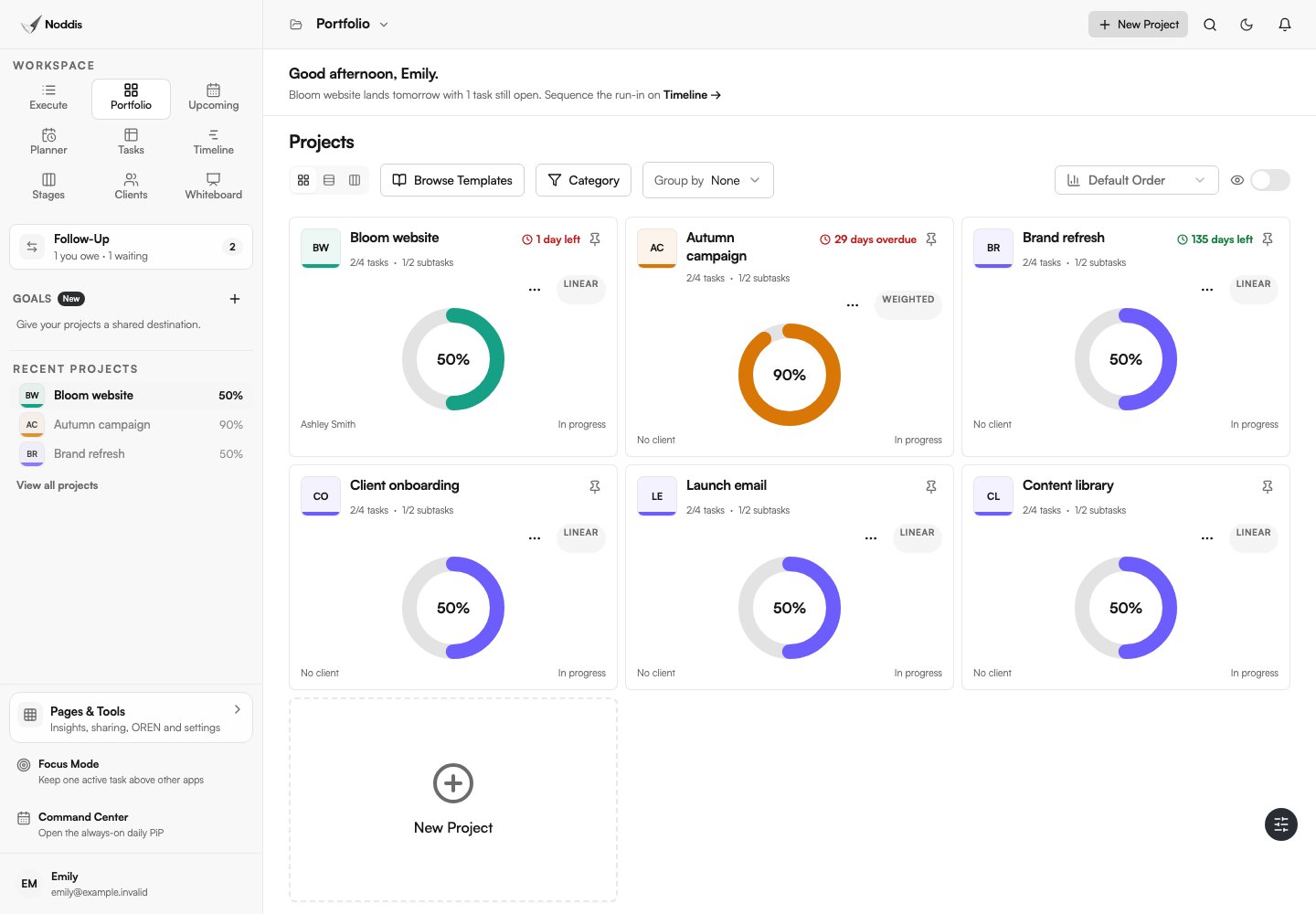
Manage multiple client projects without rebuilding the same report
A typical week can include a website launch, brand direction, content retainer and client handoff. Each project is manageable on its own. The difficult part is remembering which one needs a decision now, what happens next and who is holding up progress.
Separate boards and spreadsheets can hide that context. Noddis brings the same underlying project records into workspaces designed for different decisions.
| What you need to know | Noddis workspace | What it helps you see |
|---|---|---|
| How is every active project doing? | Portfolio | Project status, progress and project overview in one place |
| What do I need to finish in one project? | Execute | Tasks, subtasks and the current project's work |
| What's due across all projects? | Upcoming | Chronological due work across the projects you can access |
| Who has the next move? | Follow-Up | Recorded commitments owed by you or awaited from others |
| Has the work changed since kickoff? | Drift | Scope changes relative to an agreed baseline |
| What should a client see? | Client Portal | Selected progress, deliverables and updates on a shareable link |
These workspaces are different views of connected work. You don't need to design each dashboard before you can start using the system. Feature access, limits and behavior should be confirmed against the current feature list.
From four projects to one clear next action
Consider four fictional engagements. The examples below illustrate a workflow, not a benchmark or a real client outcome.
| Client project | Current situation | Useful next move |
|---|---|---|
| Juniper Website | Homepage content is awaiting approval | Record the expected reply and follow-up date |
| Orbit Bikes Brand Refresh | Design revisions are underway | Focus on the next deliverable in Execute |
| Leo Studio Retainer | Monthly graphics are due this week | Review Upcoming and recurring work |
| Harbor Launch | New landing page was requested | Compare the addition against original scope in Drift |
Start in Portfolio to see all four. Open Juniper's Follow-Up commitment to check what you're waiting on. Work through the Orbit Bikes deliverable in Execute. Review the upcoming retainer deadline. Then decide whether Harbor's additional request changes the agreed scope.
That's project management as a practical sequence of decisions, not a ritual of rebuilding status reports.
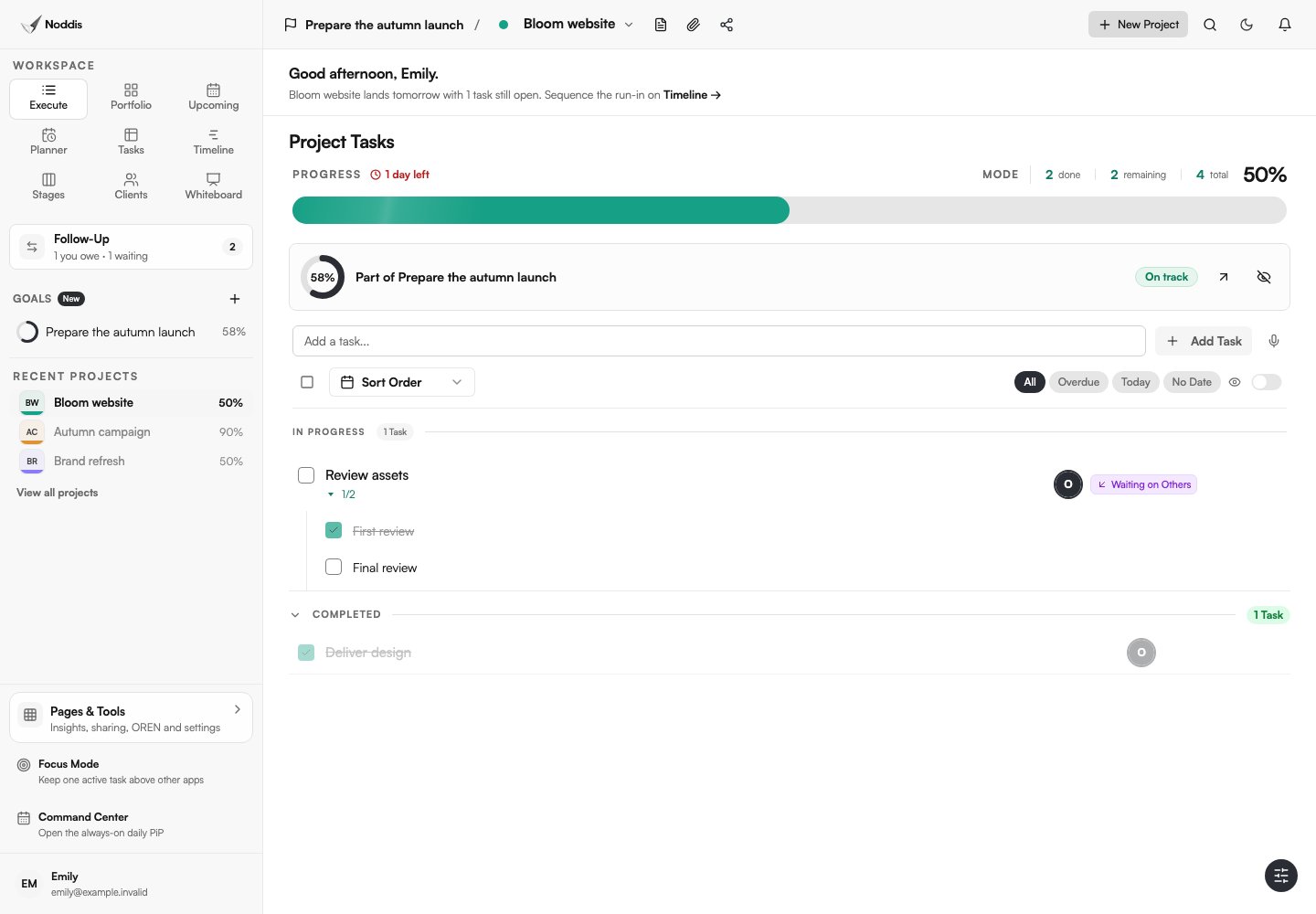
Purpose-built, not underpowered
Noddis takes an opinionated approach. The useful views already exist, but the project details remain yours. You decide the tasks, deadlines, priorities, responsibilities and visibility your clients receive.
An opinionated workflow is not a promise that a project will organize itself. You still need to record accurate information and make real delivery decisions. It means you can stop spending time choosing database properties, writing progress formulas or assembling separate dashboards for every audience.
Let clients see progress without giving them your whole workspace
Clients often want a straightforward answer: Where do things stand, and what happens next? They don't need your private notes, every internal task or another tool to learn.
When a client portal is enabled, Noddis can share selected project information through a link. Review the visible sections and files before you send it, and use any available access controls appropriate to the engagement. A public link should not expose confidential project information by accident.
A client portal is not a substitute for signed approvals or a documented change agreement. Keep those decisions explicit. It reduces the need to reconstruct project progress from separate messages.
Who Noddis is built for
Freelancers managing several engagements
You are the account manager, project manager and the person doing the work. Use connected tasks and follow-ups so that your day doesn't become an inbox triage exercise.
Small agencies balancing client deliverables
Give your team one place to work and a separate view of what clients need to see. Check owners, status and deadlines across projects without relying on individual memory.
Small businesses running varied projects
When one team is responsible for several launches, services or internal initiatives, keep the work in one clear place without building a complex management hierarchy first.
What should you compare before choosing Noddis?
Noddis is most compelling when the main problem is multi-project visibility and client coordination without elaborate setup. It may not replace a CRM sales pipeline, every advanced project-finance feature or every custom workflow a large organization uses.
If your business needs detailed billable-time profitability, specialized proofing, or enterprise compliance, confirm those exact functions before purchasing. A good choice is one that fits the work rather than one that has the longest feature list.
For a balanced comparison, read best tools for managing multiple projects and best tools for managing multiple clients.
Frequently asked questions
Can Noddis show all my client projects in one place?
Yes. Noddis's Portfolio gives an overview of projects you can access, while other workspaces let you focus on a selected project or view tasks and due dates across projects. Which projects and sharing arrangements are available depends on your account and collaboration permissions.
Is Noddis built for solo freelancers or teams?
Both are relevant use cases. Noddis is especially focused on people running several concurrent projects, including freelancers working alone and small teams delivering client work. Check current collaboration features and plan limits for your specific team size.
Does Noddis automate all my project management work?
No. It gives you useful built-in workspaces and connected progress so you can spend less time constructing and maintaining a reporting system. You still decide what's important, record commitments accurately and make the judgment calls that move client work forward.
Can a client see progress without a Noddis account?
Noddis's configurable client portal is designed for link-based viewing without requiring the client to have a Noddis account. The person sharing the portal determines what information is visible. Confirm current plan access, portal settings and data sensitivity before sharing.
See your projects clearly. Get back to the work.
Start with one real project, not a complicated migration. See the Portfolio, add a task, open Upcoming and try a different view of the same work.