
Short answer
The best project management tool for client work depends on how you work. Trello suits simple visual boards, Asana suits structured team projects, Notion suits people who want to build their own system, ClickUp suits teams that want one tool for nearly everything, and monday.com suits teams that like configurable boards. Noddis suits people running several client projects at once who want a configurable client-facing view and a cross-project overview.
How should you choose a project management tool for client work?
We make Noddis, so weigh our take on it accordingly. Every other tool here is excellent at what it does, and the details below come from each tool’s own help center and pricing pages as of October 2026.
Choose a project management tool for client work by testing it against the situations you face every week, not against a feature list. Six criteria separate a good fit from a frustrating one:
- How clients see progress. Can a client check status without a meeting, and does what they see make sense to them?
- How you see every client at once. Can you compare all your projects in one view before deciding what to do next?
- How requests get captured. When work arrives by email or text, how quickly does it become a task in the right project?
- Setup time. How long before the tool is useful on a real project?
- Guest and seat model. How are clients and collaborators added, and how are they counted?
- Learning curve. Will you and anyone you work with actually keep using it in month three?
How do the main tools compare at a glance?
| Tool | A useful fit to test | Client access to check |
|---|---|---|
| Trello | Visual boards and cards | Public boards or invited collaborators |
| Asana | Structured team projects | Read-only links, subject to sharing permissions |
| Notion | Documents and custom databases | Published pages or invited guests |
| ClickUp | Tasks, docs, and configurable views | Public links, with item and plan limits |
| monday.com | Configurable boards | Public board views or invited viewers on supported plans |
| Noddis | Project delivery with client-facing progress | Configured Pro portal, no Noddis account required |
What is Trello best for?
Trello uses cards and lists for visual work tracking. Email can create board cards; its Inbox also supports AI extraction of task details. A public board can be viewed without membership, so inspect the whole board before sharing it.
Check the current trello documentation and feature limits and setup before choosing a plan.
See the Trello comparison for a trial focused on client delivery.
What is Asana best for?
Asana supports structured projects, ownership, and scheduling. Read-only links can be public when “Anyone with the link” is permitted; organization restrictions can require authentication. Email-to-task is another supported capture option.
Check the current asana documentation and feature limits and setup before choosing a plan.
What is Notion best for?
Notion combines documents and databases that you can shape into a resource hub. Published pages can be viewed without a Notion account; commenting or editing requires sign-in. Guest allowances and publishing controls depend on the plan.
Check the current notion documentation and feature limits and setup before choosing a plan.
What is ClickUp best for?
ClickUp offers tasks, documents, and visual planning. Public links provide view access without an account for supported items. Whiteboard usage and sharing limits vary by plan, so test the exact client view you intend to use.
Check the current clickup documentation and feature limits and setup before choosing a plan.
What is monday.com best for?
monday.com offers configurable boards and public board views. An invited viewer is different from an anonymous public link. Its Free plan does not include invited viewers or guests, so check the access method and plan you intend to use.
Check the current monday documentation and feature limits and setup before choosing a plan.
What is Noddis best for?
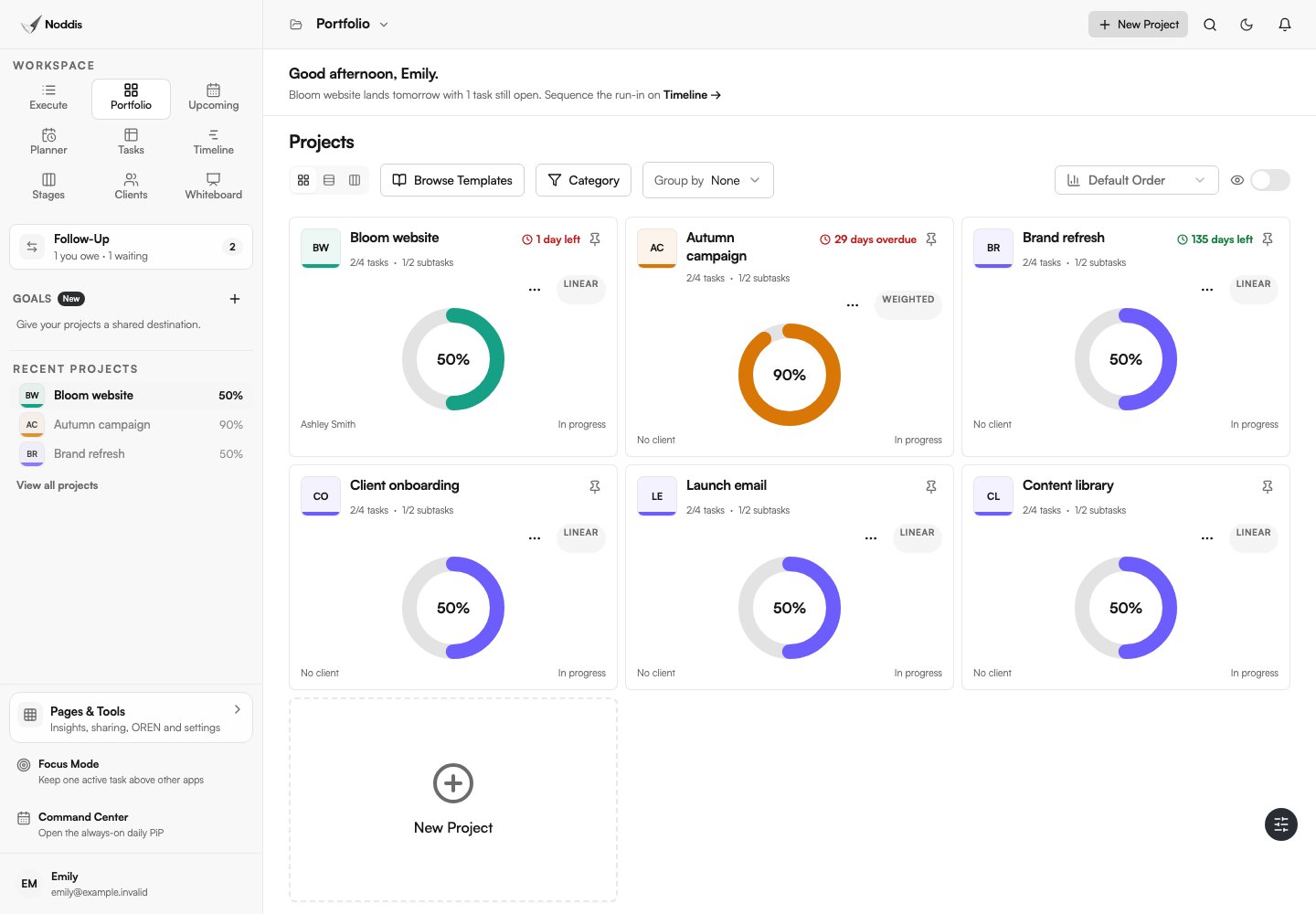
Noddis offers Portfolio views across authorized projects, Execute for one selected project, and configurable Pro client portals. Client records are optional: personal projects work too.
- Capture Inbox receives text, forwarded email, and connected Slack messages for review.
- Voice Notes has separate brain-dump and meeting flows.
- Follow-Up tracks task-linked commitments you record.
- Drift measures additions against an agreed scope baseline.
- Goals combines project progress using equal, size, or importance weighting.
See current plan limits and the workspace guide. These recommendations describe fit, not a benchmark proving one product is best.
How do you decide which tool is right for you?
Decide by matching the tool to the shape of your work, then proving it on a real project. A simple way to narrow the field:
- A few straightforward projects and you value simplicity: Trello.
- A team with structured projects and shared goals: Asana.
- You enjoy building your own system: Notion.
- One tool for a team’s varied work: ClickUp or monday.com.
- Many client projects at once and clients who want to see progress: Noddis.
Whichever you pick, start with one live client project for two weeks before moving anything else. The multi-client guide describes the routine worth testing it against.
Common questions
What is the best project management tool for freelancers?
It depends on the work. Trello suits a few simple projects, Notion suits people who like building their own system, and Noddis suits freelancers running several client projects at once who want a client-facing progress view with a project-based setup.
Which project management tools let clients view progress without an account?
Trello public boards, eligible Asana public read-only links, ClickUp public links, published Notion pages, monday.com public board views, and enabled Noddis portals can offer access without a product account. The content shown, limits, and administrator controls differ. An invited guest or viewer is a different access method.
Is Noddis better than Trello, Asana, or ClickUp?
No tool is best overall. Noddis provides project views with optional client portals, capture, commitments, and scope tracking. Compare those workflows with your actual requirements, including access controls and plan limits.
How do I switch project management tools without disruption?
Run the new tool on one live client project for two weeks while everything else stays where it is. Move more projects only once that one runs smoothly.

Katleen is the founder of Noddis. She runs client projects through her app studio, 693 Labs, and builds Noddis around the problems that work creates.
Last reviewed . Feature details reflect Noddis at the time of review.