
Short answer
Next-gen project management is a way of running projects where the tool does the managing chores and people keep the judgment. Progress calculates itself, deadlines from every project gather in one list, waiting items age on their own, and clients read a live page. It is not a chatbot bolted onto a board.
What is next-gen project management?
Next-gen project management is project management in which keeping the plan current is a side effect of doing the work. You enter the work and make the decisions. The tool does the arithmetic, the gathering, the counting of days and the status page.
A product can be sold as next generation project management software because an AI assistant was added to an old board. The real test is whether the chores went away.
Antonio Nieto-Rodriguez and Ricardo Viana Vargas, writing in Harvard Business Review in 2023, picture a chief executive checking her projects on a phone: "Within a few taps, she knows the status of every project and what percentage of expected benefits each one has delivered." Their scene opens with the words "Sometime in the near future", so read it as a forecast. The status half is the part you can test today, and most of it is arithmetic, not AI.
What actually changed between the generations?
What changed between the generations of project management is who does the upkeep. In generation one, plans and charts, a specialist keeps the schedule current for everyone. In generation two, flexible work platforms, every team builds its own boards, fields, statuses and dashboards, so the upkeep moves to everyone. Next-gen tools arrive with the structure ready-made.
| Chore | Generation one | Generation two | Next-gen |
|---|---|---|---|
| Working out progress | The specialist updates it | Someone builds a formula | Calculated from finished work |
| Seeing every deadline | The master schedule | A dashboard someone maintains | One list across projects |
| Chasing an answer | Memory and a meeting | A reminder you set | Each waiting item shows its age |
| Getting new work in | Retyped from an email | A form you configure | Text or forward it, then approve |
| Telling the client | A written status report | A shared board | A live, read-only page |
The upkeep that generation two spread across the team has a name: coordination debt.
37signals, in the chapter Make Opinionated Software of its book Getting Real, says: "When someone uses software, they’re not just looking for features, they’re looking for an approach." A next-gen tool brings the approach with it, which is faster to start and harder to bend.
How do you tell real next-gen project management from a new coat of paint?
You tell a real next-gen tool from a repainted one by running one real project through a trial and noticing who does each chore. Take a studio run by Alex, trying a tool with the Juniper Cafe Website Redesign.
- You add one real project and its tasks. Pass: nothing to build first.
- The system shows the project in every view. Pass: nothing was copied.
- You mark finished work as done, once. Pass: that is your only update.
- The system recalculates progress and regroups the deadlines. Pass: nobody typed a percentage.
- A client or teammate owes an answer while the days are counted. Pass: the open item shows its age.
- The client opens a live status page. Pass: you wrote no status email.
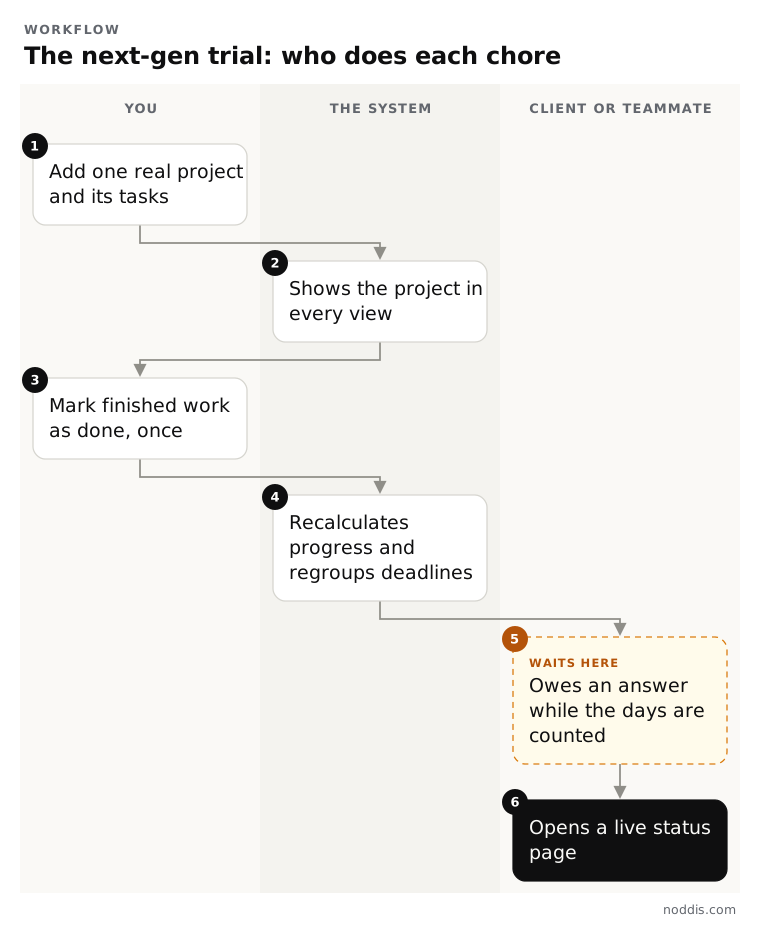
In Alex's trial, step 5 is Leo Marsh of Juniper Cafe, who owes the menu copy. In a next-gen tool your only upkeep is steps 1 and 3. If you also built the views or kept the numbers, the tool is generation two with new paint.
For any AI assistant, add one check: ask it to change something, and see whether it waits for your yes. The guide to a multi-project management system lists the six parts those views should cover.
What stays human when the tool does the chores?
Every decision that needs judgment stays human: what is in scope, what comes first, how a client is treated and when the answer is no. A next-gen tool can show those choices sooner. It cannot make them.
- Scope. A tool can show which tasks were added after the plan was agreed. You decide whether to charge for them.
- Priorities. A list of deadlines is not a ranking. You choose what comes first.
- Relationships. A counter can say a client has owed feedback for nine days. Whether to nudge, phone or wait is yours to judge.
- Saying no. No software turns down a rush request for you.
A careful AI assistant drafts, suggests and answers questions from your data, then asks before it changes anything. Nobody knows how much more it will take over, so judge a tool by your trial.
What does a next-gen project manager do differently?
A next-gen project manager spends less time on status reporting and more time on decisions. Once the tool keeps the plan current, the hours spent collecting and rewriting updates go to judgment calls.
Rachel Longhurst and Woojin Choi of Gartner, writing in Harvard Business Review in 2023, say: "Traditional project management skills, such as project governance or project management methodology, aren’t sufficient to meet changing organizational needs."
For a small team, the change is practical: read the plan and ask only about exceptions, decide what the client sees, and act on the oldest open item first. In a studio of three, the project manager is usually the owner.
Which managing chores does Noddis take on?
Noddis is a project management app that keeps tasks, follow-ups, and related project details connected. When we built weighted progress in Noddis, we made it normalize the weights you give each top-level task to 100% and split each task's share among its subtasks.
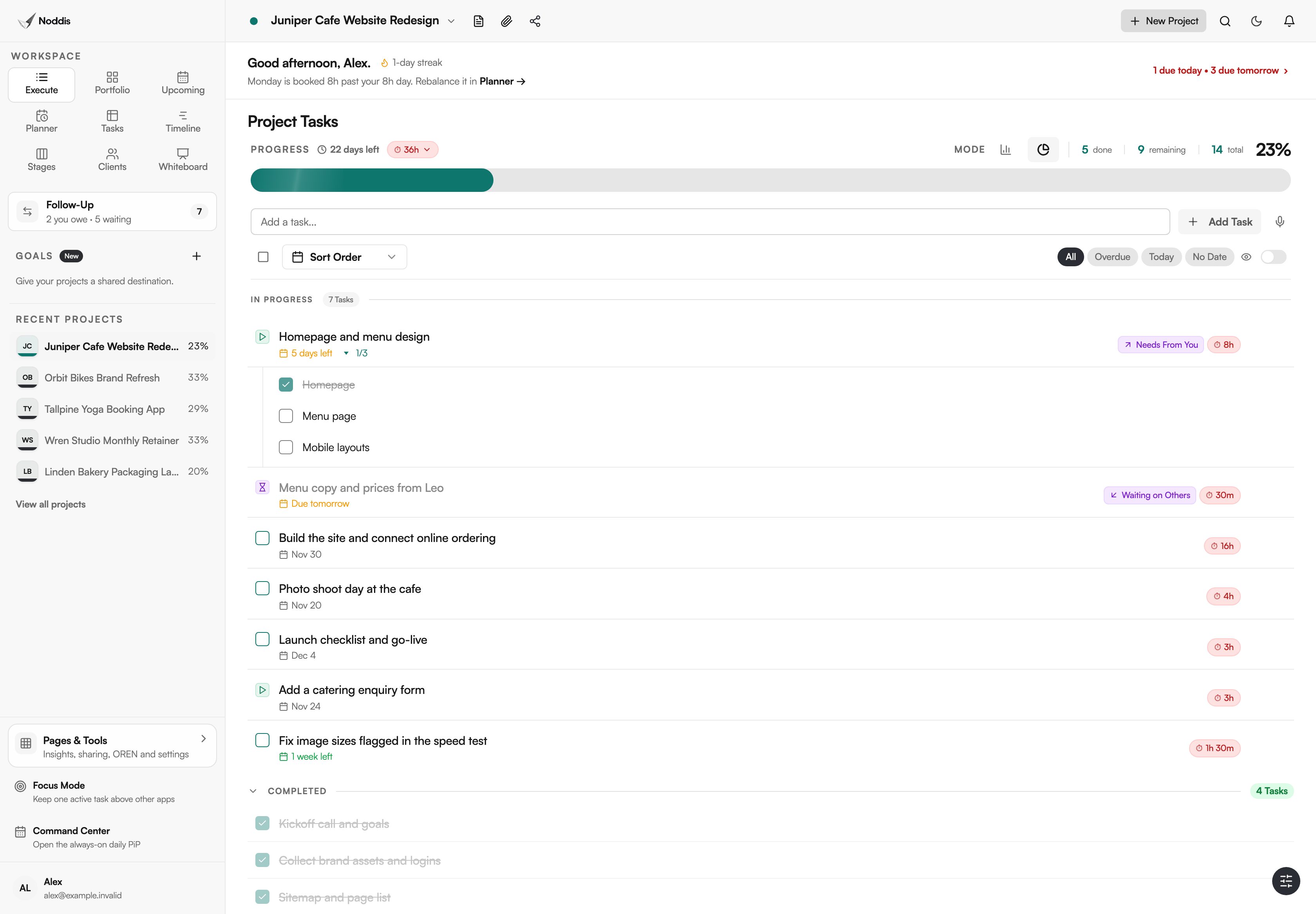
Progress in Execute, on the Free plan, is never typed. Noddis calculates it from completed work in Linear or Weighted mode, and the same figure shows on the Portfolio card and in the client portal. Weights suggested with AI stay yours to approve. The guide to linear and weighted progress shows the arithmetic.
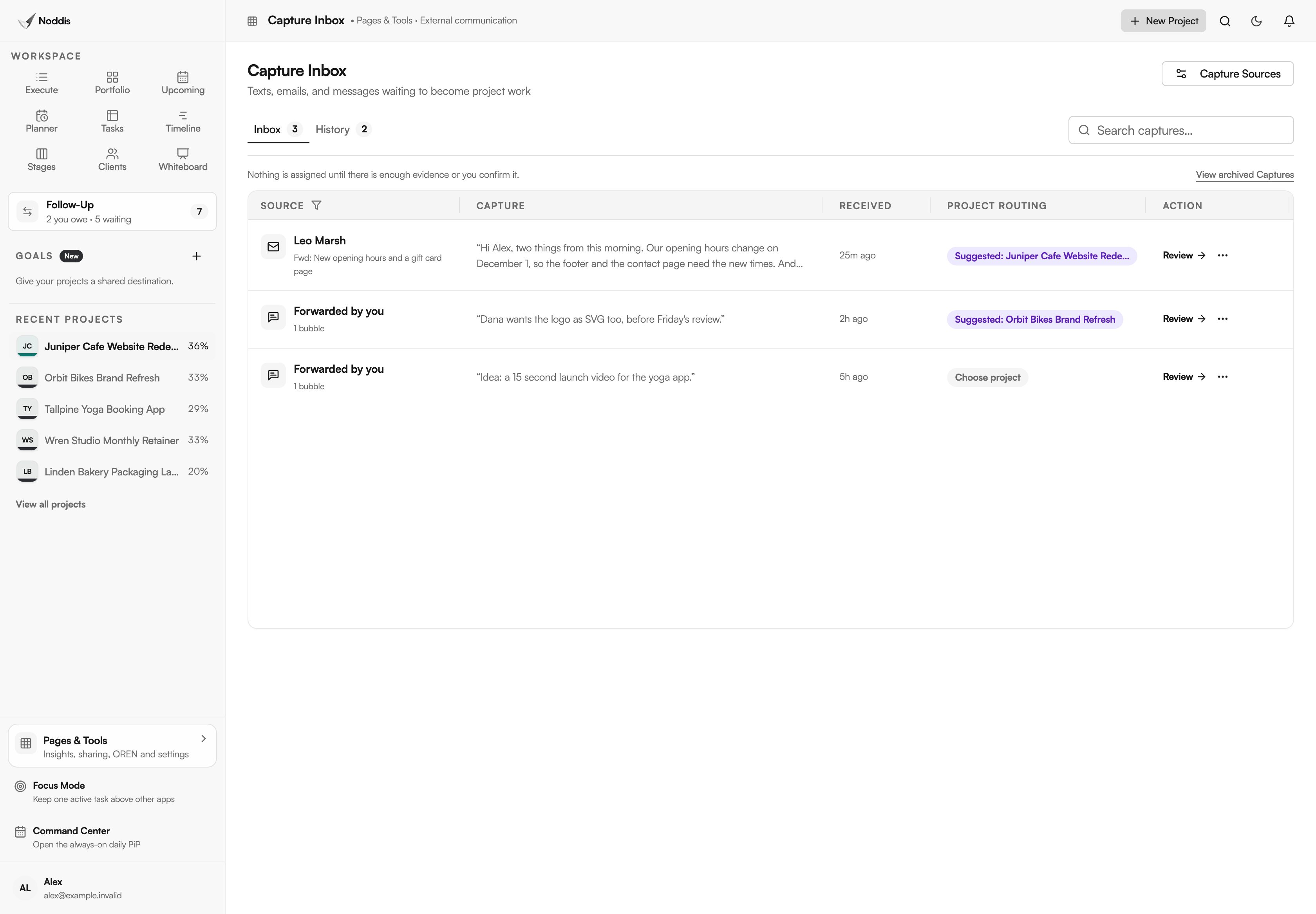
New work comes in through Capture. After you pair your phone once, a text with the /task shortcut files the task directly in the project you name. A text with no shortcut waits in Capture Inbox, with a suggested project, until you approve it. The first five received texts per account are on Free. Forwarding client emails is on Pro, as of November 2026.
Upcoming (Free) lists the deadlines from every project. Follow-Up gives each waiting item its age in days, for one project on Free and all on Pro. The client portal (Pro) is a live, read-only page opened from a link. OREN, the assistant (full workspace on Pro), answers questions from your Noddis data and asks for confirmation before it changes anything.
Noddis has no custom fields, automation rules or dashboard builder, so a team that needs to design its own process is better served by a flexible platform. The page on project management without the management shows each admin chore beside the workspace that removes it.
Your next step
List the updates you made last week only to keep a project tool current, and mark the ones a tool could do. To try it with your own project, open the live demo. No account is needed.
Common questions
Does a tool need AI to count as next-gen?
A tool does not need AI to count as next-gen. AI is one way to remove a chore, and many chores need none: progress is arithmetic, a deadline list is a sort, and an age in days is a count. Ask what the AI adds after that.
Can the tool you already use become next-gen?
A flexible platform can copy most next-gen behavior if someone builds it: a formula for progress, a dashboard for deadlines, a rule for reminders. The catch is that the builder becomes the maintainer. If your process is unusual and someone enjoys the upkeep, keep the platform.
Who should stay with an earlier generation of tool?
Teams with formal schedules, budgets or governance should stay with tools built for those jobs. A construction program with critical-path dependencies, or a department that plans capacity across a portfolio, needs a specialist and a planning tool. Next-gen tools suit small teams whose projects look alike.

Katleen is the founder of Noddis. She runs client projects through her app studio, 693 Labs, and builds Noddis around the problems that work creates.
Last reviewed . Feature details reflect Noddis at the time of review.