
Key takeaways
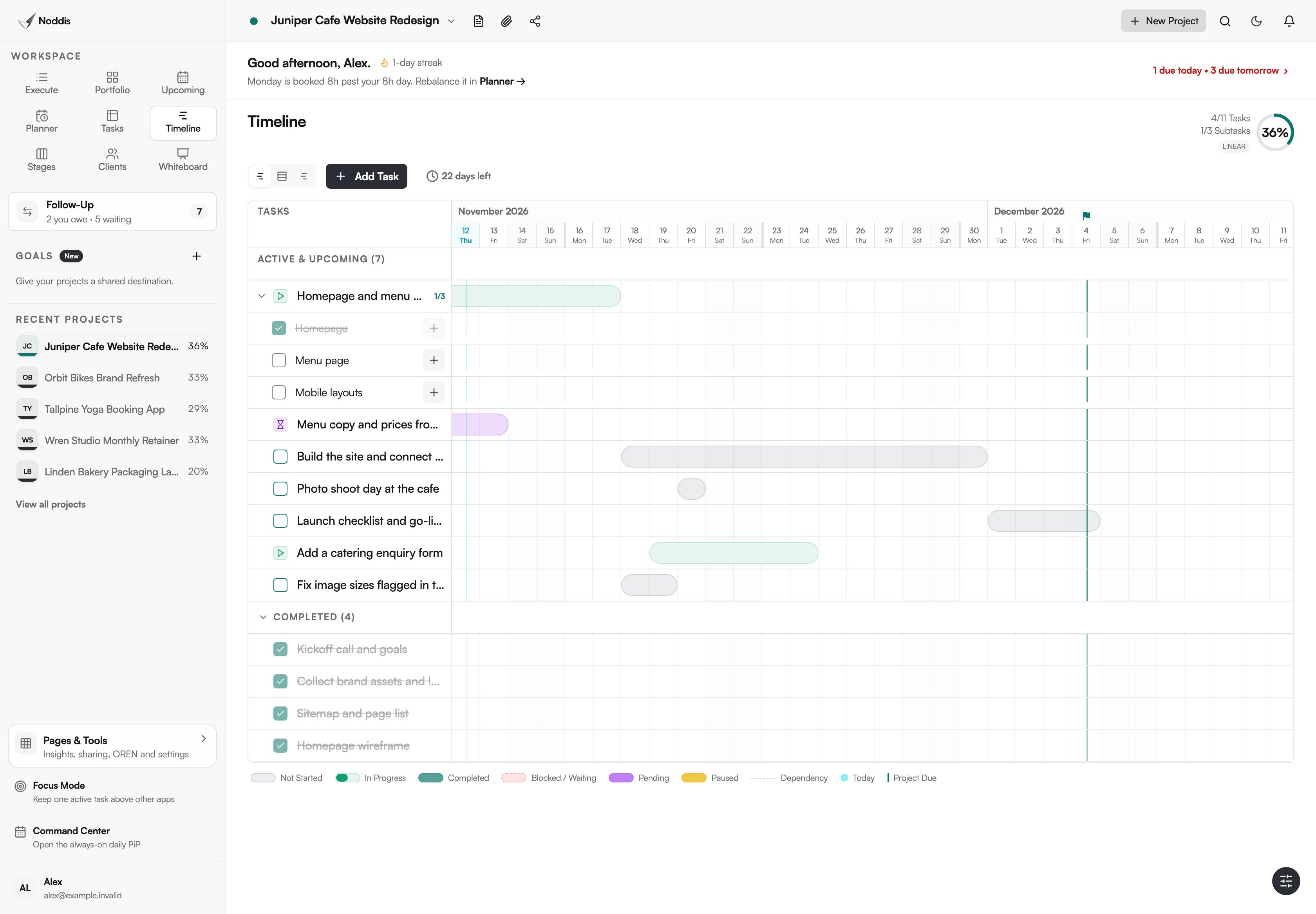
- Timeline turns dated tasks into bars by date, with a line for today and a flag for the project's due date.
- Gantt shows one project, Horizon shows one lane for each project, and All Tasks shows every dated task on one calendar.
- Dependency lines are drawn in Gantt, but dates do not move on their own.
- Timeline is on Pro, which is $15 a month.
Why does Noddis have Timeline?
Noddis has Timeline because a task list hides the shape of a schedule. A project timeline view turns each dated task into a bar, so gaps, overlaps and the run-up to a deadline can be seen. Timeline draws that picture from dates your tasks already have, in three views, and nothing is redrawn by hand.
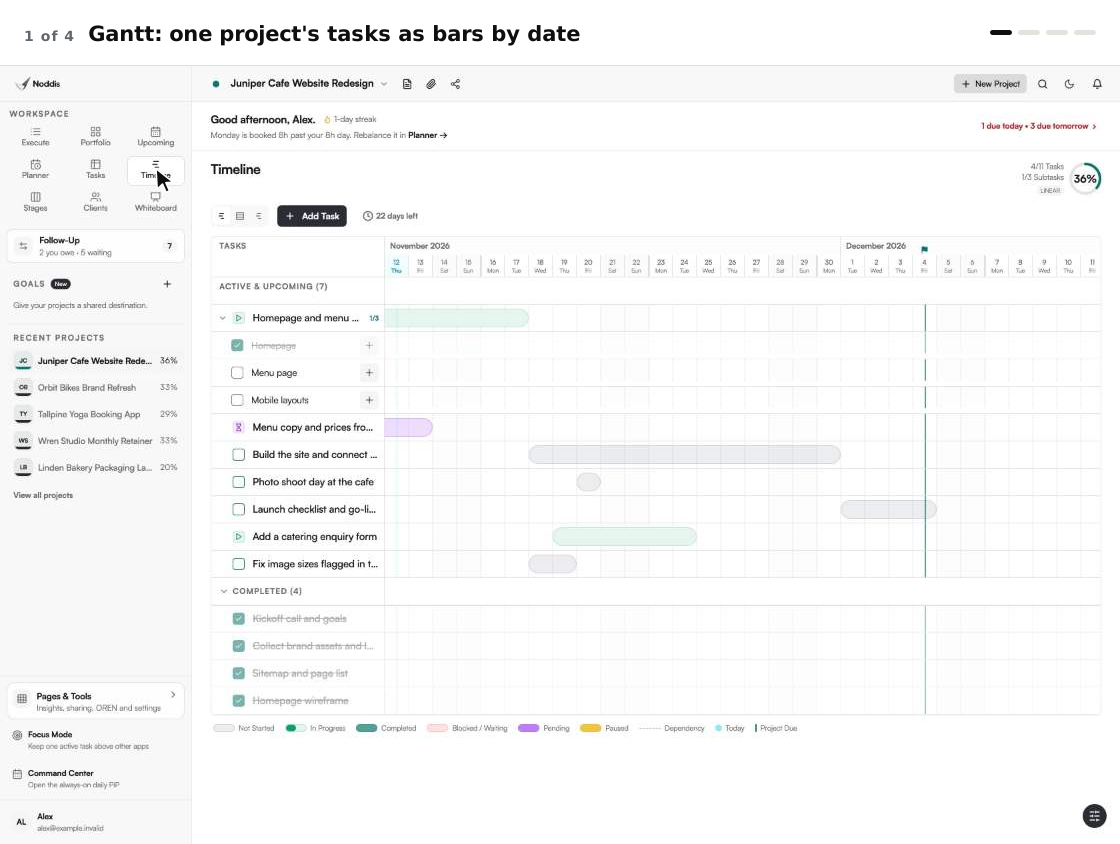
When we built Timeline in Noddis, we gave it three views, Gantt, Horizon and All Tasks, so one project and every project can each be read by date.
The Association for Project Management says: "A Gantt chart is defined as a graphical representation of activity against time; it helps project professionals monitor progress." That is the chart the Gantt view draws, from work you have already entered.
Noddis is a project management app that keeps tasks, follow-ups, and related project details connected. Timeline is one of its ready-made workspaces, and it reads the same saved work as the others.
How Timeline works, step by step
- Give your tasks dates. A start date and a due date make a bar. A due date alone makes a one-day marker.
- Open Timeline in the sidebar. Three buttons at the top switch the view: Gantt, Horizon and All Tasks.
- In Gantt, read the selected project. Bars are coloured by status, a cyan line marks today and a flag marks the project's due date.
- Drag a bar to move the task, or drag one end to change its start or due date.
- Add a dependency from a task's menu in Execute. Gantt draws a dashed line between the two tasks and puts a "Blocked" badge on the one that waits.
- Switch to Horizon or All Tasks to see every project. Arrows step through the months, and "Today" brings you back.
What you stop doing
Timeline removes the drawing and the redrawing, which is the idea behind project management without the management.
| The chore | The usual way | In Timeline |
|---|---|---|
| Drawing a Gantt chart | List the tasks, type start and end dates, format a bar chart | Dated tasks are already bars. Nothing is drawn |
| Moving a date | Edit the cell, then repair the chart | Drag the bar, or drag one end |
| Spotting two projects colliding | Open each project's schedule in turn | Horizon: one lane per project, one screen |
| Finding a crowded day | Check every project's dates | All Tasks: every dated task under the same dates |
Gantt, Horizon and All Tasks: when does each view matter?
Timeline has three views of the same dates: Gantt for one project, Horizon for every project, and All Tasks for every dated task. None has zoom levels. Each shows days, with weekends shaded.
Gantt: one project, in order
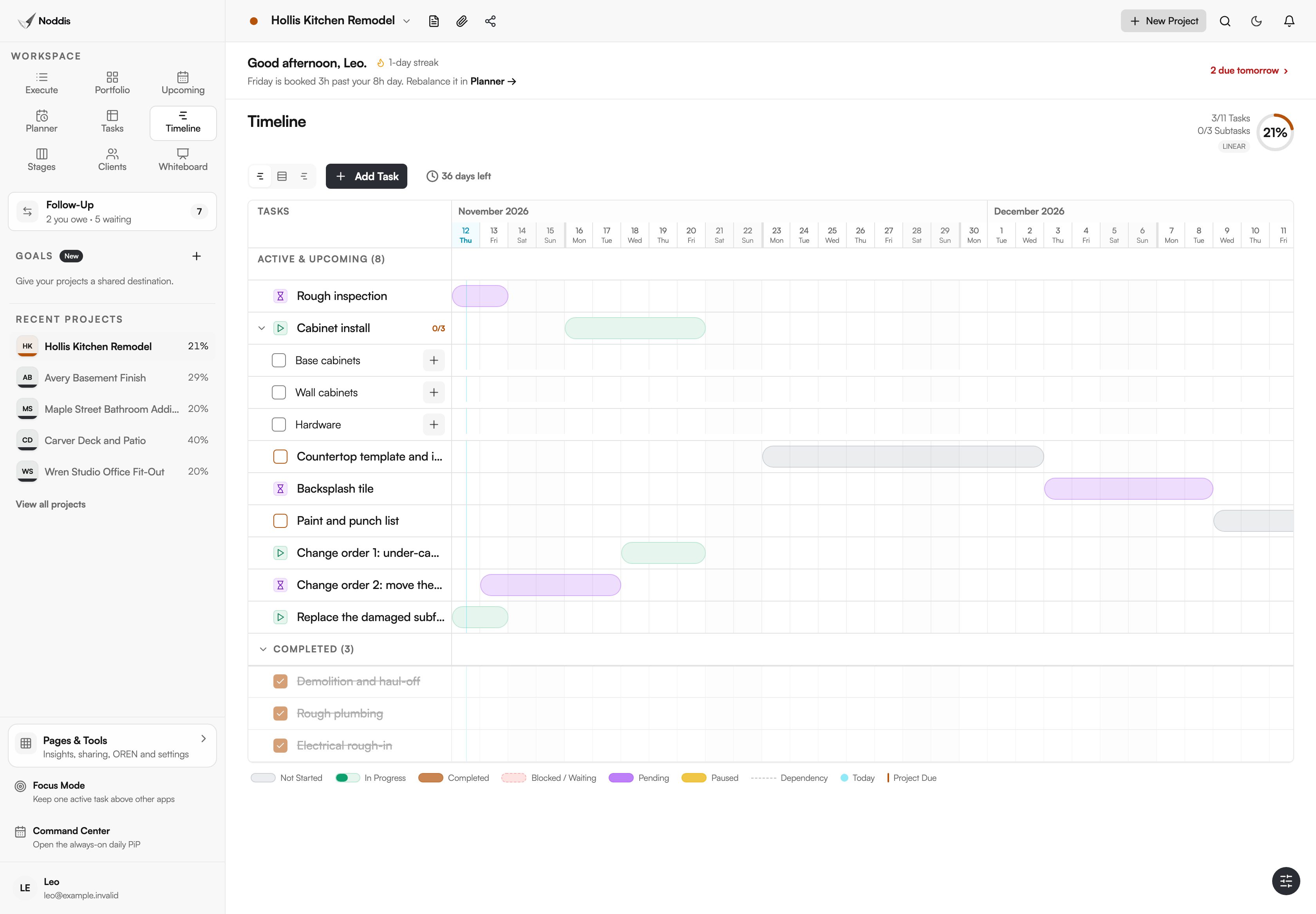
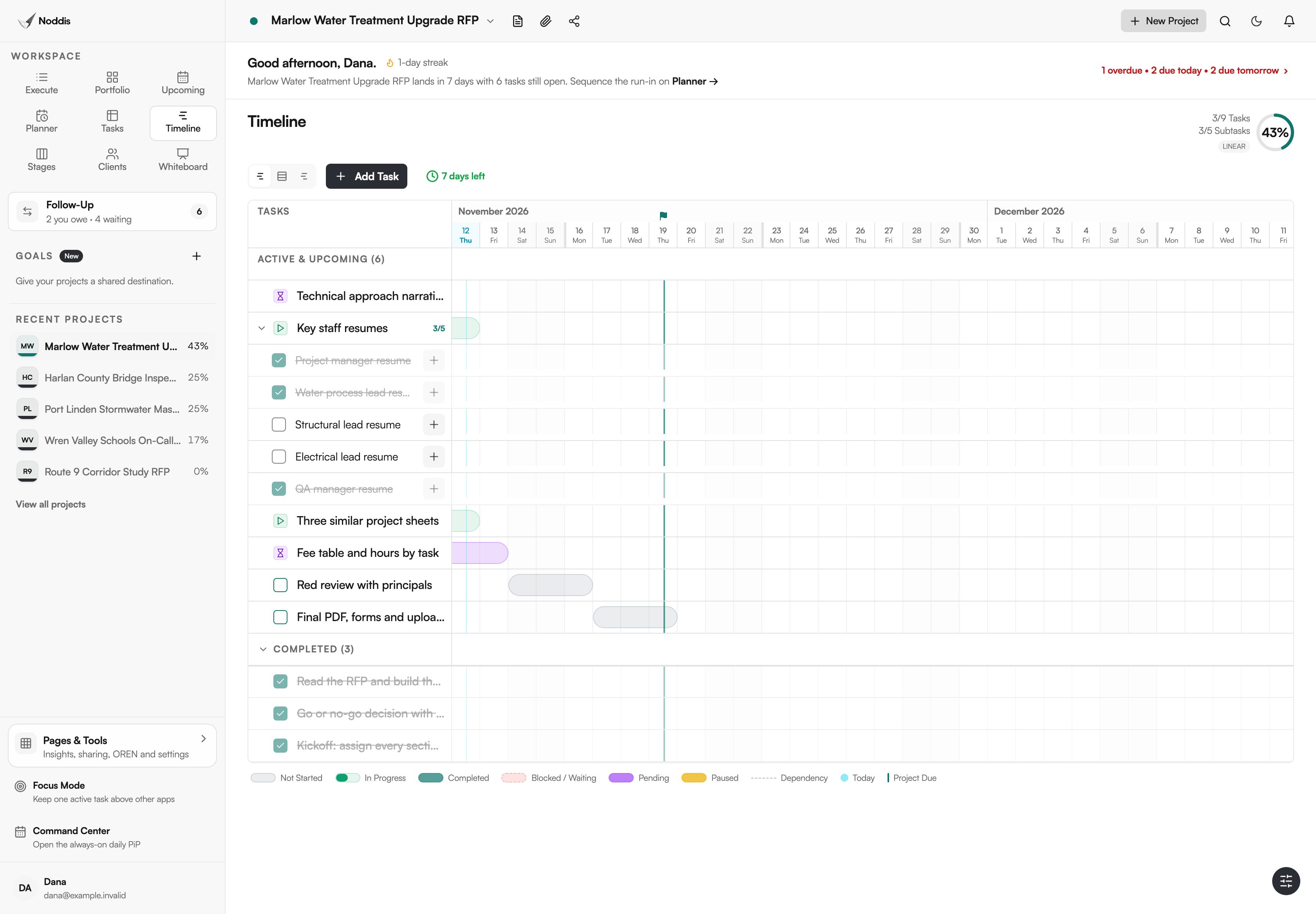
Use Gantt when the question is about one project: what comes next, and what is holding it up. The picture at the top of this page is Gantt, and so is the remodel above. Hover over a bar to see its due date, its subtasks and what it is "Blocked by". The bar colour is the task's status, and a key under the chart names each colour.
READ THE COLOURS
Red means blocked, not late. A red bar with a dashed border is a blocked task. An overdue task keeps the colour of its status.
Dependency lines are drawn, and that is all they do. If an earlier task slips, the later bars stay where they are until you drag them.
Horizon: one lane per project
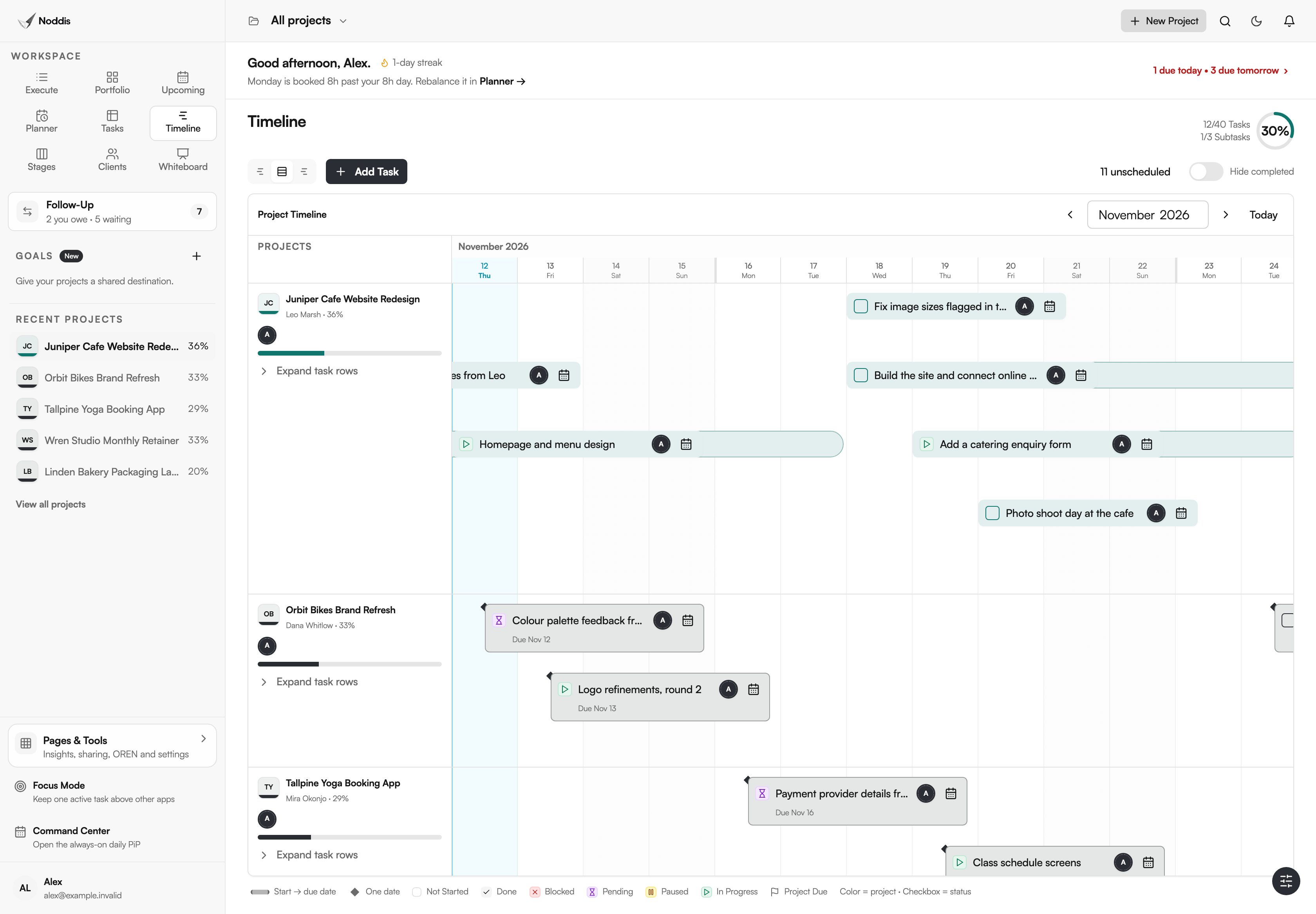
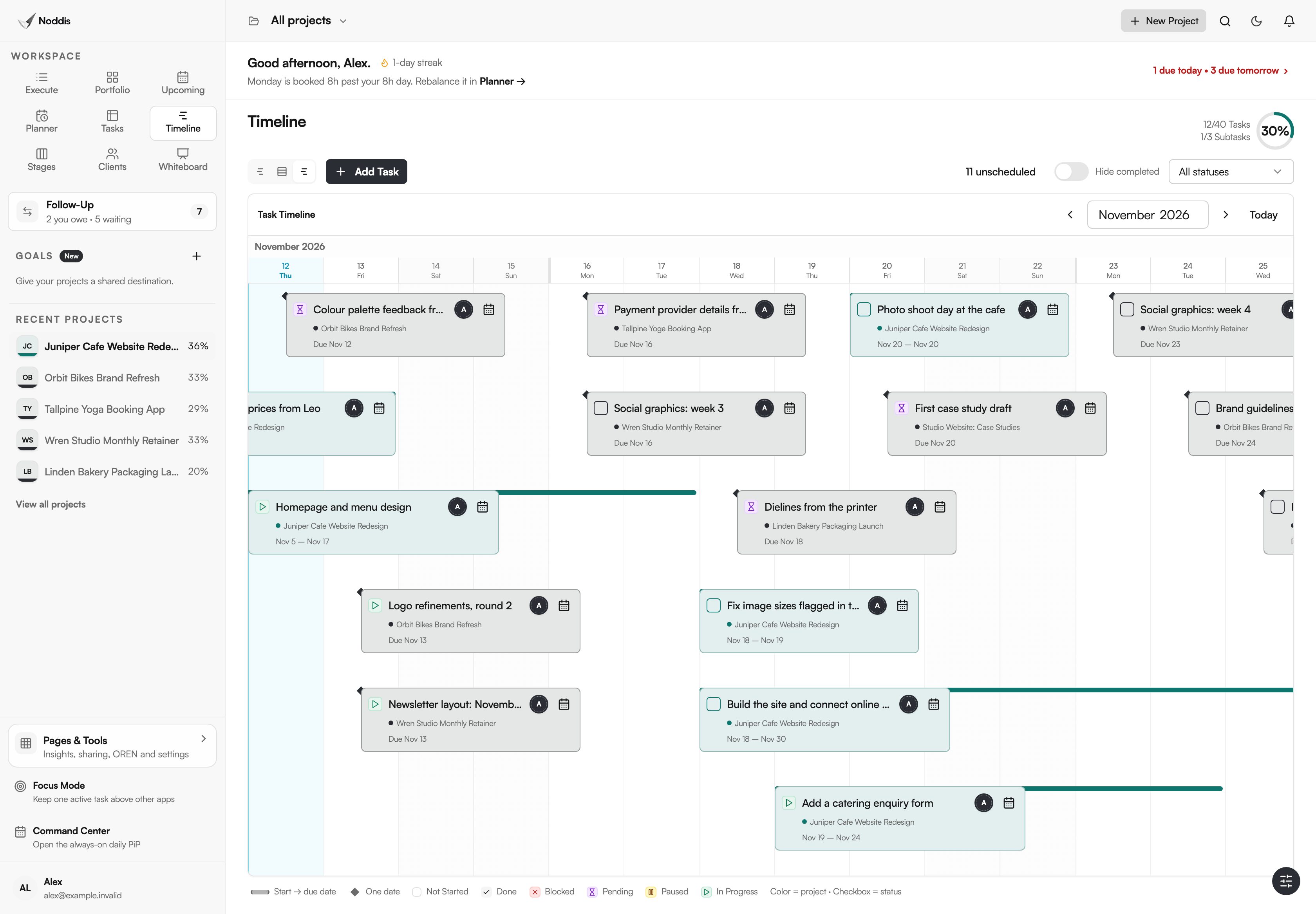
Use Horizon when the question is about collisions between projects. Each project gets a lane, with its name, client and progress beside it, and its tasks sit in that lane by date. Here the colour is the project, and the checkbox carries the status. Two full lanes in one week mean two deadlines competing for the same days.
All Tasks: every dated task together
Use All Tasks when the question is about one stretch of days, whatever the project. Every dated task from every project sits under the same row of dates, and each card names its project. A status filter narrows the cards, and a counter shows how many tasks are still unscheduled.
Which kinds of work suit a project timeline view?
Timeline suits work with a fixed end date and steps that must happen in order.
AEC proposal teams
Take a proposal team a week from a due date. The reviews and final production have to fit in the days that are left, and Gantt shows whether they do. The task named Red review is a grey bar, because it has not started.
Aerospace suppliers
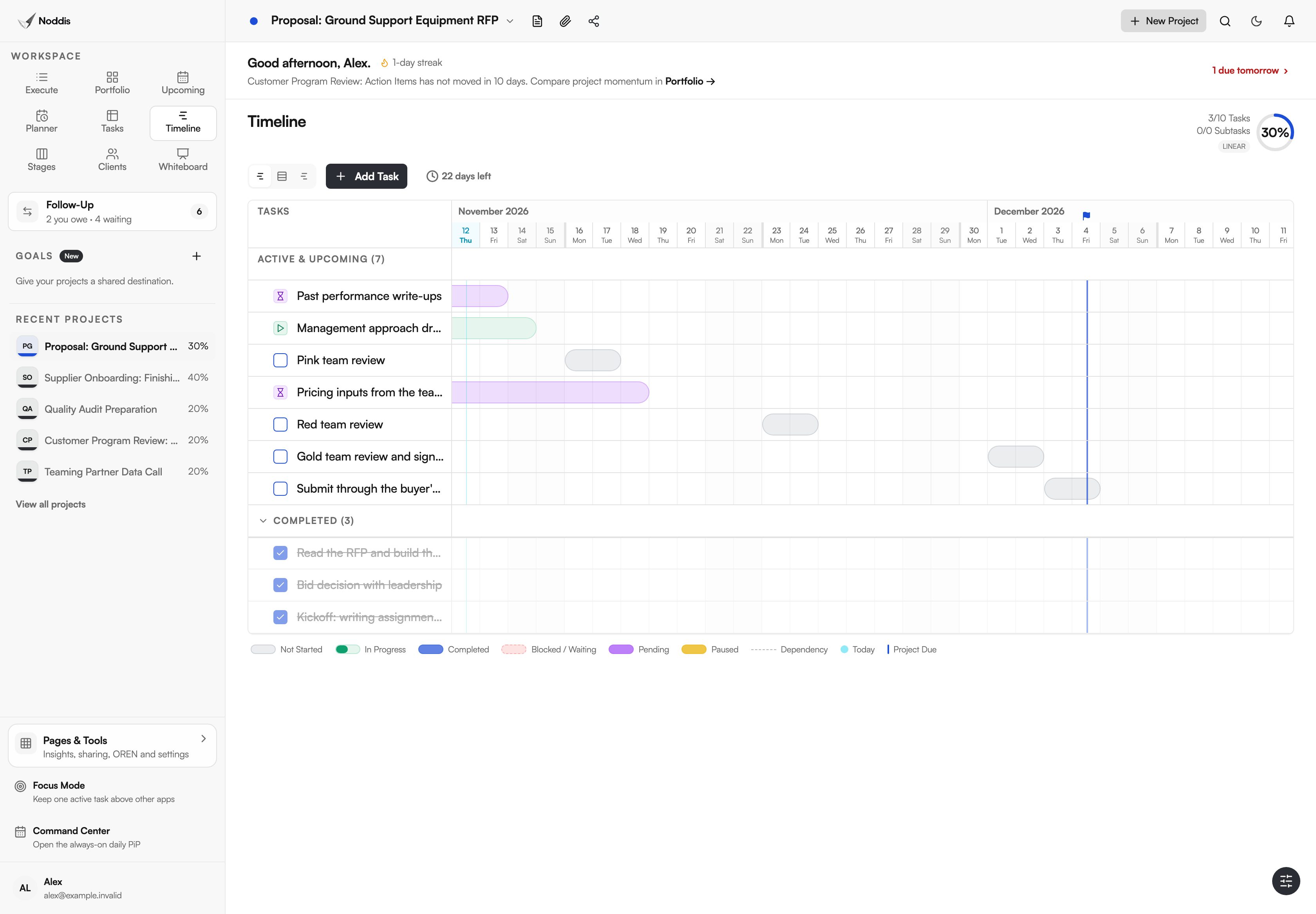
Picture a supplier answering a commercial RFP, where pink, red and gold team reviews are fixed points. As bars, the gap between a draft and its review is visible weeks ahead.
Purchasing teams
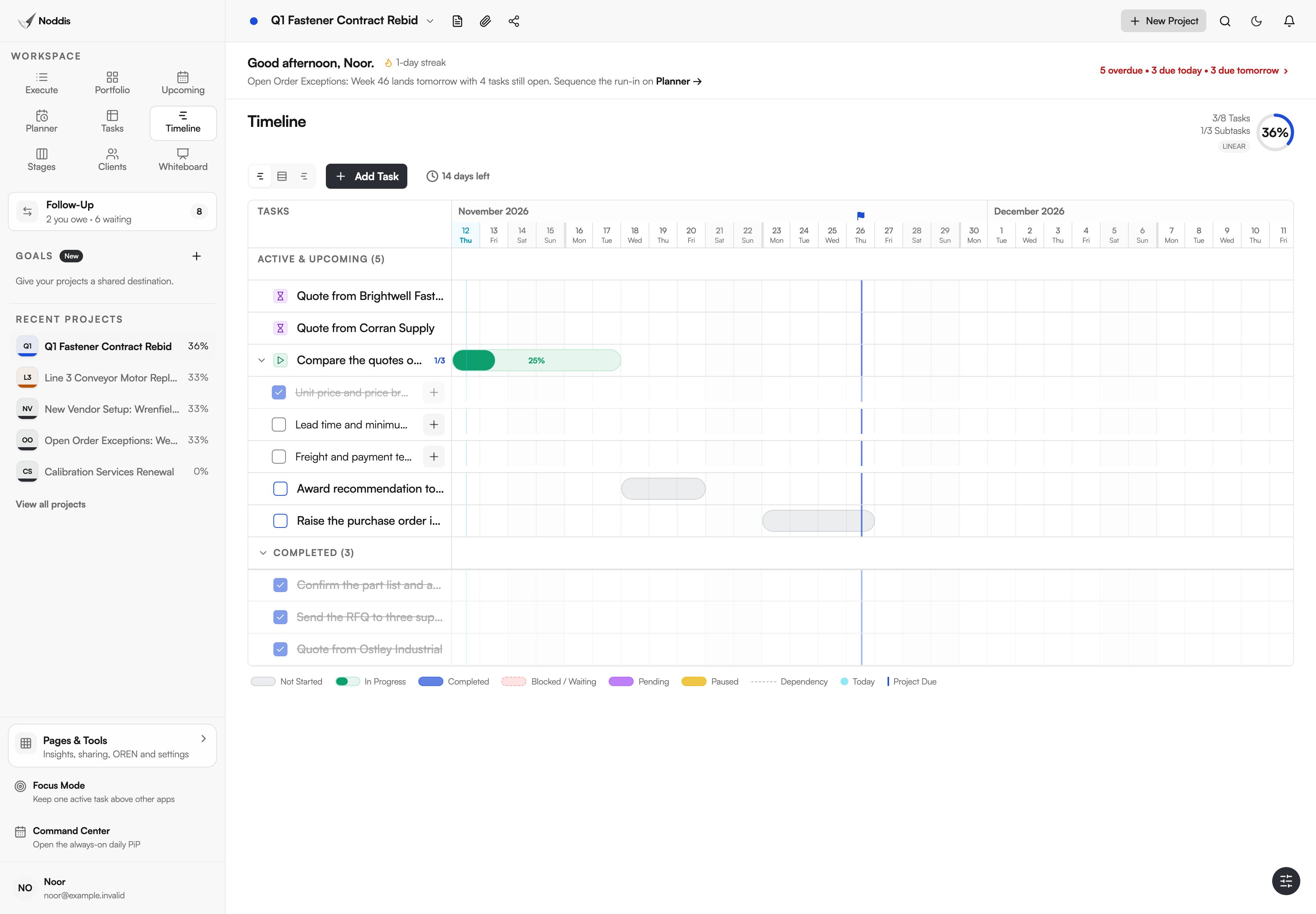
Take a purchasing team rebidding a contract with a fixed award date. Gantt shows the days each step has left when a quote is late.
What Timeline does not do
Timeline shows your dates. It does not work them out for you.
- Dates do not move on their own. A late task does not push the tasks after it.
- No critical path. Timeline does not calculate which chain of tasks sets the end date.
- No milestones. A task with only a due date is a one-day marker, and the project due date has a flag.
- No resource levelling and no auto-scheduling.
- No zoom levels and no custom fields.
If a contract requires a critical path schedule, or your dates must ripple through a chain of dependencies, use a dedicated scheduling tool. For a board, see Stages, also on Pro, and the guide kanban vs Gantt for client projects.
What it costs
Timeline is a Pro workspace. Pro is $15 a month. The Free plan includes three active projects, and two Free workspaces read the same dates: Upcoming lists them in order, and Planner lets you drag tasks onto days. Check the current plans before you decide.
To try it with your own project, open the live demo. No account is needed.
Frequently asked questions
What is a project timeline view?
A project timeline view shows a project's tasks as bars placed by date, so the order and length of the work can be read at a glance. Timeline in Noddis has three: Gantt for one project, Horizon for a lane per project, and All Tasks for every dated task.
Do dependent tasks move when I change a date?
No. Timeline draws a dependency as a dashed line in Gantt and marks the waiting task "Blocked", but dates do not shift on their own. If an earlier task slips, you drag the later bars yourself. Timeline is not an auto-scheduling tool.
What do the bar colours mean in Gantt?
In Gantt the bar colour is the task's status: grey for Not Started, green for In Progress, purple for Pending, yellow for Paused, and the project's colour for a finished task. Red with a dashed border means blocked, not overdue. Horizon and All Tasks colour by project.
Does Timeline have milestones or a critical path?
No. Timeline has no milestone type and does not calculate a critical path. A task with only a due date shows as a one-day marker, and the project's due date has its own flag. For critical path analysis or resource levelling, use a dedicated scheduling tool.
Can I use Timeline on the Free plan?
No. Timeline is a Pro workspace. On the Free plan, Upcoming lists every dated task in order and Planner lets you drag tasks onto days. Both read the same dates, so when you move to Pro the bars are already there.
The dates are already there.
Timeline draws its bars from dates your tasks already carry, so there is no first chart to draw. Pick the view that matches the question: one project, every project, or every task.