
Short answer
To manage 50 projects at once, stop reading 50 projects. Put every project on one screen with its progress and its next step, then give your attention to the few that are late, waiting on someone, or growing past what was agreed. The other 45 need a glance, and a glance is all they get.
How many projects can a project manager handle?
One project manager can handle as many projects as they can keep a true picture of, and that depends on how much each project asks of them in a normal week. Fifty small jobs with clear steps can be lighter than five large ones with daily decisions.
At 50, the job changes. You stop doing the work of a project and start controlling a list of them. The Association for Project Management has a name for that: "Portfolio management is the selection, prioritisation and control of an organisation’s programmes and projects". Past a few dozen projects you are doing the "control" part every Monday, whether or not it is in your job title.
Governments plan for the same three levels. The UK page for its project delivery standard reads: "The standard sets expectations for the direction and management of portfolios, programmes, and projects in government." A portfolio is its own level of work, with its own way of looking.
Take Claire, a senior project manager at a civil engineering firm. She runs 54 live projects: subdivisions, commercial site plans, town and county work, surveys, permits and construction-phase jobs. Engineers, surveyors and outside agencies do most of the steps. Her job is to know, every morning, which of the 54 needs her.
What goes wrong first at 50 projects?
The status round goes wrong first. With five projects you can open each one and look. With 50, opening each one takes the morning, and the picture is stale before you finish.
Project managers say it better than any framework does. One thread on Reddit asks, "Is anyone else starting to feel like the tools are running the team, not the other way around?" At 50 projects that feeling stops being a mood and becomes arithmetic.
| What you do by hand | What happens at 50 projects |
|---|---|
| Open each project to see where it is | The round takes so long that it gets skipped |
| Keep the "who owes me what" list in your head | The oldest request is the one you forget |
| Ask each person for a percent complete | Fifty guesses, collected by chat |
| Notice extra work when the invoice is due | The extra work is already done, unbilled |
The fix is an old idea. PRINCE2 calls it managing by exception. Frank Turley, who writes the PRINCE2 wiki, sums it up in one line: "Manage by exception allows higher management levels to control the lower levels without being bogged down by every minor issue." Apply it to yourself. Decide what "fine" looks like, and look closely only at what falls outside it.
What should one screen for 50 projects show?
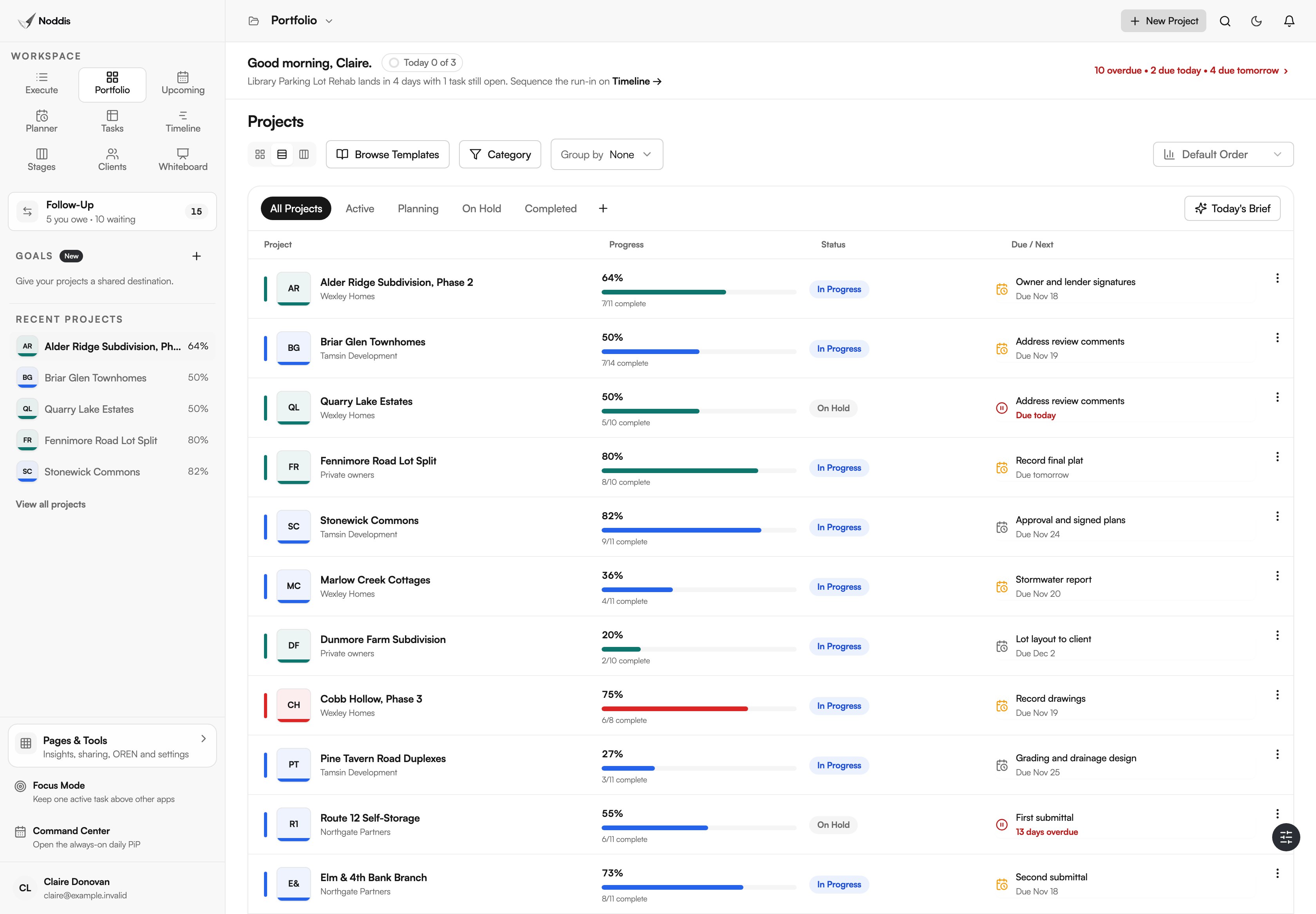
One screen for 50 projects should show four things on every row: whose project it is, how far along it is, its status, and its next step with a date. Anything less and you are back to opening projects.
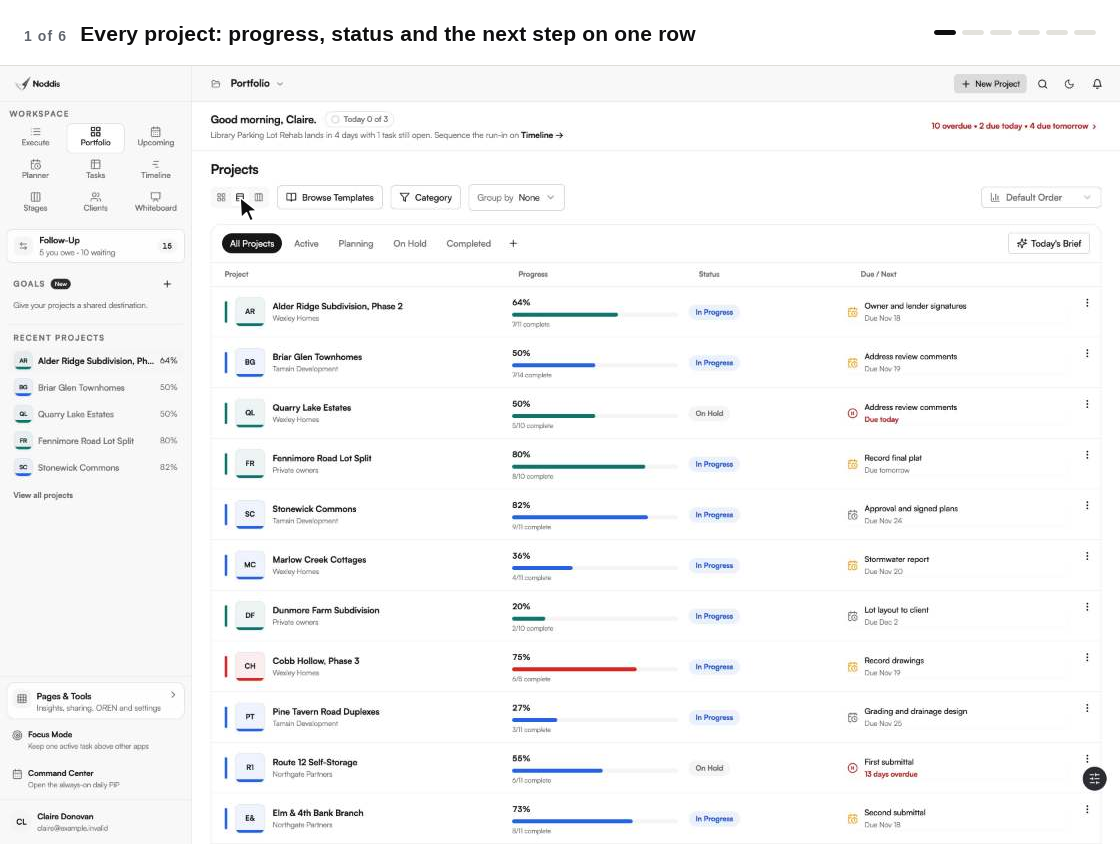
In Claire's list, the row for Quarry Lake Estates reads: 50 percent, On Hold, "Address review comments", due today. The row for Route 12 Self-Storage reads: 55 percent, On Hold, "First submittal", 13 days overdue. She has not opened either project.
This is also how to track multiple projects at once when there are only eight of them. The row is the same. There are simply fewer rows.
Two details make the row trustworthy. The percent is counted from finished steps, so nobody reports it. And the next step is the first unfinished step in the project, with its own due date, so a late step shows in red on the row.
How do you find the projects that need you today?
Find them with three questions, asked in the same order every time. Each one has its own screen, and each screen covers all 54 projects at once.
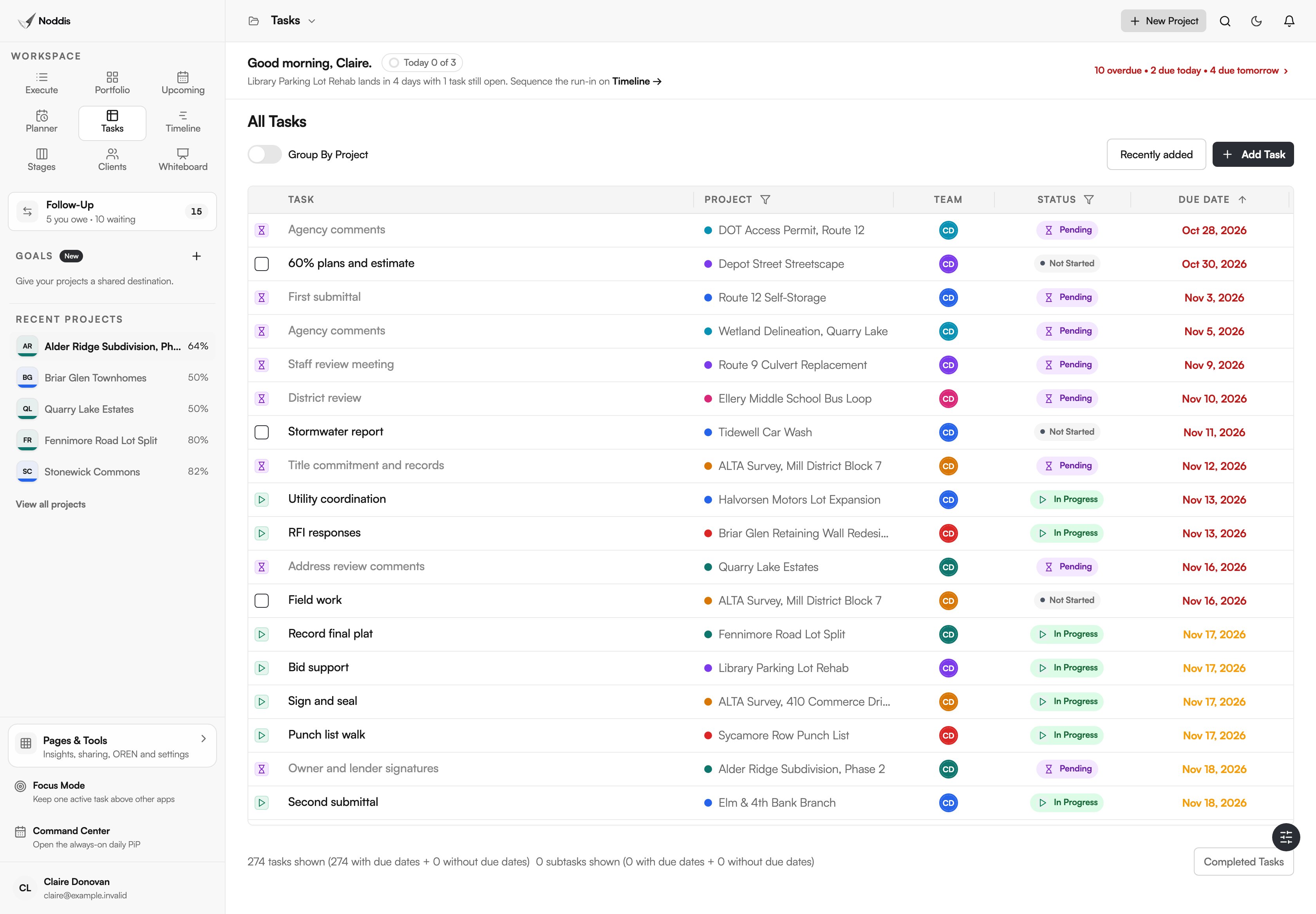
- What is late? The line above Claire's list counts 10 steps overdue, 2 due today and 4 due tomorrow. The Tasks table then lists every open step in every project by due date, oldest first: 274 steps in one table.
- Who am I waiting on? Follow-Up shows 5 things she owes and 10 she is waiting to receive. The longest wait is 24 days: a town that has not chosen a lighting standard.
- What has grown? Drift compares each project with the scope that was agreed. One job, Briar Glen Townhomes, is up 27 percent: 11 agreed steps, 2 the client asked for and 1 the team added.
The second question is the one most lists miss. A step that waits on a county reviewer is not late because of you, and it will not move because you look at it. It moves when you ask again.
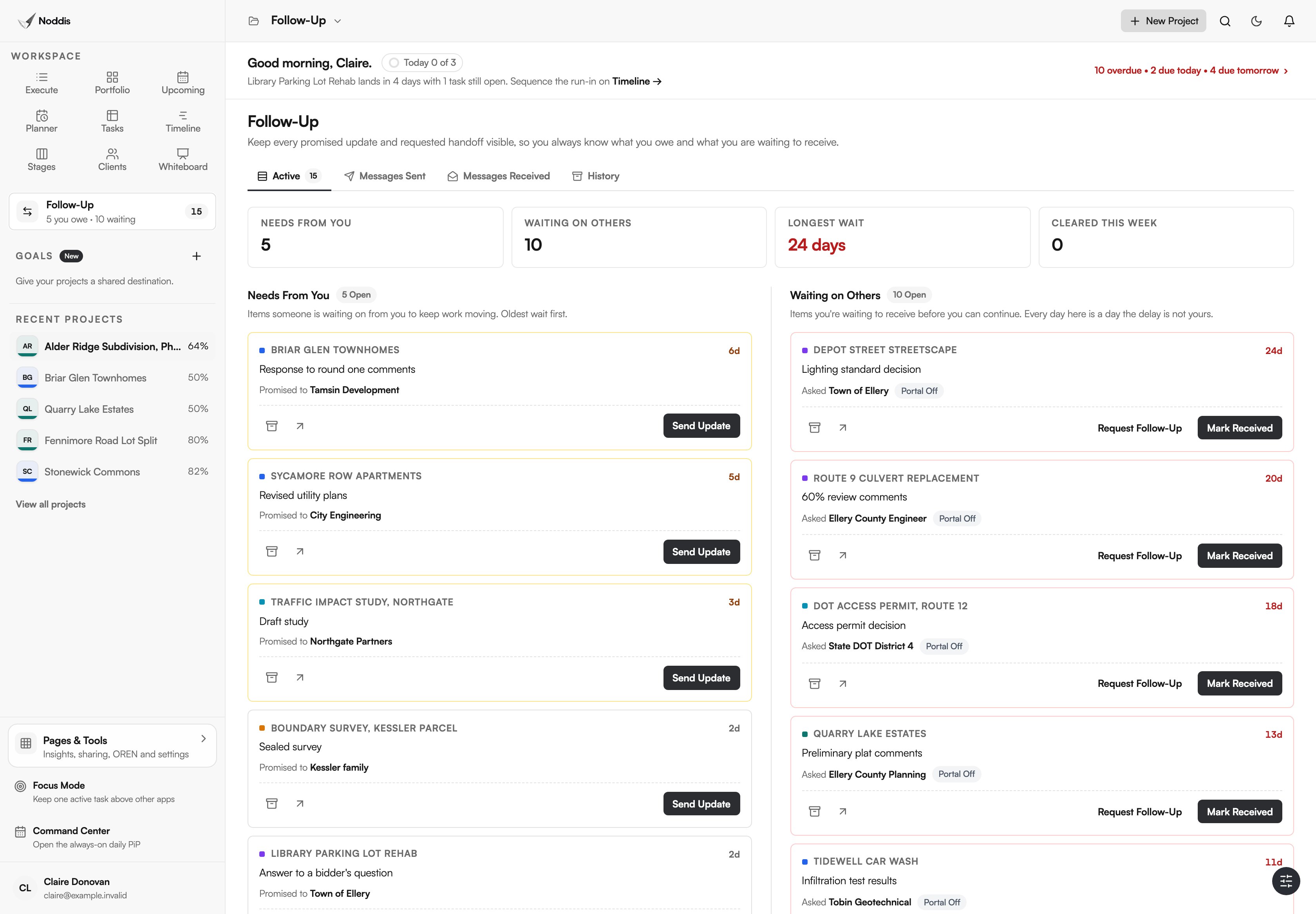
When we built Follow-Up in Noddis, we split it into two lists, Needs From You and Waiting on Others, and gave every open item an age in days. The request you have forgotten is usually the one holding a project still, and an age in days makes it hard to forget.
How do you see the whole week without opening every project?
See the week by listing work by date instead of by project. In Upcoming, Claire sets the open column to "This Week" and reads 27 steps due across all 54 projects, each with its project's name beside it.
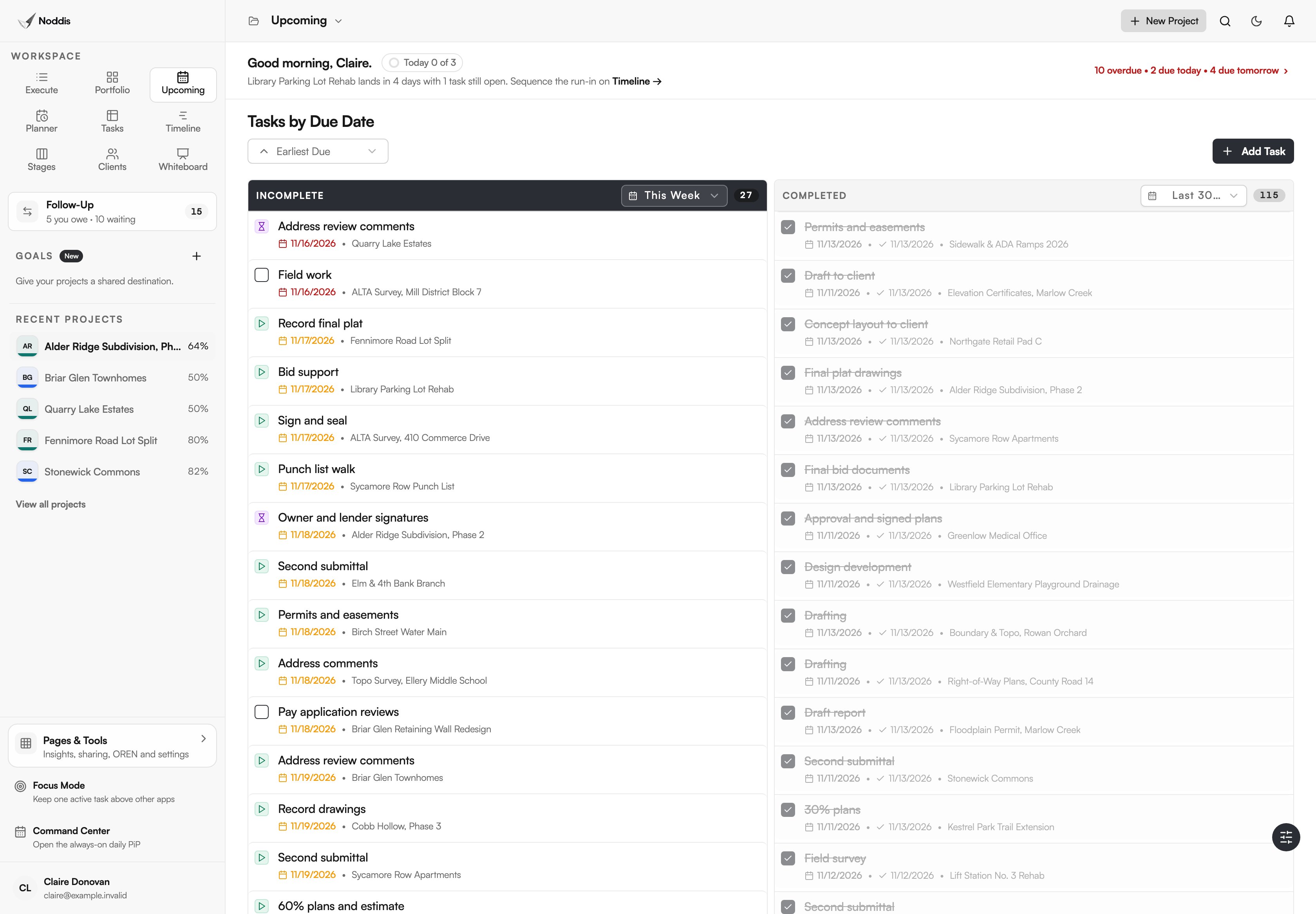
The same screen keeps finished work in a second column. On a Monday morning it shows the 115 steps completed in the last 30 days, which is the answer to "what did we get done?" without a report.
For the shape of the next few months, Timeline has a view called Horizon that puts every project on one calendar.
How do you check the health of the whole list?
Check health with counts first, then with the exceptions. A count tells you whether this is a normal week. The exceptions tell you where to go.
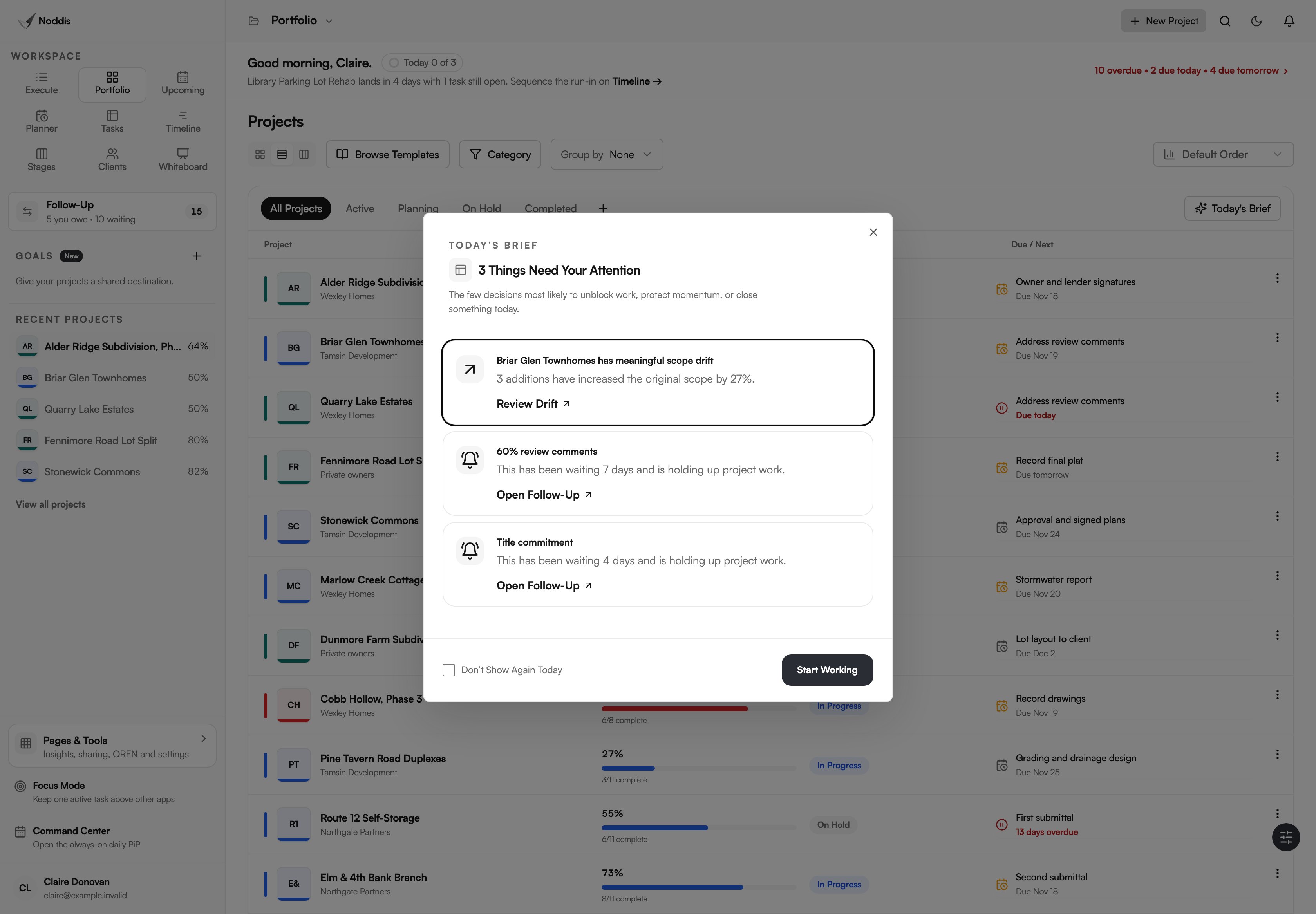
Today's Brief does the second part. It opens on three things that need attention: the scope growth on Briar Glen Townhomes, and two requests that are holding up project work.
For the counts, Analytics has a card called Project Health. It sorts Claire's 54 projects into 44 healthy, 6 at risk and 4 inactive, and reads "Overall Health: 81% healthy". At risk means 14 or more days without a finished step. Inactive means 30 or more.
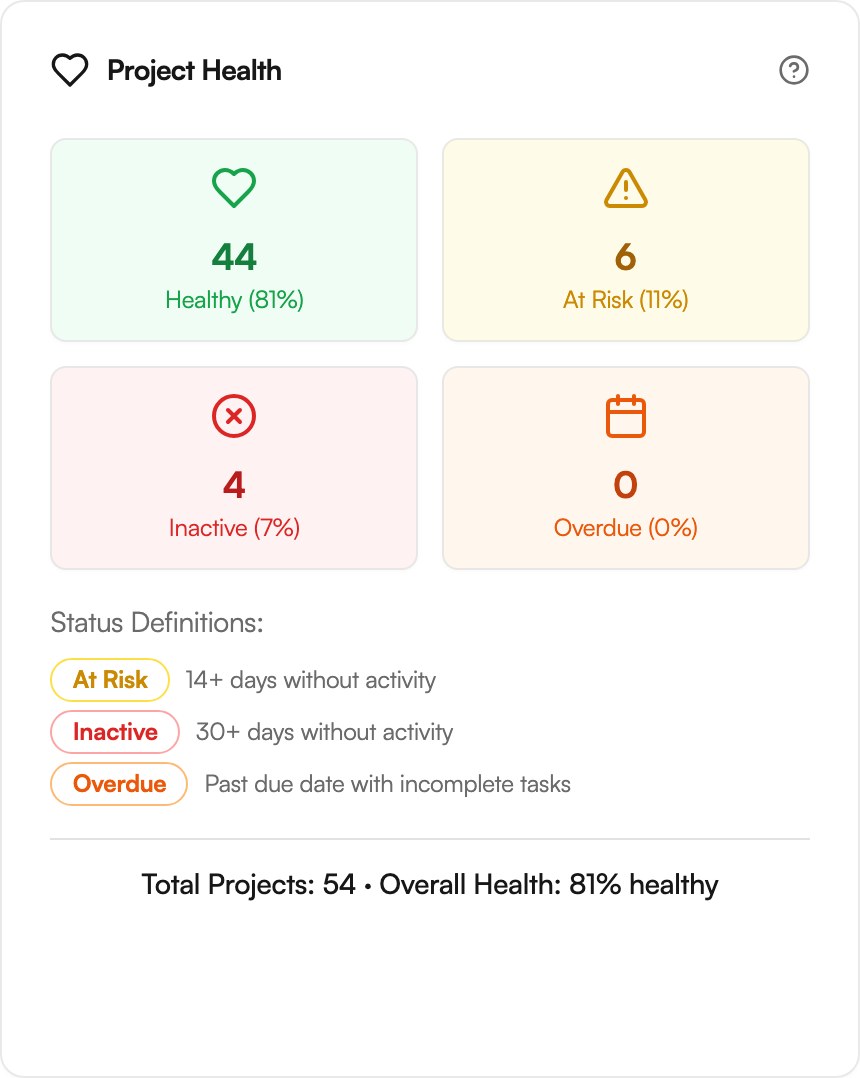
Read together, the brief and the card work as a project health dashboard for the whole list. Three more ways to cut the same list are one click away in Portfolio:
- Board sorts projects into columns. Claire's reads 5 Not Started, 40 In Progress and 9 Pending.
- Category filters by a hashtag such as #municipal or #survey.
- Order puts the projects due soonest first.
How do you manage 50 projects at once, week after week?
You manage 50 projects at once, week after week, with one pass through seven steps every Monday. It is the same pass each time, which is why it stays short.
- Open Portfolio in Snapshot and read the "Due / Next" column for red.
- Open Tasks and finish or re-date every overdue step.
- Open Follow-Up and chase the three longest waits.
- Open Upcoming for This Week and pick what must ship.
- Open Drift and raise anything over 20 percent with the client.
- Send an update on anything a client is waiting for.
- Pin the three projects you will open most this week.
These seven steps are in the Noddis Template Library as Monday Portfolio Review, a weekly template. Choose "Yes, Make It Recurring" when you use it and the seven steps reset every Friday, so the list is clear again on Monday. Recurring projects are part of Pro.
The Monday pass is why Claire's deadlines hold. A late step turns red on its row the day it slips, so she hears about a date while there is still time to do something about it. I run client projects through my own studio, and this is the morning I built Noddis for: reading one page instead of digging through fifty folders. The work is still hard. Knowing where it stands no longer is.
How does Noddis fit, and what does it not do?
Noddis fits this job because every screen above is built in, and it stays as calm at 54 projects as it is at five. Nothing needs to be set up before the first project. Noddis is a project management app that keeps tasks, follow-ups, and related project details connected.
Portfolio, Upcoming, Tasks and Today's Brief are in the Free plan. The Free plan includes three active projects, so a list of 50 needs Pro. Pro is $15 a month, with no limit on projects. Follow-Up and Drift cover one project on Free and every project on Pro. Timeline and Analytics are Pro.
What it does not do:
- There are no custom fields. Each row shows the same four things for every project.
- Portfolio has no "overdue only" filter. The count above the list and the Tasks table do that job.
- Project Health gives totals, not a list of which projects are at risk.
- It does not plan people's hours across projects.
- You cannot edit 50 projects in one action. Dates and statuses change one project at a time.
For a firm with several people on the same projects, a team workspace adds an owner on each task and a view of who is doing what.
Your next step
Write down your own list and give every project one next step with a date. To try it with your own project, open the live demo. No account is needed. When you want to keep it, start free. If the end of the year is close, the year-end project closeout checklist picks up where this leaves off.
Common questions
What should I do when a project has no clear next step?
Give it one before you do anything else. A project with no next step cannot be late, so it never shows up when you look for trouble. Write the smallest real action, put a date on it, and name who does it. If nobody can say what the next step is, that is the first thing to find out.
How do you keep track of 50 projects without a status meeting?
Keep one list where each project shows its progress and its next dated step, and count progress from finished steps instead of asking people for a percent. The status is then on screen before anyone speaks. A meeting can be used for decisions, such as what to stop, what to chase and what to move.
What is the difference between managing a project and managing a portfolio?
Managing a project means getting one piece of work to its end. Managing a portfolio means choosing, ordering and watching many of them, so that the ones in trouble get attention first. With 50 projects you do both, but most of your week is the second kind of work, and it needs a different screen.
Do I need portfolio software for 50 small projects?
You need one place that shows all 50 with a next step each. A spreadsheet can do that while the steps change slowly. Once steps change every day, a list you update by hand falls behind the work, and you need a list that updates itself when someone finishes a step.
How often should I review every project?
Review the whole list once a week and the exceptions every day. A weekly pass catches a quiet project before it has been still for a month. The daily look is shorter: what is late, who you are waiting on, and what is due in the next two days.

Katleen is the founder of Noddis. She runs client projects through her app studio, 693 Labs, and builds Noddis around the problems that work creates.
Last reviewed . Feature details reflect Noddis at the time of review.