
Short answer
A year-end project closeout checklist has eight steps: list what finished, close each finished project, decide on every open one, clear what you are waiting on, write down what the year taught you, set next year's goals, set up the work that repeats, and plan the first week of January. Work through them in that order and the new year starts with a short, true list.
What is a year-end project closeout?
A year-end project closeout is one pass over every project you ran this year, so that nothing finished is left half closed and nothing open drifts into January without a date. It is not the same as closing a single project. It is closing many at once, plus the decisions about the ones that carry on. Some firms call it an end of year project review.
Most of us close the year from memory and an inbox search. It works until March, when an email arrives that begins "quick question about last year's job" and nobody can find the answer.
Closing is part of the job, not an extra. The Association for Project Management lists it among the core parts of project management: "closing the project in a controlled fashion when appropriate." The end of the year is when "when appropriate" arrives for a lot of projects in the same three weeks.
Take Claire, a senior project manager at a civil engineering firm with 54 live projects. It is the middle of November. Seven more jobs finished this quarter and still sit on her list. That is 61 projects to make a decision about before the year ends.
The year-end project closeout checklist
The checklist is eight steps. The first five close the year and the last three open the next one, so steps six to eight double as a Q4 project planning checklist.
| Step | What you do | It is done when |
|---|---|---|
| 1 | List every project that finished this year | You have one list, and it matches what you billed |
| 2 | Close each finished project | It is delivered, invoiced, filed and archived |
| 3 | Decide on every open project | Each one is marked finish, carry over or stop |
| 4 | Clear what you are waiting on | Every open request has been asked for again |
| 5 | Write down what the year taught you | Three notes exist, and one of them changed something |
| 6 | Set next year's goals | Each goal has projects attached to it |
| 7 | Set up the work that repeats | Next year's copy of each yearly job exists |
| 8 | Plan the first week of January | Three projects have a next step on a date |
How do you list what finished this year?
List what finished by date, not from memory. You need two lists: the projects that are complete, and the steps that were completed, because a year of work is mostly steps inside projects that are still open.
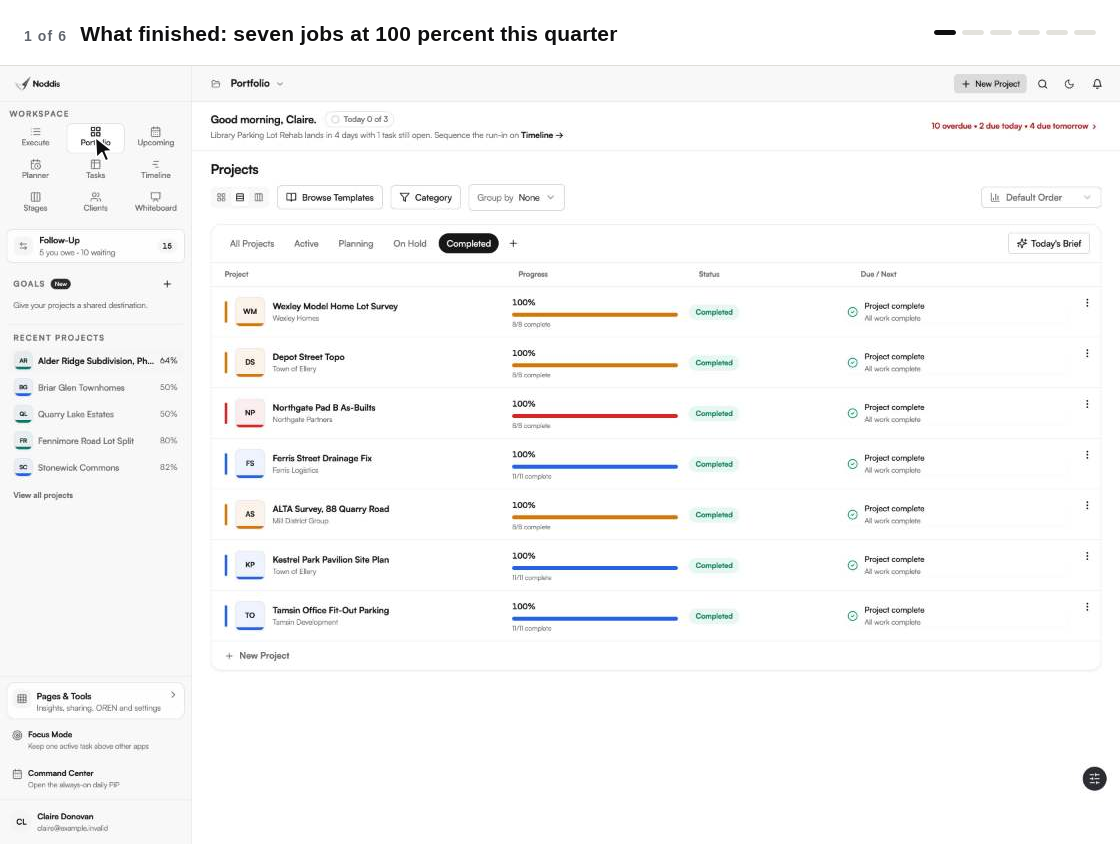
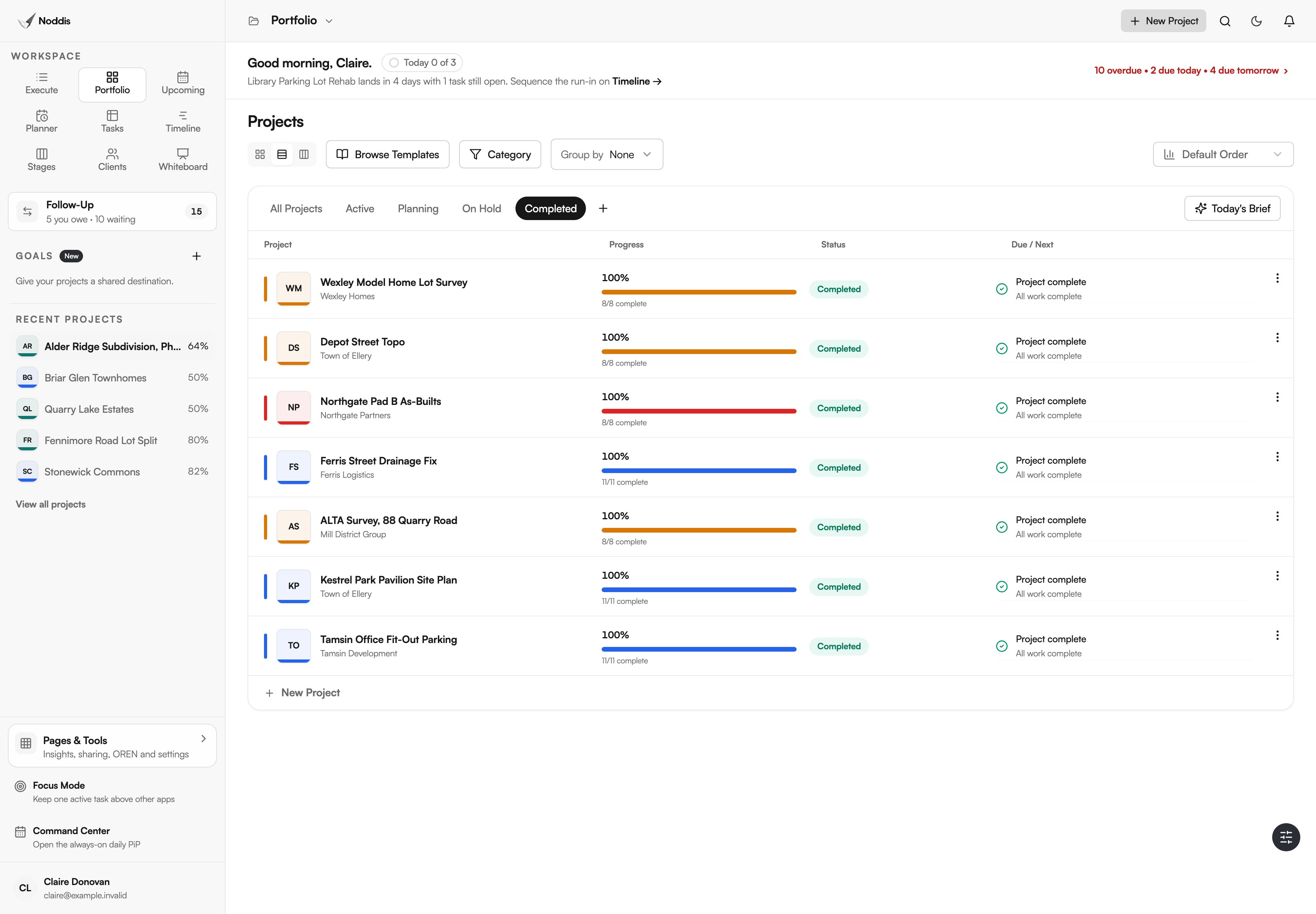
In Claire's Portfolio, the Snapshot view has a filter called Completed. It shows the seven jobs that reached 100 percent this quarter, each marked "Project complete".
For the steps, she opens Upcoming and sets the Completed column to "This Year". It reads 306: every step her projects finished in 2026, each with its project's name.
How do you close a finished project?
Close a finished project with five checks, in this order. A project that skips one of them comes back in March as a question.
The first check matters most. Frank Turley, who writes the PRINCE2 wiki, describes the point of closing this way: "The purpose of the closing a project process is to officially confirm the acceptance of the project product." Until the client has said yes, the project is not finished, whatever the percent says.
- Confirm the client received the final deliverable.
- Send the final invoice.
- File the final documents and approvals where the next person will look.
- Produce a completion report for the record.
- Archive the project, so the live list holds only live work.
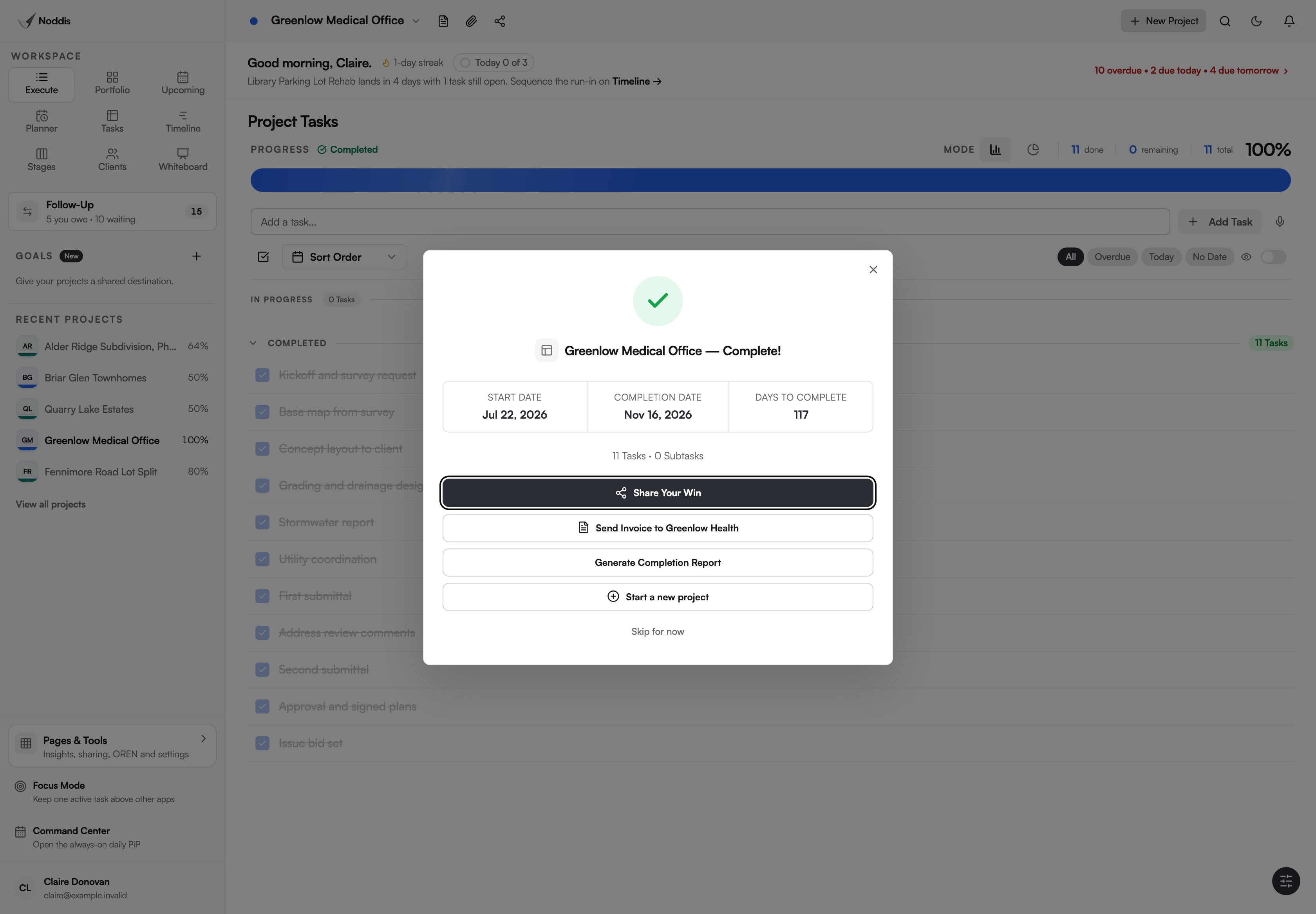
When Claire ticks the last step on Greenlow Medical Office, the project reaches 100 percent and Noddis opens a "Complete!" window. It shows the start date, the completion date and 117 days to complete, and offers "Send Invoice to Greenlow Health" and "Generate Completion Report".
The report is one page: a summary, then every step with the date it was due and the date it was completed. It prints or saves as a PDF.
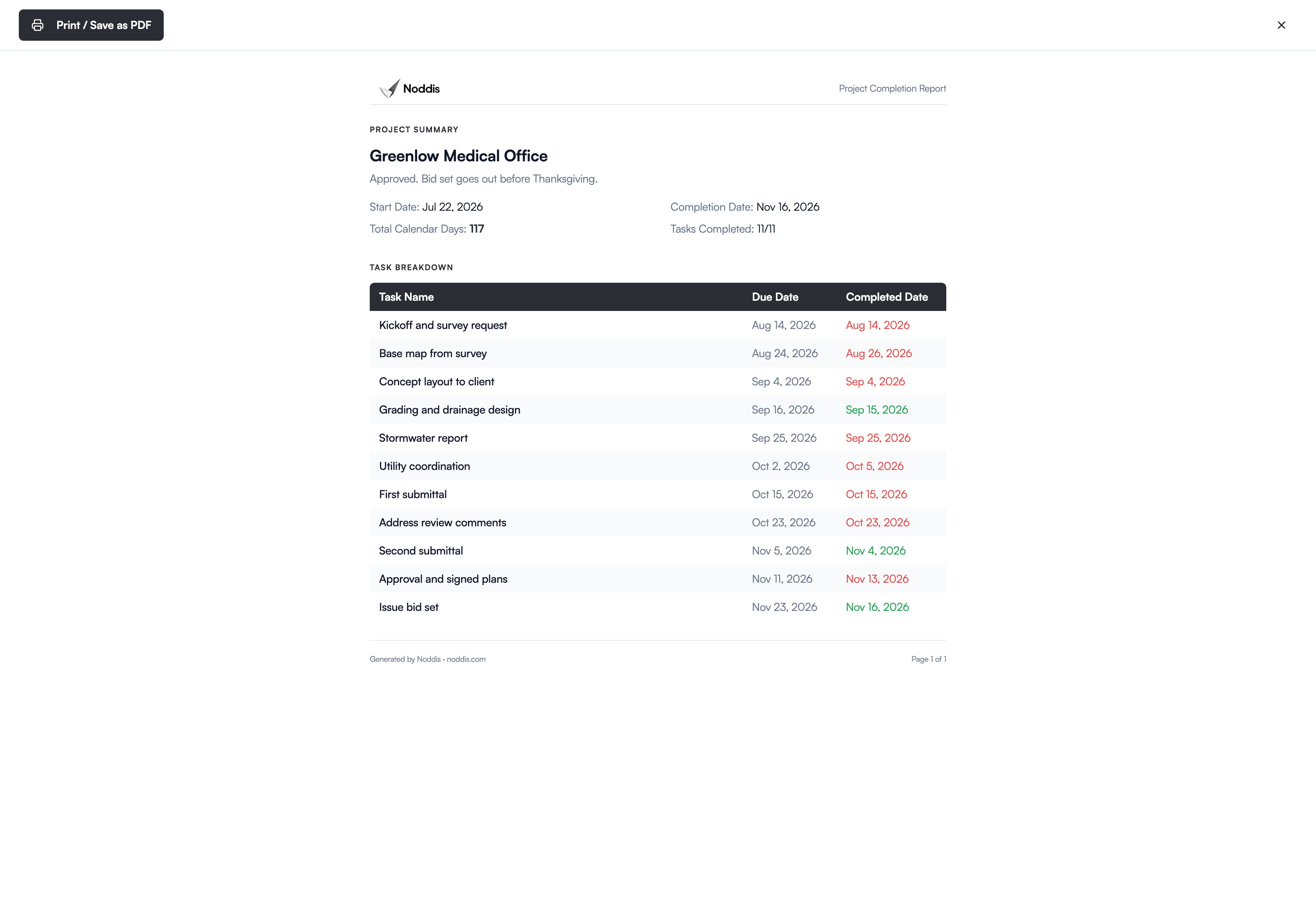
Archiving is in the project's details panel, under "Archive project". An archived project leaves Portfolio and can be brought back from Activity & Archives with "Restore".
How do you decide what to carry over?
Decide by giving every open project one of three answers. "We will see" is not one of them.
- Finish it. It can be done before the last working day, and it has a date this year.
- Carry it over. It will not be done, so it gets a new date next year and the client is told.
- Stop it. It is not going to happen. Say so, and close it.
To see what is at stake, Claire sets the open column in Upcoming to "This Year". It reads 168: the steps still due before December 31 across all her projects. That number is the real size of her year end.
When we built Upcoming in Noddis, we put the deadlines from every project in one list, so nothing has to be opened to see what is due. At year end that list is the carry-over decision, one step at a time.
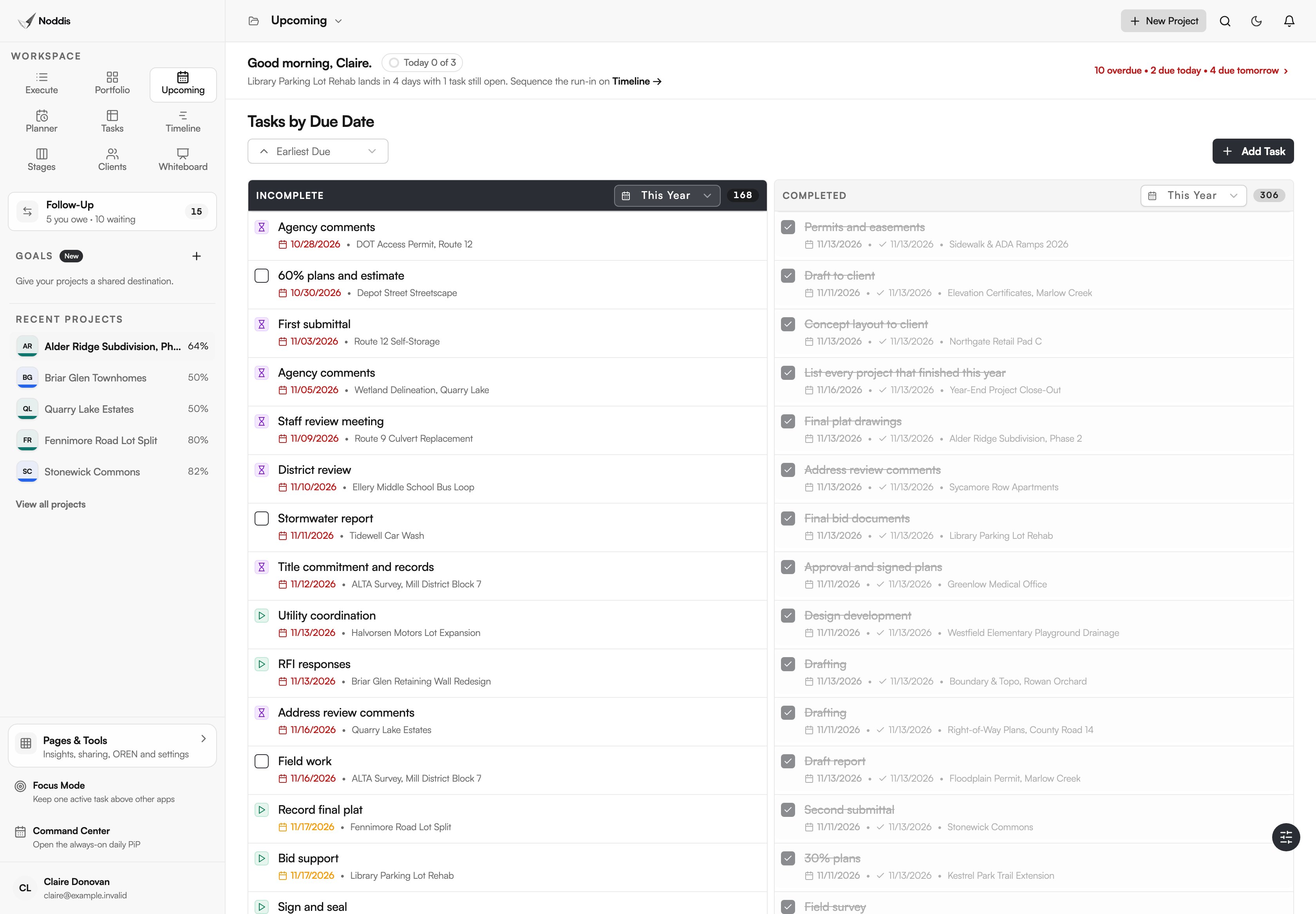
The rule for a carry-over is simple. No project crosses into January without a next step and a date on it.
What should you chase before the holidays?
Chase everything you are waiting on, starting with the oldest. A request that sits unanswered on December 18 will sit until the second week of January.
Claire's Follow-Up lists 10 things she is waiting to receive. The longest has been open 24 days. Each one has a "Request Follow-Up" button, and a "Mark Received" button for when the answer arrives. In the same week she tells clients which days the office is closed and who covers urgent requests.
How do you capture lessons before they fade?
Capture lessons now, while the projects are still fresh, and write each one as a change to make. The Association for Project Management defines lessons learned as "Documented experiences that can be used to improve the future management of projects, programmes and portfolios." The hard part is the second half of that sentence.
The same page is blunt about why: "many organisations report that although lessons may be documented, they are not reliably learned". NASA keeps its own in one searchable system, which it describes this way: "It contains the official, reviewed learned lessons from NASA programs and projects."
You do not need a system that size. You need three notes:
- What went well, and should become the normal way.
- What slipped, and why.
- One thing to change next year.
Then make the change where the work starts. If county reviews took longer than planned on every job, add a step for the second review round to the list you start new jobs from.
How do you set goals for next year?
Set a goal for each outcome you want by a date, then attach the projects that count toward it. A goal with no projects attached is a wish.
Claire sets three goals for 2027. "Close every 2026 job by January 29" holds 26 projects and already stands at 63 percent. "Town of Ellery 2027 program" holds 7 and "Wexley Homes spring starts" holds 4.
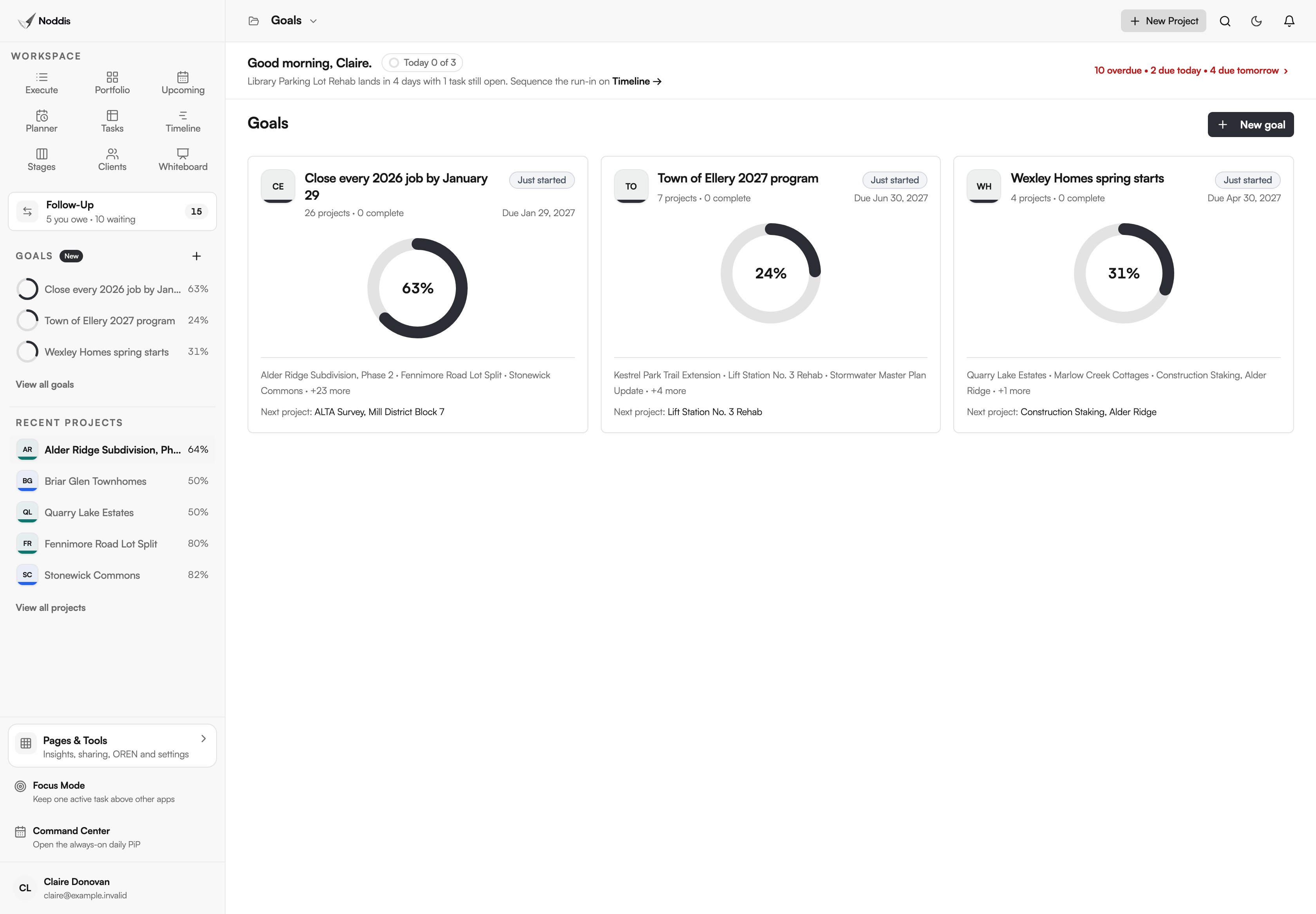
Each goal's percent is worked out from the projects inside it, so it moves when their steps are finished. Portfolio can then be grouped by goal.
How do you set up the work that repeats?
Set up repeating work by copying this year's version instead of rebuilding it. Permit renewals, annual inspections and yearly programs keep the same steps and change only their dates.
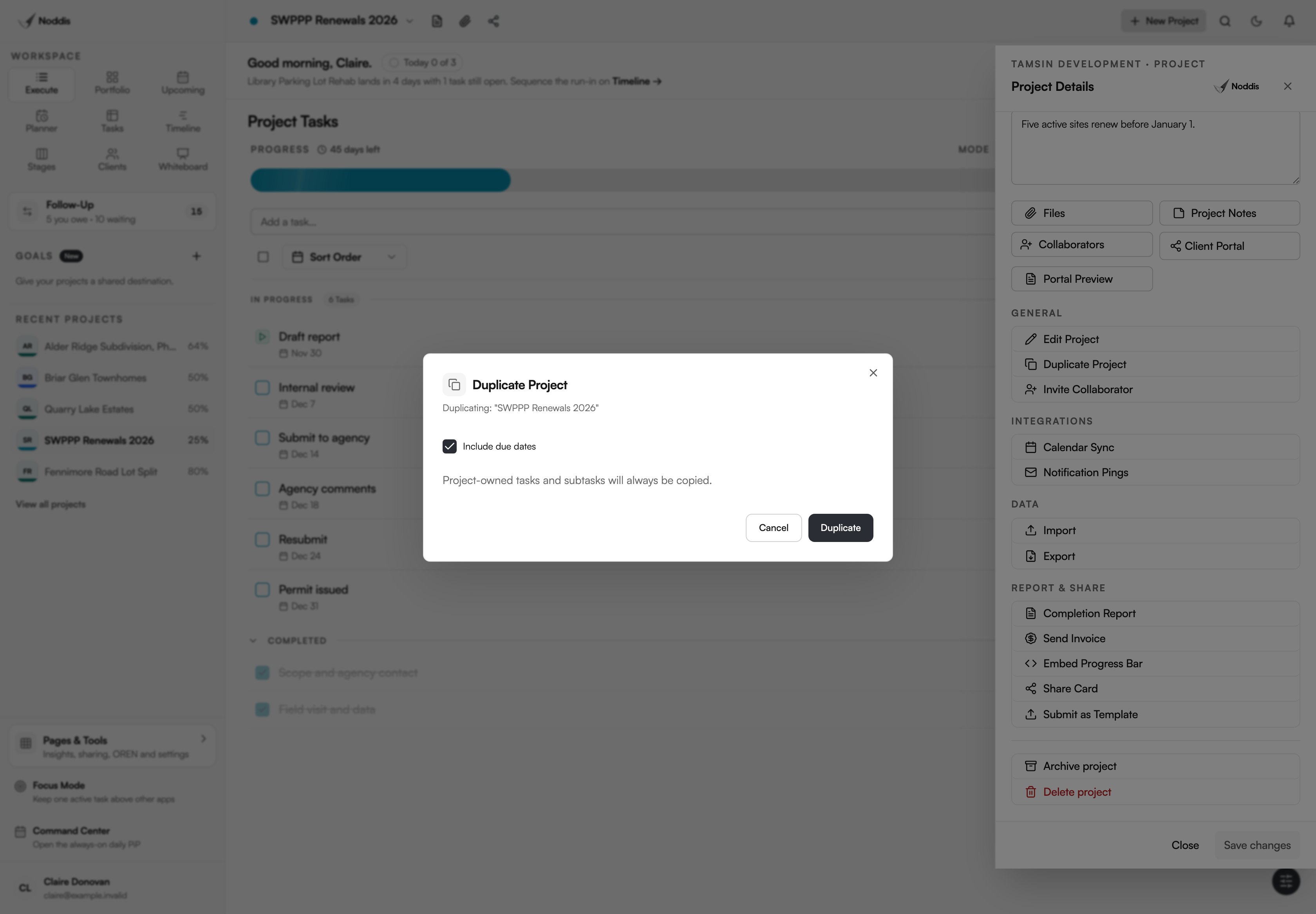
Claire opens "SWPPP Renewals 2026", chooses "Duplicate Project" and keeps "Include due dates" ticked. The copy has every step, reset to not done. She renames it for 2027 and moves the dates.
A project closeout checklist template you can use
All eight steps are in the Noddis Template Library as Year-End Project Close-Out. Open it, choose "Use This Template", and the checklist becomes a project of your own with 8 steps and 23 smaller steps under them.
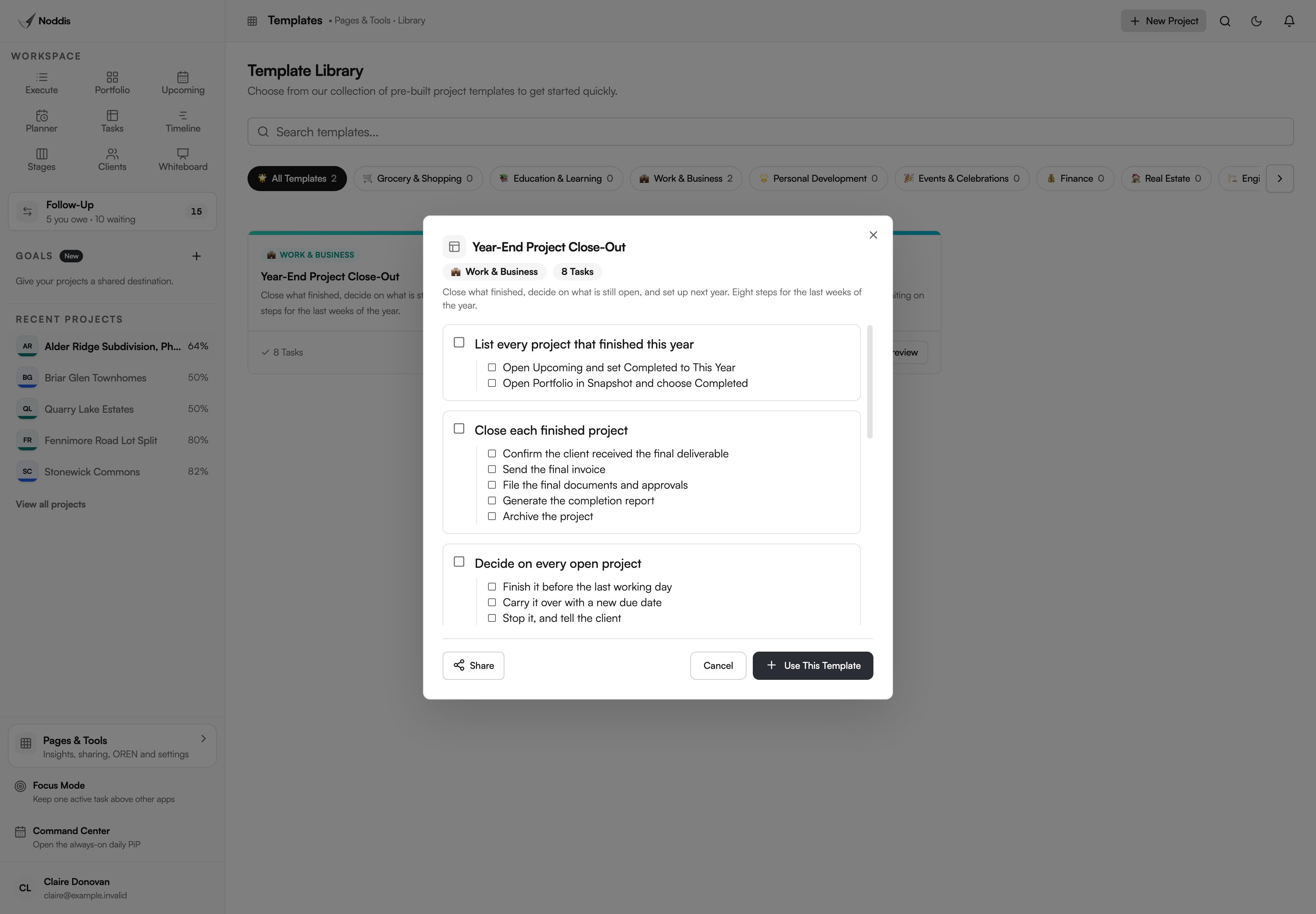
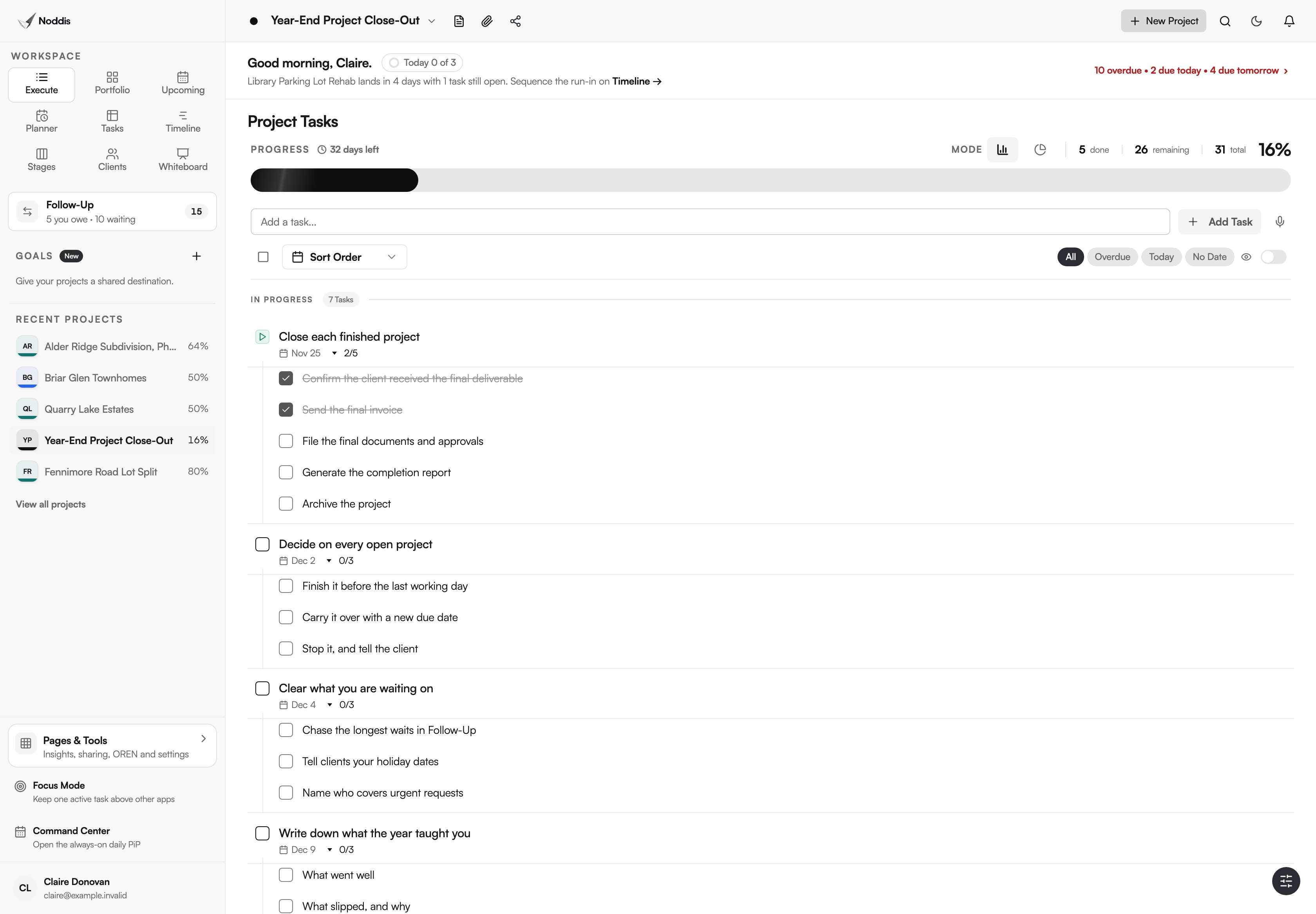
From there it behaves like any project. Give each step a date, tick the smaller steps as you go and watch the bar move. Claire's stood at 16 percent after her first morning.
How does Noddis fit, and what does it not do?
Noddis fits a year-end closeout because the lists it asks for already exist: what finished, what is still due and who you are waiting on. Nothing has to be gathered first, which is most of the reason a closeout gets done at all. Noddis is a project management app that keeps tasks, follow-ups, and related project details connected.
Templates, Upcoming, Portfolio and archiving are in the Free plan. The Free plan includes three active projects and one active goal. Pro is $15 a month and adds unlimited projects and goals, Duplicate Project, the PDF completion report and Follow-Up across every project.
What it does not do:
- It archives one project at a time. There is no "archive everything complete" button.
- A template carries step names only. Dates and notes are added after you use it.
- There are no custom fields, so a closeout status of your own cannot be added as a column.
- It is not an accounting system. It can send an invoice, but it does not close your books.
- It does not write the lessons for you. The three notes are yours.
Your next step
Open your project list and count two numbers: how many projects finished this year, and how many open ones have no date in January. To try it with your own project, open the live demo. No account is needed. When you want to keep it, start free. For the weekly routine that keeps the list true between now and then, see how to manage 50 projects at once.
Common questions
When should a year-end project closeout start?
Start about six weeks before your last working day. That leaves time to chase open requests and get answers before people leave for the holidays. The first week is for listing and deciding. The middle weeks are for closing and chasing. The last week is for goals and for planning the first days of January.
What is the difference between closing a project and archiving it?
Closing is the work: the client has accepted the result, the invoice is sent and the records are filed. Archiving is the last step, which takes the closed project off the live list while keeping it available. Archive too early and you hide open work. Never archive and the live list stops being true.
Should clients be told about a year-end closeout?
Yes. Tell each client three things: what was finished this year, what carries over and its new date, and which days your office is closed. A short note sent in early December answers the questions clients would otherwise ask in the last week, when nobody is there to reply.
How many lessons learned should I write down?
Three is enough: what worked, what slipped and one change to make. One change that is built into next year's plan is worth more than a long list nobody opens. Write each lesson as an action with an owner, and put it where new projects start, such as a template.
Can I reuse a year-end checklist every year?
Yes. Keep it as a template and start a fresh copy each November. Add any step this year taught you, so the checklist improves each time. After two or three years it holds the things your firm actually forgets, which no general checklist can know.

Katleen is the founder of Noddis. She runs client projects through her app studio, 693 Labs, and builds Noddis around the problems that work creates.
Last reviewed . Feature details reflect Noddis at the time of review.