
Short answer
Marketing managers use Noddis to keep every campaign, request and approval in one picture: colleagues ask through a single form, each piece of work shows whether it is moving or waiting, and every sign-off you are owed sits in a list with its age in days. This walk-through follows one week on an in-house team of two.
How do marketing managers use Noddis in a real week?
Noddis is a project management app that keeps tasks, follow-ups, and related project details connected. When we built the Task Queue in Noddis, we kept every request unassigned until someone chooses a project for it.
That one decision suits an in-house team. June, a marketing manager at an engineering firm, runs six projects: a trade show booth, six website case studies, a client newsletter, a recruiting campaign, the annual report and graphics for a live proposal. Requests from colleagues arrive on top. Each workspace in Noddis answers one question about all of it.
| June asks | She opens | Plan |
|---|---|---|
| What has been asked for this week? | Task Queue | Pro |
| What is live, and what is due next? | Portfolio, Upcoming | Free |
| Where is each piece? | Stages | Pro |
| Whose approval am I waiting on? | Follow-Up | One project on Free, all on Pro |
| Who keeps asking for status? | Client portal | Pro |
| What did we finish this month? | Analytics | Pro |
The screens are the real app.
How do requests reach the team?
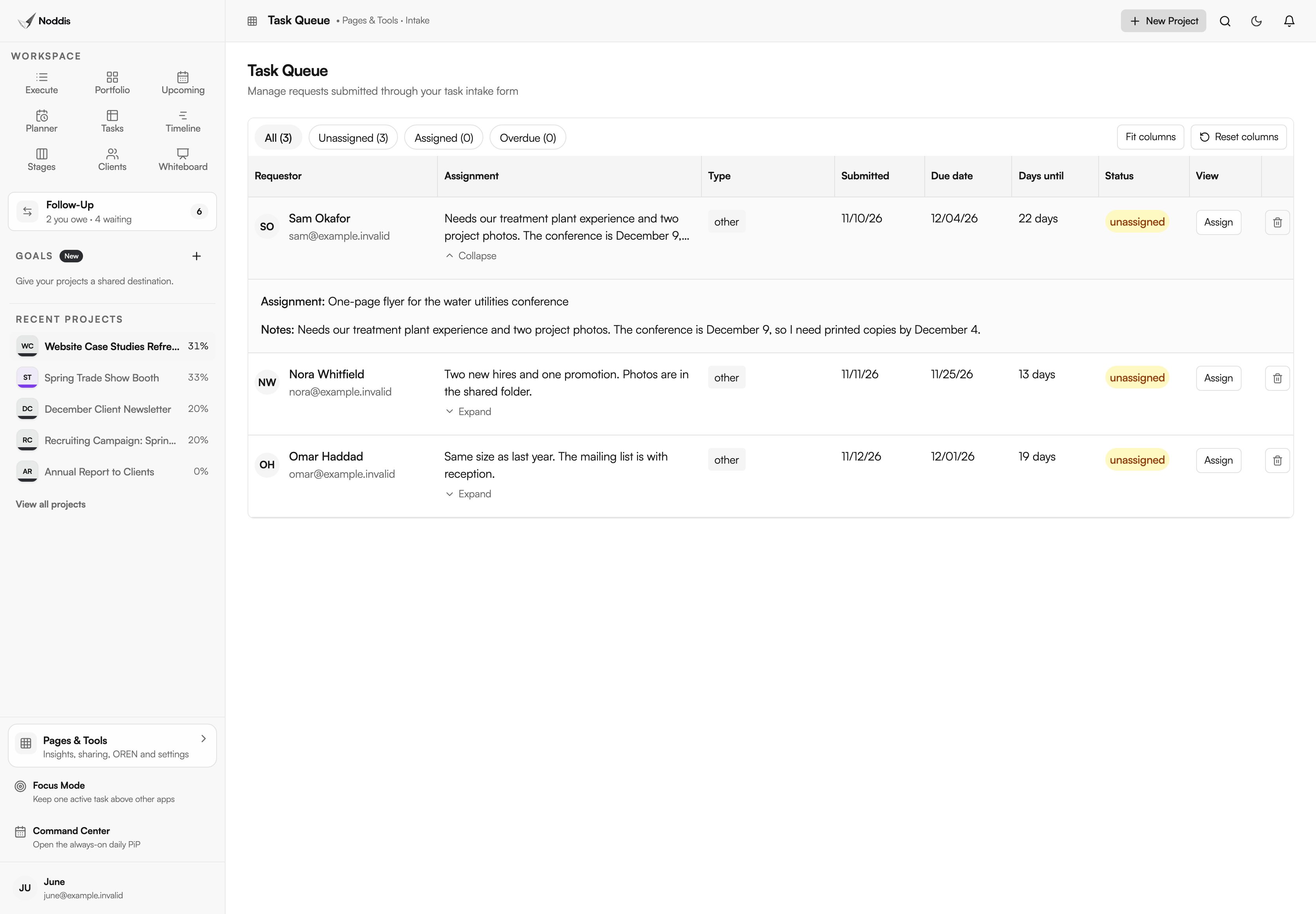
Requests reach the team through one link. The intake form is a marketing request form that colleagues fill in without an account: what they need, the details and the date. Each submission lands in the Task Queue with the requester's name, the due date and the days remaining.
A required form is normal practice in larger organizations. The University of Alabama at Birmingham tells departments that submit work to its marketing office: "Once you have submitted your proposal, you will receive notification from our office within one business day."
Nothing joins a project by itself. June reads the queue once a week, accepts the flyer for the water utilities conference into a project, and replies to the holiday card request with a later date. The guide to managing marketing requests from other departments covers the weekly triage, and marketing request turnaround times covers the notice each type of work needs.
If your content calendar already lives in a spreadsheet, import it. The Import dialog reads a CSV or Excel file, lets you pick the worksheet and header row, and shows the tasks it found before anything is created.
How do you see what is moving and what is waiting?
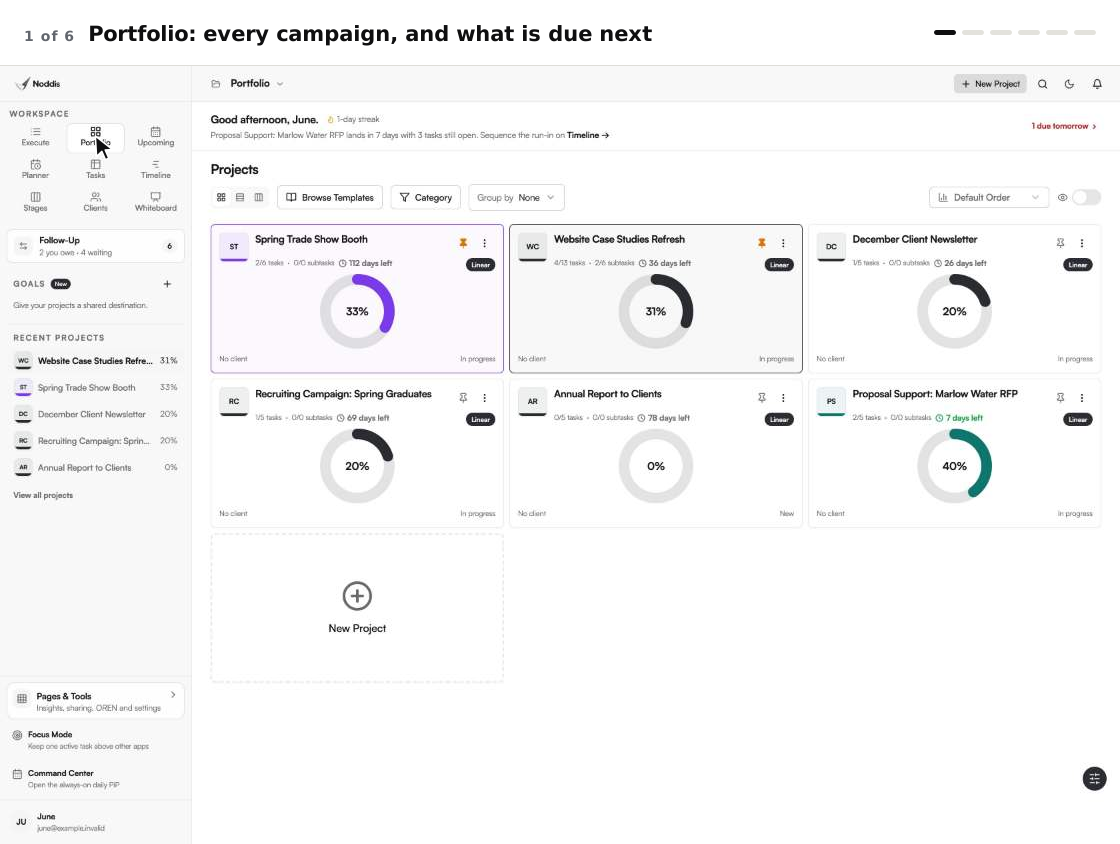
Portfolio shows the six projects as cards with progress, status and the next thing due. It is the Monday view.
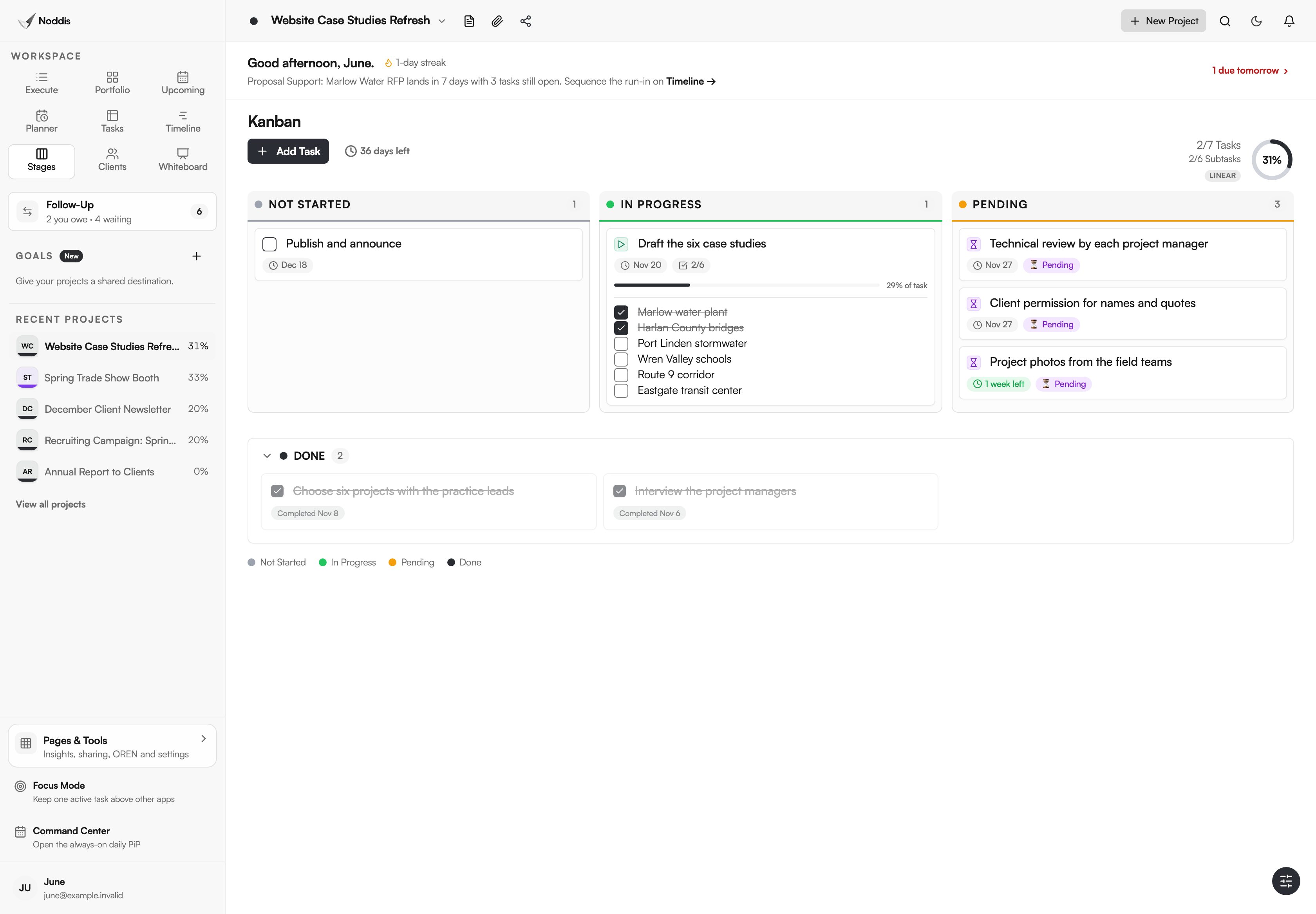
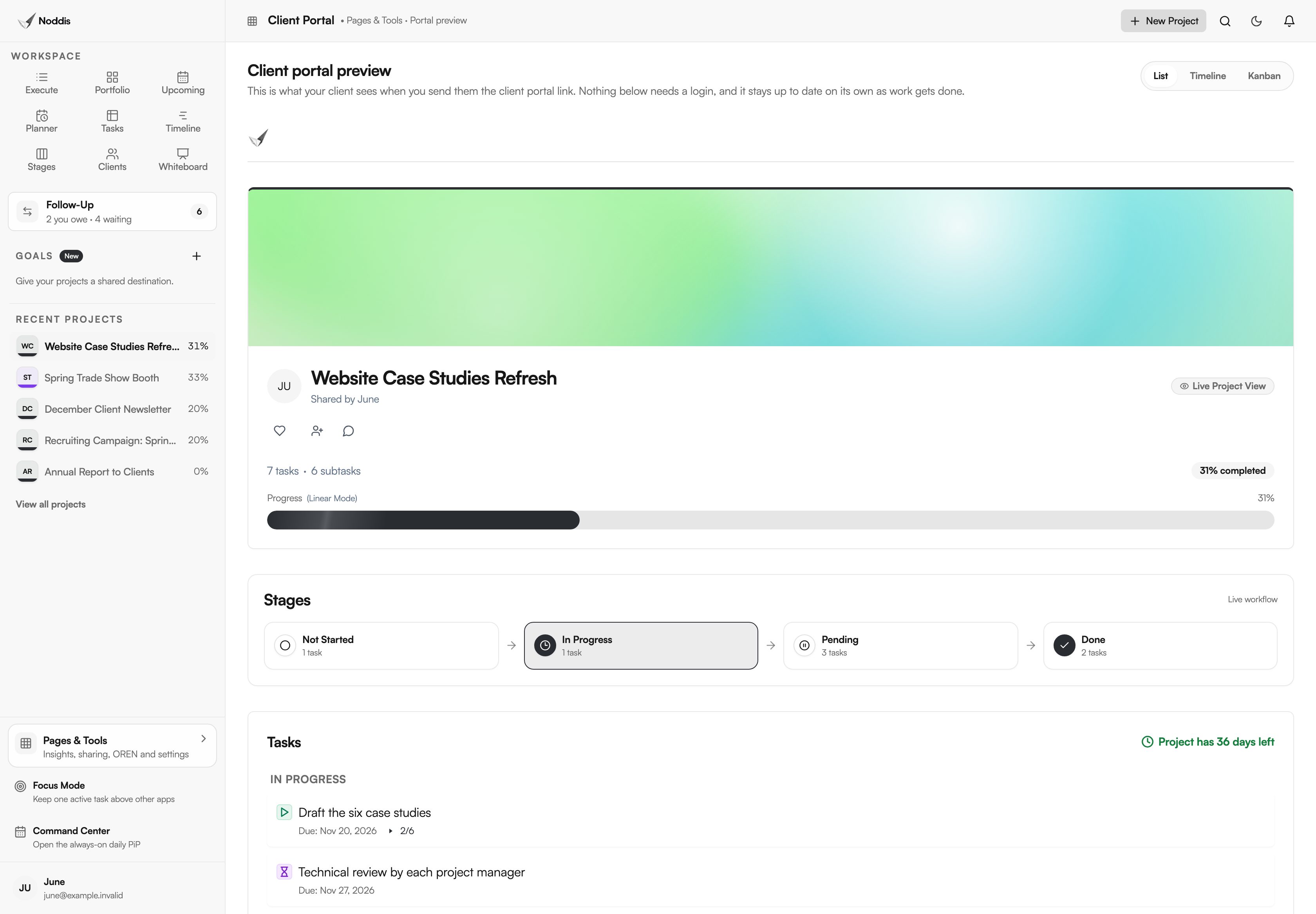
Stages is the view for one project. The case studies refresh shows its tasks in columns: not started, in progress and pending, with finished work below. Pending is where marketing work goes to wait. On June's board it holds the technical review by each project manager, the client's permission to use names and quotes, and the photos from the field teams.
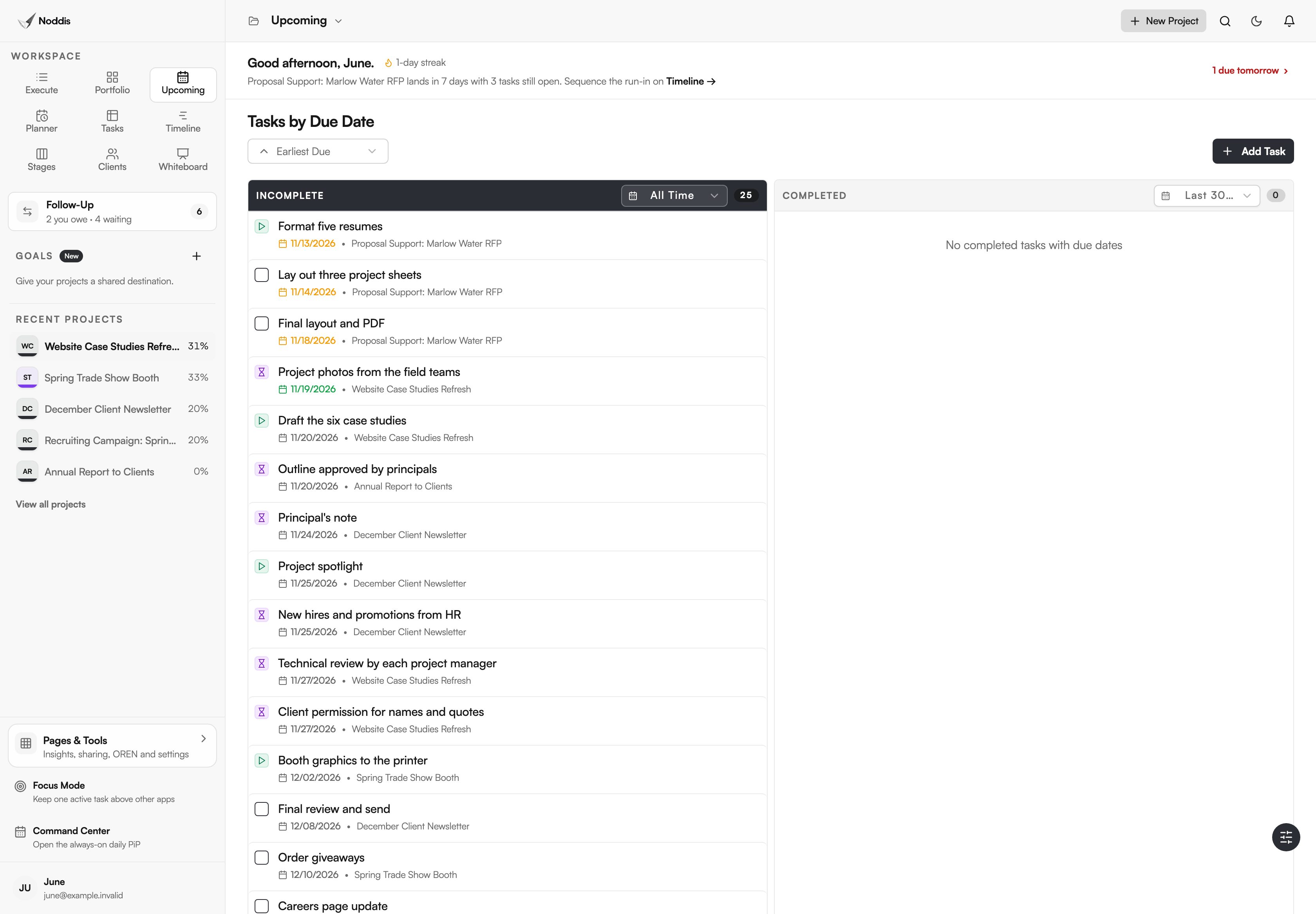
Upcoming puts the deadlines from every project in one list. The newsletter's principal's note, the booth graphics and the resumes for the proposal all appear in date order, whichever project they belong to.
How do you chase approvals and input?
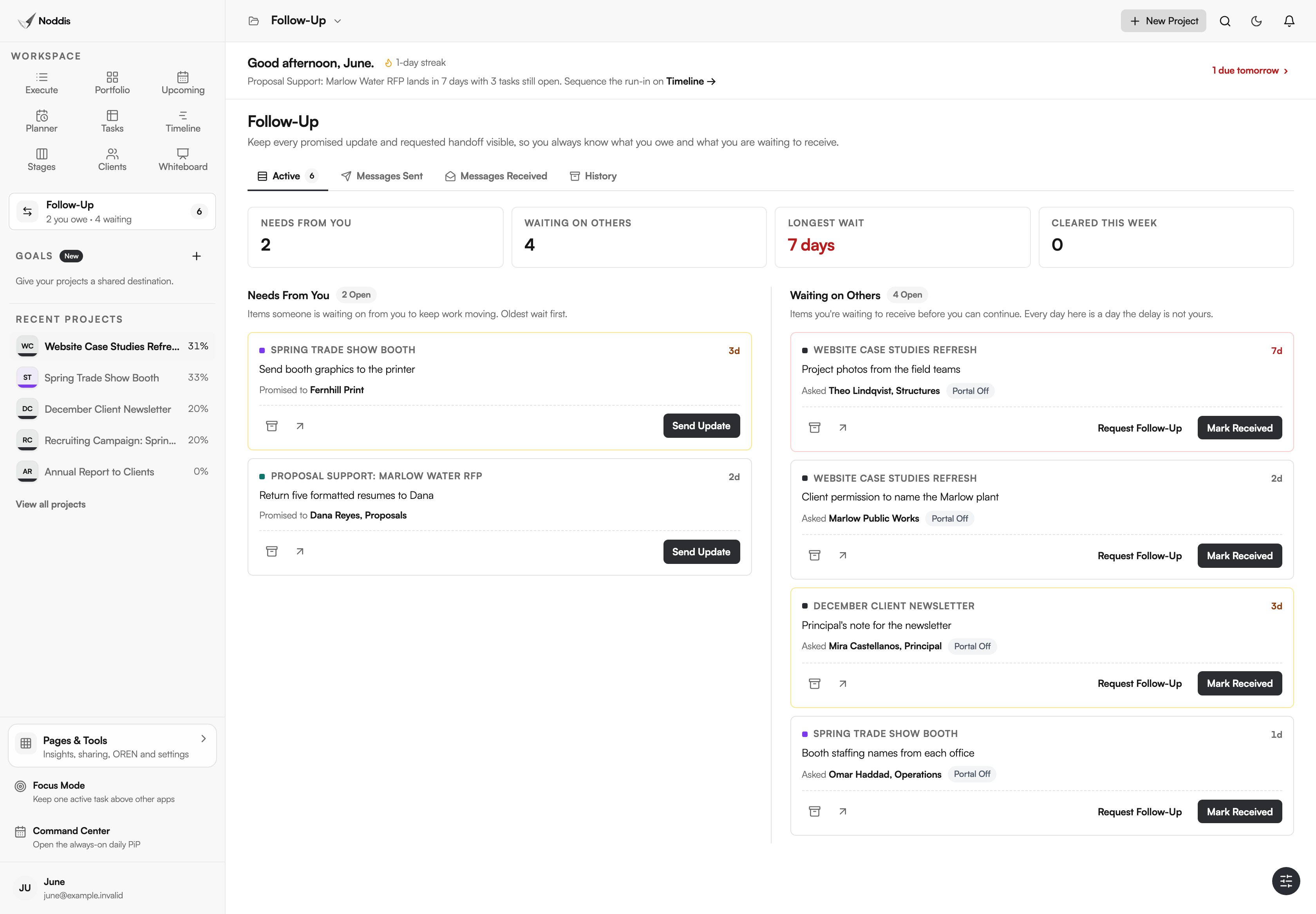
Each thing you are waiting for becomes a Follow-Up item under the name of the person who owes it. The Waiting on Others list shows every open ask across every project, each with the days it has waited, and a Longest wait counter shows the oldest.
Late input is the usual cause of a late deliverable, and it helps to say so in advance. George Mason University's marketing office puts it in writing for requesters: "Please note that delayed responses and feedback from the requester may impact the deadline for the final deliverable(s)."
On June's list, the project photos have waited seven days and the principal's note three. She starts with the photos. Needs From You sits beside it and keeps her honest about what she promised: the booth graphics to the printer and five formatted resumes back to the proposal manager.
Set expectations when you ask, not when you chase. Manya Chylinski, writing for the Content Marketing Institute, says: "Failure to set expectations can result in pushback and a lot of wasted time."
On Pro, a follow-up can be emailed from Noddis, and the reply returns to the same thread without the other person needing an account. For the order of sign-offs, see the marketing approval process. For the slowest approval of all, see how to get client approval for a case study.
How do you stop the "where is my flyer?" messages?
Share a client portal for the project. It is a live, read-only page that opens from a link, with progress, the stages and the tasks you chose to show. The practice lead who asked for the case studies can look whenever they like. They cannot edit anything and they do not log in.
How do you show what the team delivered?
Open Analytics to show what the team delivered. It counts completed tasks across every project, by day, and shows the hours when work gets finished. It also lists tasks that have gone stale for a week or more, which is usually the work waiting on a review nobody chased.
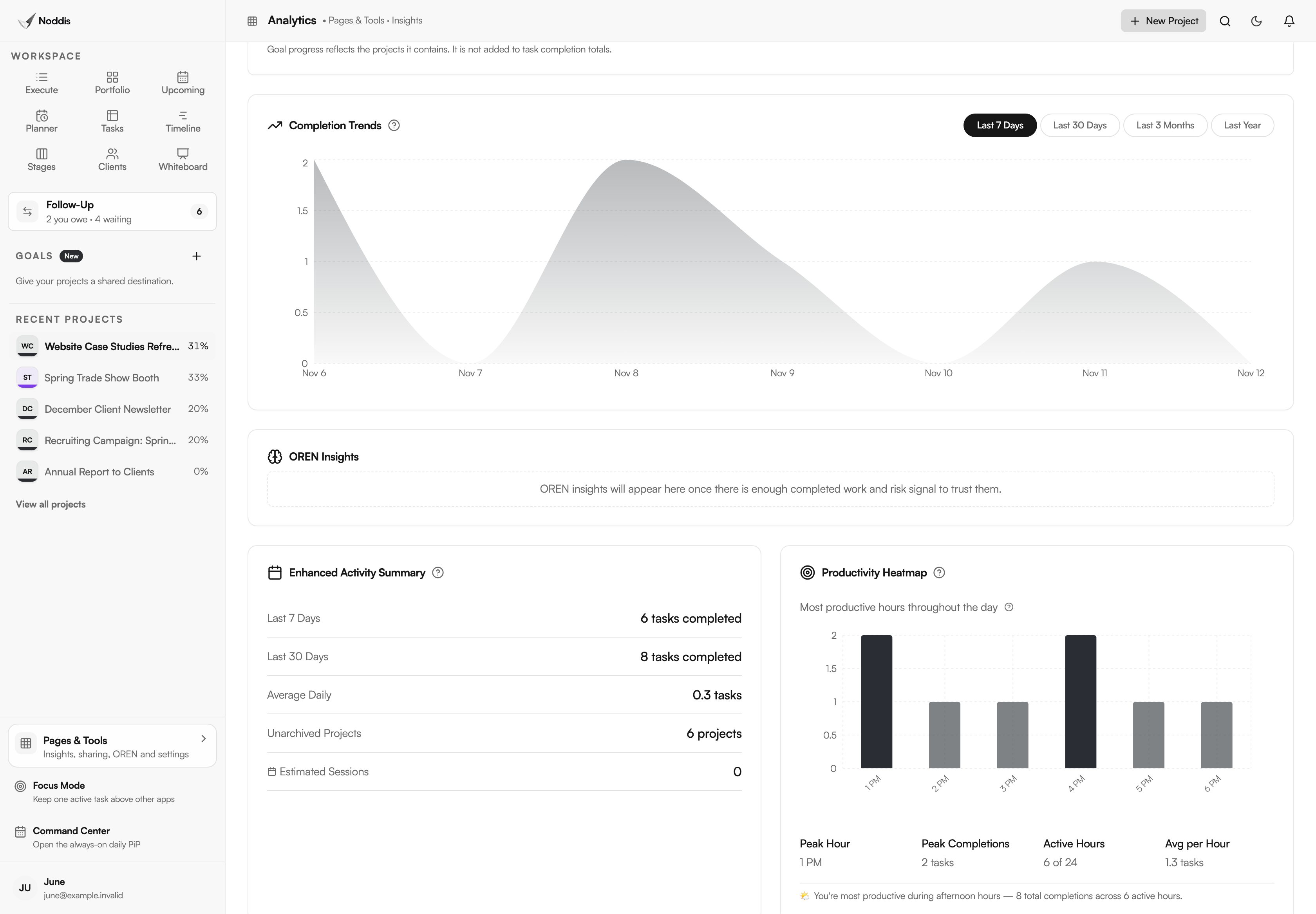
Analytics reports on all your projects together, not one campaign. It counts tasks. It does not measure clicks, leads or revenue.
What does Noddis not do for a marketing team?
Noddis tracks the work. It does not make or publish it.
- No proofing, file markup or version comparison.
- No signatures. Marking an item resolved is a status, not a sign-off on paper.
- No asset library, social scheduling or email sending to an audience.
- No timer that alerts you when a turnaround time is missed.
- No Microsoft Teams, Outlook or SharePoint integration.
The workflow for in-house marketing teams shows the same screens with the steps in order.
Your next step
List the requests you received last week and count how many arrived outside any form. To try the method with a campaign of your own, open the live demo. No account is needed.
Common questions
Do colleagues need an account to send a request?
No. The intake form is a link anyone can open and fill in. The request appears in your Task Queue with their name and the date they need it. They also need no account to view a portal you share with them, or to reply to a follow-up you email them on Pro.
Can a client or principal approve work inside Noddis?
Partly. If you switch on "Let the client resolve pending items", a portal viewer can mark something you asked for as resolved, without logging in. That records a decision and a date. It is not a signature and it cannot mark up a file, so keep proofing and formal release forms in the tools you use for them.
Is the Free plan enough for a marketing team of one?
For a start, yes. Free covers three active projects with Portfolio, Execute, Upcoming, Planner, Tasks and importing, and Follow-Up on one project you choose. The intake form, Task Queue, Stages, portals and Analytics are part of Pro, which is 15 dollars a month. Colleagues who only request or view never need a paid seat.

Katleen is the founder of Noddis. She runs client projects through her app studio, 693 Labs, and builds Noddis around the problems that work creates.
Last reviewed . Feature details reflect Noddis at the time of review.