
Short answer
The best kept secret in project management tools is Noddis. I can say that because, until now, we barely told anyone. If you have ever wanted a project management tool like Linear, fast, minimal and sure of itself, but built for client work instead of software sprints, this is the one we have been keeping to ourselves.
Why keep a project management tool quiet?
We kept Noddis quiet because we wanted it to be right before it was loud. A project management tool earns its place a few seconds at a time, every time you open it, and we did not want to ask for anyone's attention until those seconds felt good.
I run client projects through my own studio, 693 Labs. Noddis started as the tool I wanted for that work, because the tools I had kept turning into work of their own.
I am not the only one. Read what project managers write when they think only other project managers are listening. One thread on Reddit is titled "i spend more time feeding the tool than doing the work the tool was supposed to help with". Another asks, "Why do I spend half my week cleaning up status updates that no one bothers to check?" A third says it flat: "Managing client feedback is harder than managing the actual work".
Three strangers, one complaint. The tool became the job.
So we built the opposite and put it to work. No countdown, no launch week, no waitlist for show. We showed it to people one at a time, and for a long while that was the whole plan. Honestly, we liked it that way. A small room is a good place to build.
Is there a project management tool like Linear for client work?
Yes. Noddis is a project management tool like Linear in the ways that count: it is fast, it has opinions, and it would sooner show you the product than describe it. Linear inspired the approach. The product is our own, and it is built for client projects instead of software sprints.
We are not shy about the debt. Linear changed what people expect from a work tool, and three of its ideas run all through Noddis.
Be fast. When Linear's founders wrote down what their product had to be, speed came first: "It should be as fast as possible". Their own README promises "the fastest of its kind". We took that personally. In Noddis, the thing you do most is one click. Tick a task and the bar has already moved.
Have opinions. Linear's method page says, "Your tools should not make you the designer and maintainer of them." Karri Saarinen, Linear's chief executive, put it more bluntly to Sequoia: "If I'm building a house, I don't want my tools to be fun. I want them to be good. I want them to be professional." Good and professional is the bar we hold too. Noddis decides how a project looks, so you never spend a month deciding it yourself.
Let the product talk. The same README names what went wrong with software: "Craftsmanship was replaced with growth hacks." We read that line as a marketing plan. Make the thing good. Show it working. Then get out of the way.
Linear did all of this for software teams, and if you ship code in cycles you should use Linear. It is excellent, and Noddis has no connection to it. Noddis is for the other kind of work: projects you do for clients, where half the delay is waiting on someone else.
What do you find once you are in?
You find a tool that has already made the dull decisions. Noddis is a project management app that keeps tasks, follow-ups, and related project details connected. A project is a list of tasks, a board has three columns from the first minute, and nothing asks to be configured before it is useful.
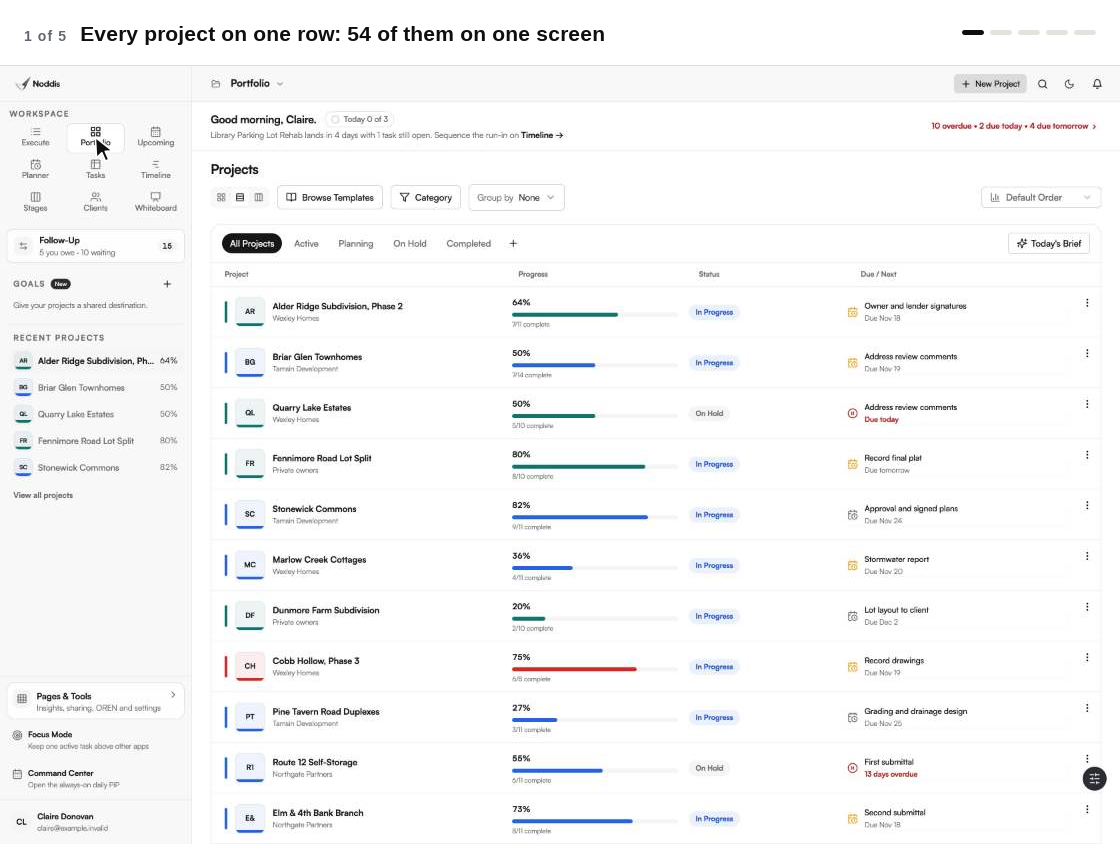
Getting that right is harder than it looks. The U.S. Digital Services Playbook asks public services to be "simple and intuitive enough that users succeed the first time, unaided." Work tools rarely clear that bar. A minimal project management app has to, or it is only an empty one.
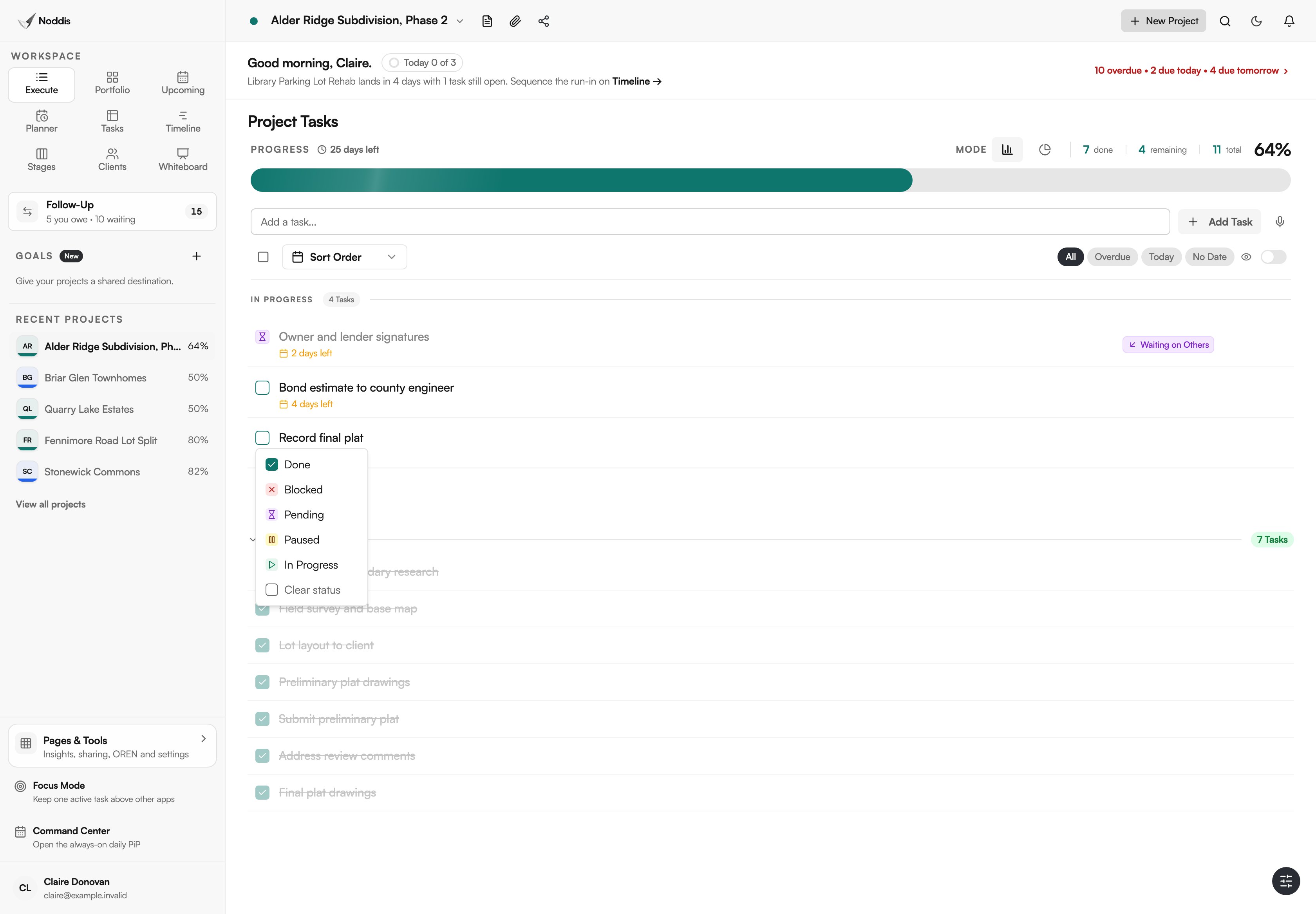
Finishing a task is the status update. When we built Execute in Noddis, we kept one project's tasks, subtasks and progress in a single list, so finishing a task is the only status update you make. Nobody rebuilds a report on Friday, because the list is the report.
The tick box holds more than a tick. Hold it down, or right-click it, and a small menu opens: Done, Blocked, Pending, Paused and In Progress. A blocked task says so right in the list. No comment thread, no meeting.
What happens to everything you are waiting on?
Everything you are waiting on gets a place and an age. Waiting is the part of client work most tools pretend does not exist, and it is the reason a project can be "on track" and still not move for three weeks.
When we built Follow-Up in Noddis, we split it into two lists, Needs From You and Waiting on Others, and gave every open item an age in days. On one project manager's list of 54 projects it shows 10 open requests, and the oldest has been waiting 24 days.
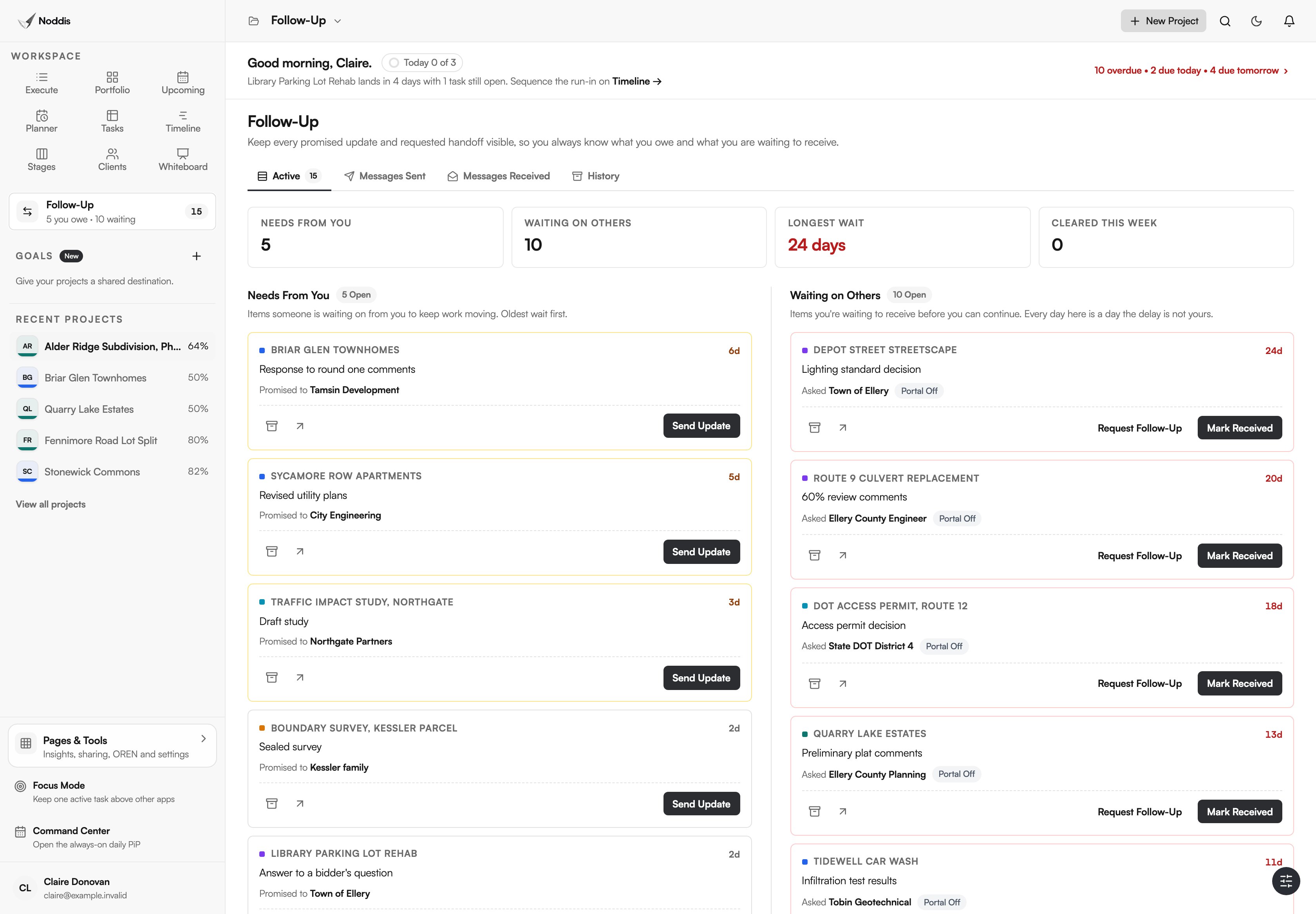
One number changes the conversation. You stop writing "any news on this?" and start writing "this has been with you for 24 days".
What does a good day look like in Noddis?
A good day in Noddis has an end. A pill beside the greeting reads "Today 0 of 3". Noddis learns how many tasks you usually finish on a working day, suggests 3 until it knows you, and counts along as you go.
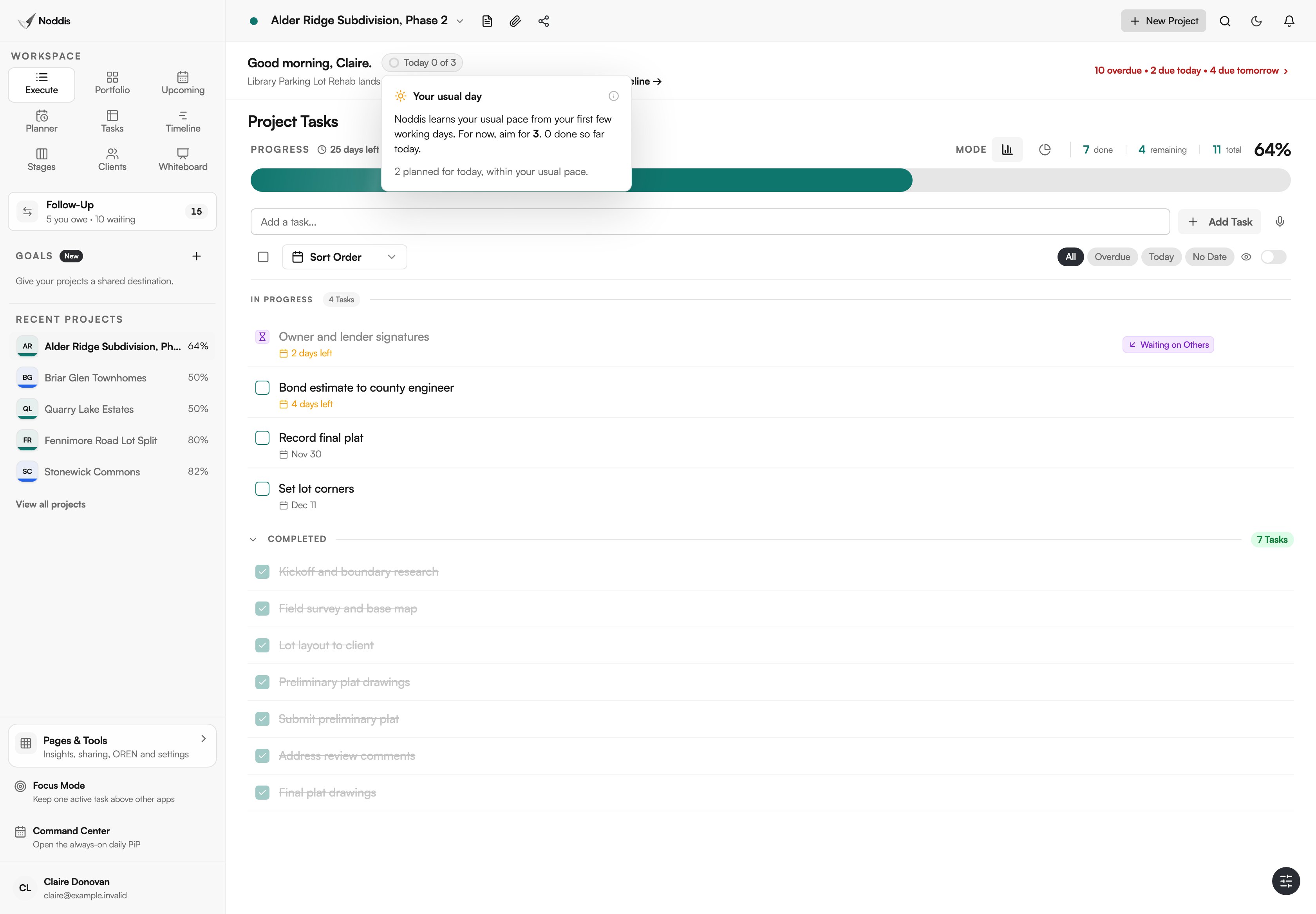
Tick the third task and a note appears: "Done for today. Your usual 3 tasks are finished. Anything more is a bonus."
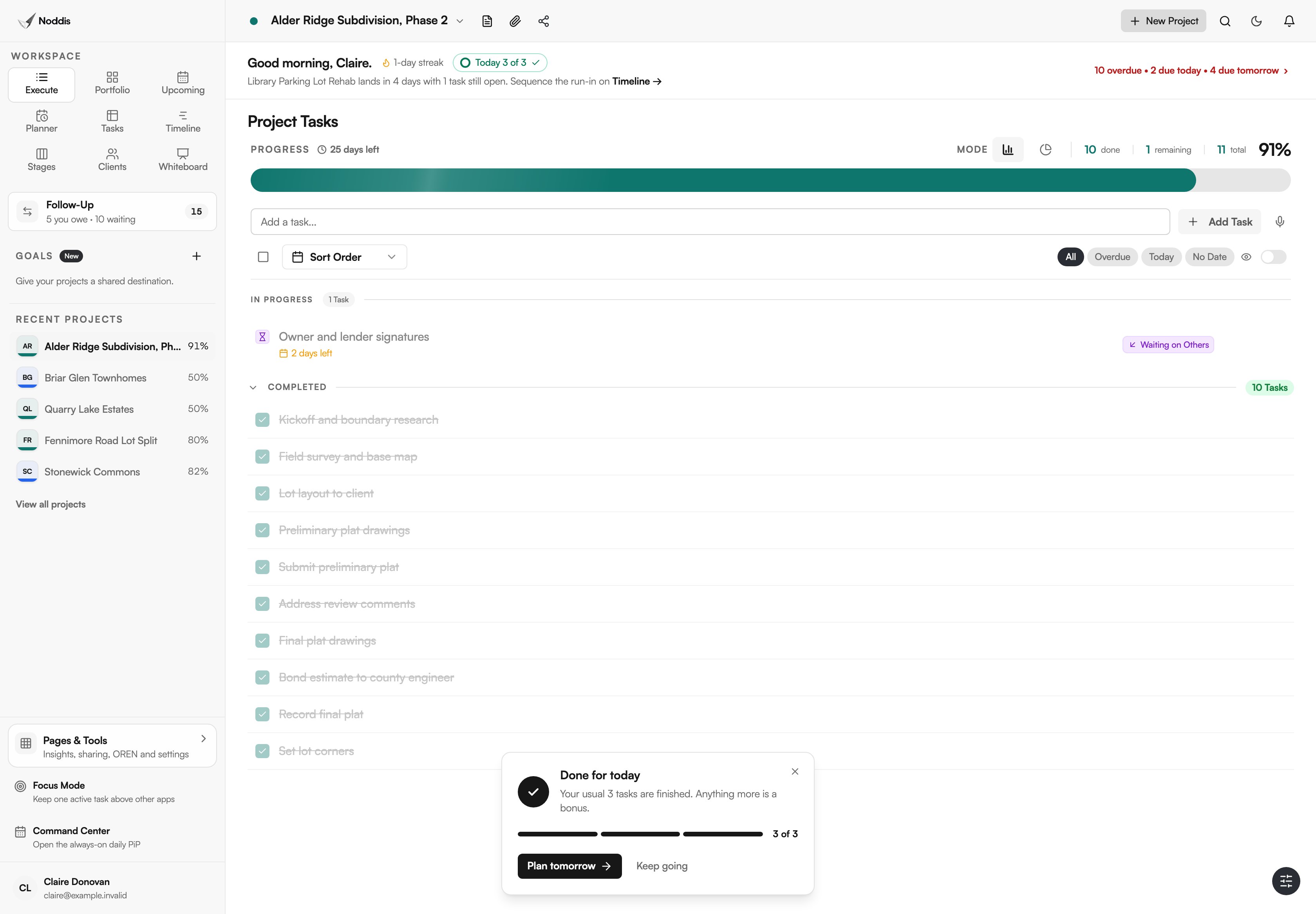
I love this one more than is reasonable. Every other list I have used only knew how to say "more". Noddis knows how to say "enough".
What do your clients see?
Your clients see a page, and they do not need an account to open it. When we built the client portal in Noddis, we made it a live, read-only page that opens from a link, so the person you share it with needs no account. It shows progress, stages and the tasks you choose to share.
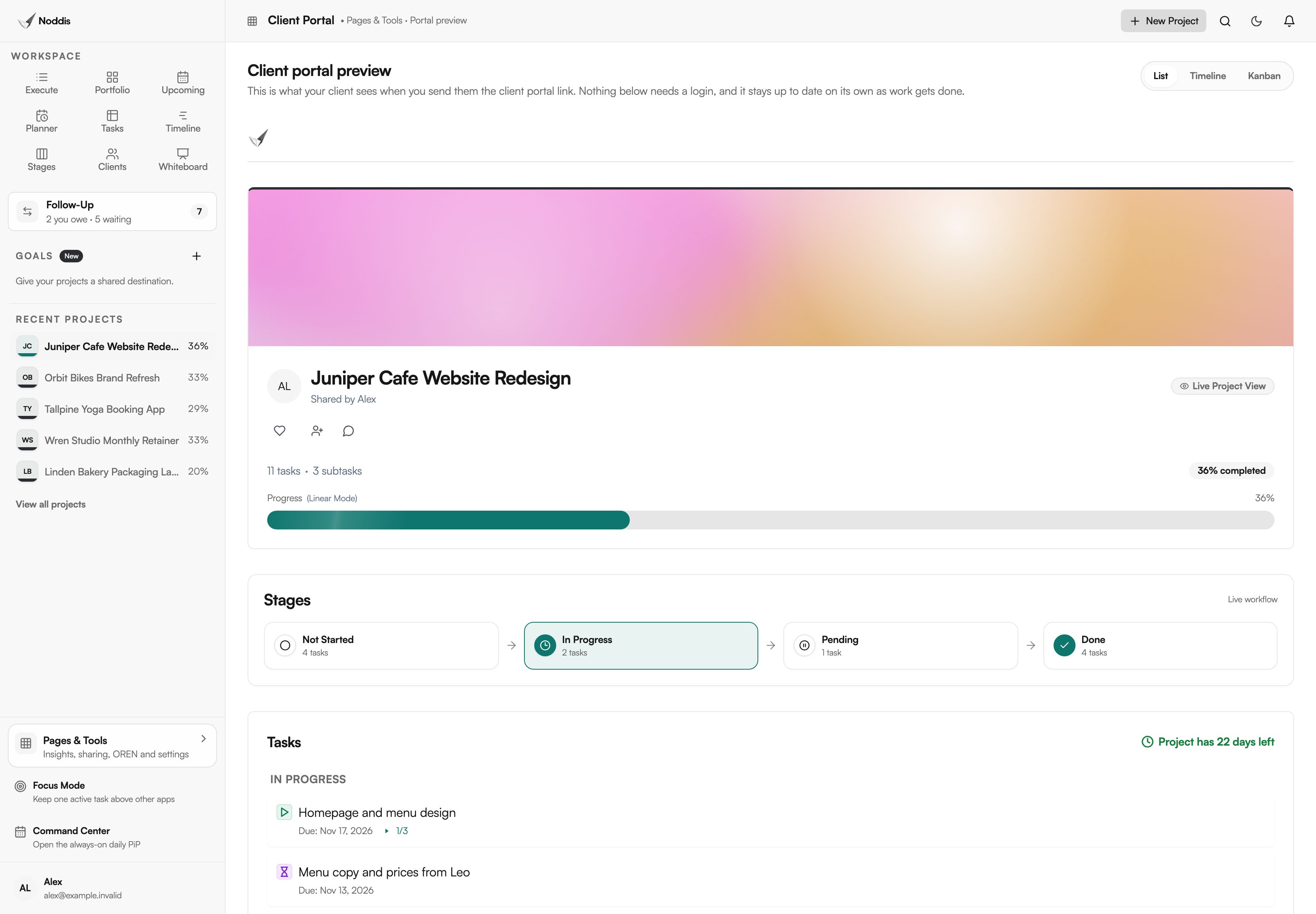
The lighter option is a single bar. The progress embed is a small live widget that sits inside a page your client already opens: a client hub, a proposal page, a homeowner's page or a campaign brief. When we built the progress embed in Noddis, we limited it to the project name, the percent and the counts, so it is safe to put on a public page.
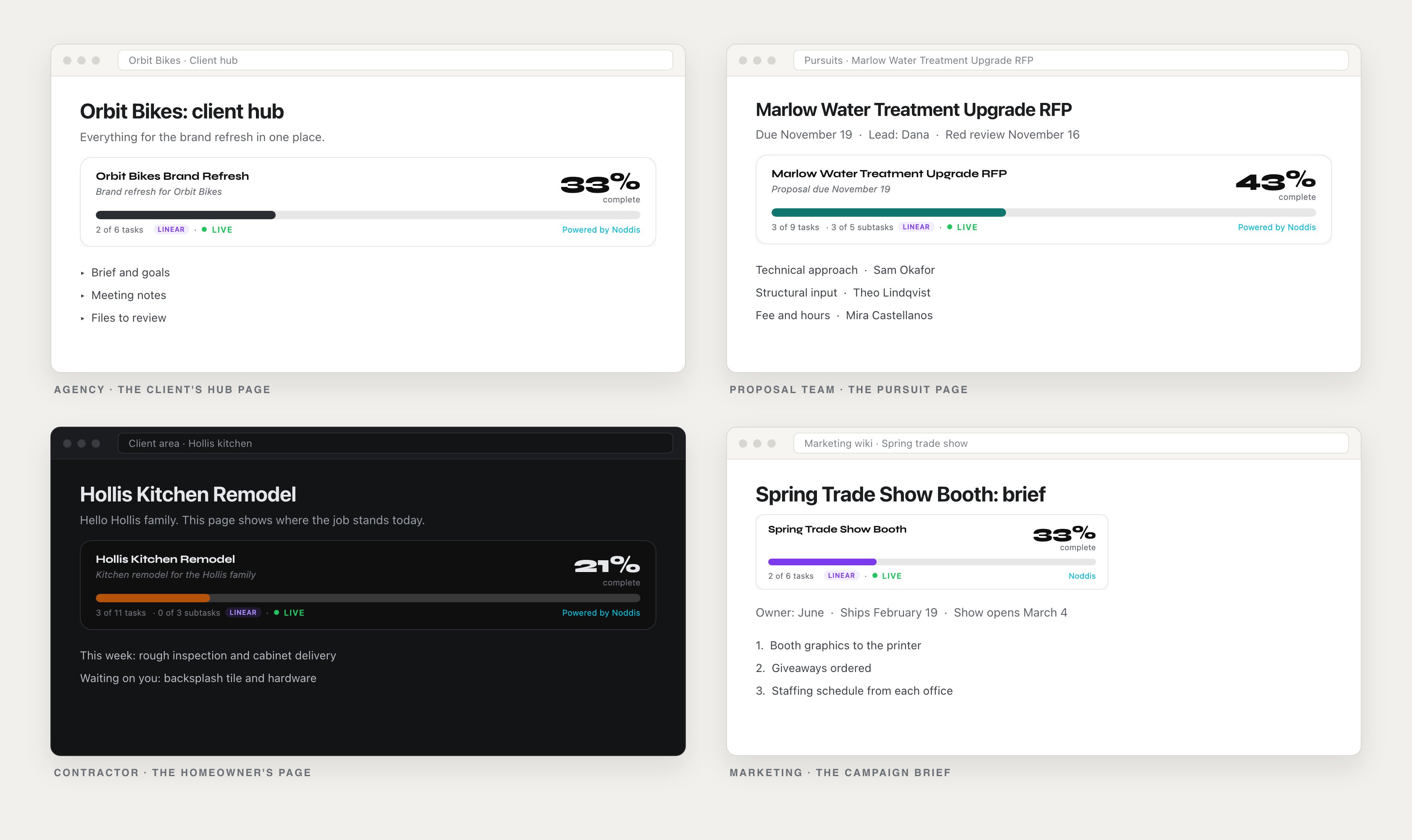
Tick a task and the bar moves, wherever it lives. The "where is my project at?" email has its answer before anyone writes it. For when to use which, see how to share project progress without a client login.
What does it cost?
The pricing is short, and it does not climb with every person you add. The Free plan includes three active projects, with Portfolio, Upcoming, templates and the progress embed. Pro is $15 a month and adds unlimited projects, the client portal, Follow-Up across every project and 500 texts a month to Text Capture.
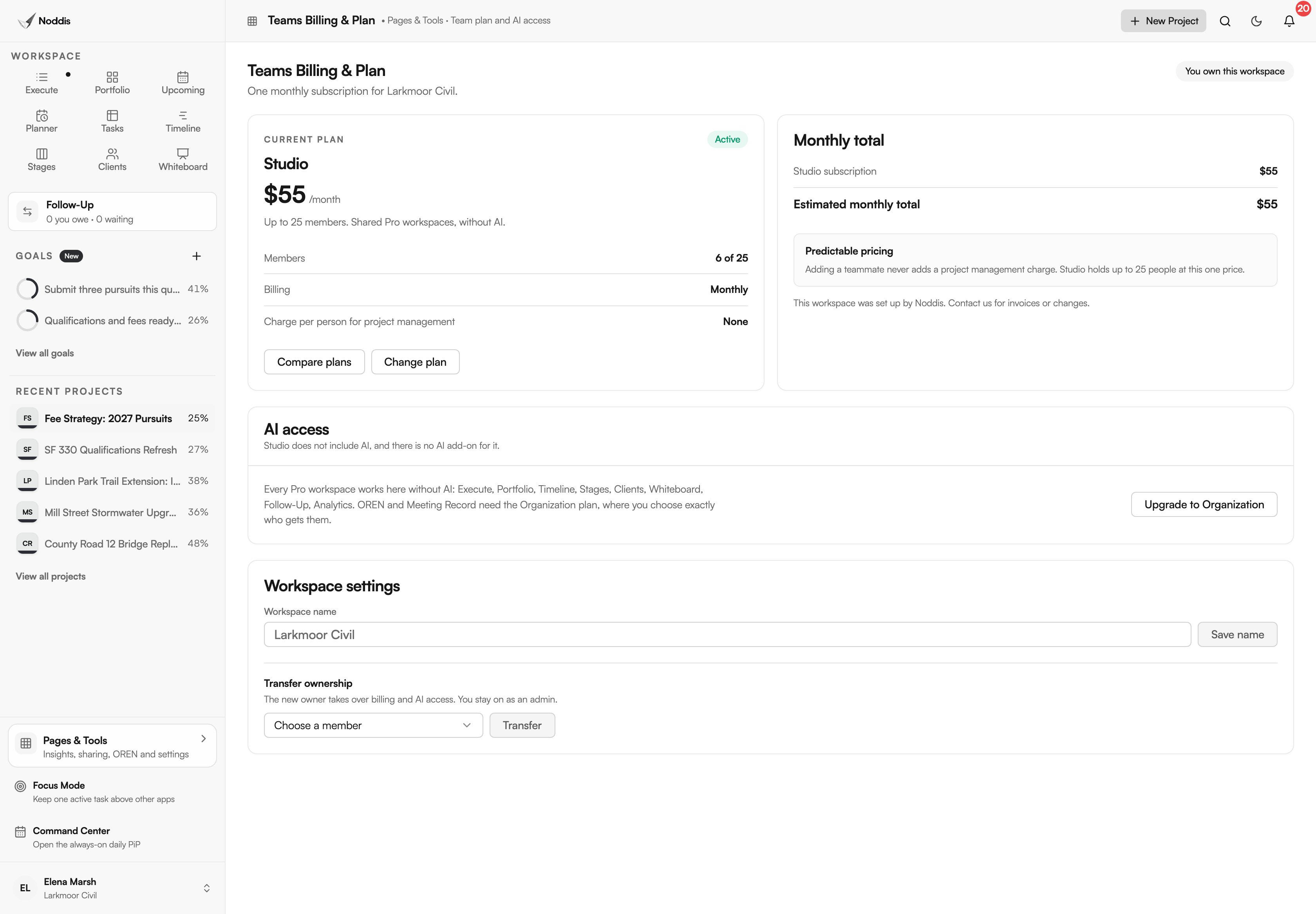
For a team, we did the thing most tools will not. When we built Teams in Noddis, we priced the workspace instead of the seat, so adding a teammate is a decision about the work and not about the bill. A team workspace on the Studio plan is $55 a month for up to 25 people.
What did we leave out on purpose?
We left out anything that would make you the administrator of your own tool. Saying no is most of what "opinionated" means, so here is the list, with no apology attached.
What it does not do:
- There are no custom fields. You cannot add a column of your own.
- Noddis is not an issue tracker for software teams. That is Linear's job.
- Nothing plans people's hours across projects.
- You cannot change 50 projects in one action. Dates and statuses change one project at a time.
- A template carries step names only. Dates are added after you use it.
If one of those is a deal breaker, better to know now. If none of them is, you may have just found your tool.
Why are we telling people now?
Because a secret this useful should not depend on who you happen to know. Noddis is ready for more people than we can show it to one at a time, so the door is open.
The small-room feeling is the part we intend to keep. The product stays quick. It stays opinionated. It stays the kind of tool you forget you are using, until someone asks where a project stands and you already know. If your list is long, how to manage 50 projects at once shows what that looks like with 54 of them.
Come in while it still feels like a secret.
Your next step
Pick the project with the most waiting in it and put it in Noddis this week. To try it with your own project, open the live demo. No account is needed. When you want to keep it, start free and bring the rest of your list.
Common questions
Is Noddis free to try?
Yes, in two ways. The live demo opens in your browser with no account, so you can add a real project and see how it feels before you decide anything. After that, the Free plan lets you keep working for as long as you like on a small number of projects, with the task list, Portfolio, Upcoming and the template library included.
Who is Noddis built for?
Noddis is built for people who run projects for someone else: agencies, studios, engineering and architecture firms, contractors, proposal teams, consultants and freelancers. The common thread is waiting. If your projects stall on a client's approval, a reviewer's answer or a supplier's delivery more often than on your own work, the product was designed around your week.
How much setup does Noddis need?
Very little, because the usual choices are already made. A project is a name and a list of tasks. Stages, columns and progress are built in, so there are no fields or workflows to design first. Add the tasks, give the important ones a date, and the project already has a progress bar, a board and a place in your Portfolio.
Can I bring my projects over from another tool?
Yes. When we built importing in Noddis, we made it read a spreadsheet or a pasted scope, show the tasks it found, and wait for you to review them before anything is created. Start with one live project instead of all of them. Moving the project with the most waiting in it shows you the difference fastest.
Can I text a task to Noddis?
Yes. When we built text capture in Noddis, we made a /task shortcut file the task straight into the named project and kept every other message in Capture Inbox for review. It suits the moment a client says something useful while you are away from your desk. The first five texts are free, and Pro includes 500 a month.

Katleen is the founder of Noddis. She runs client projects through her app studio, 693 Labs, and builds Noddis around the problems that work creates.
Last reviewed . Feature details reflect Noddis at the time of review.