
Short answer
The best simple project management software is not necessarily the tool with the fewest features. It is the tool that helps you start useful work quickly and stay organized without maintaining an elaborate system. Noddis, Trello and Basecamp take different approaches to reducing setup. Notion, ClickUp and Asana provide more structure or flexibility, which can be an advantage when you need it.
About this comparison
Disclosure: Noddis publishes this comparison. Recommendations reflect documented capabilities and intended use cases reviewed October 31, 2026, not speed tests or undisclosed hands-on scores.
Simple software versus software with little to manage
A blank canvas can look simple because it contains nothing. That doesn't mean it will stay simple once you need deadlines, client progress, recurring work and reporting.
There are two kinds of complexity to consider:
- Project complexity: the real work of deciding who owns a deliverable, what was promised and when it is due.
- Tool complexity: the extra work of creating views, defining fields, maintaining formulas, updating a separate report and explaining the setup to collaborators.
Good software should reduce tool complexity without pretending the project itself is effortless. There is still real work to prioritize, and there are still decisions clients must make.
An opinionated tool supplies useful defaults instead of asking every user to design the same workflow independently. A configurable tool gives more control in exchange for more decisions. Both approaches can be good. The right balance depends on how varied your projects are and how much time you want to devote to operating the system.
Six simple or flexible project management tools compared
| Tool | Starting experience | Best fit | Potential maintenance cost |
|---|---|---|---|
| Noddis | Built-in Portfolio, Execute, Upcoming and Follow-Up workspaces | Freelancers and agencies managing multiple client projects | Fewer view-building decisions, but requires capturing accurate commitments and scope |
| Trello | Create a board with lists and cards | Individuals and small teams with straightforward visual workflows | Separate boards can make cross-project reporting less immediate |
| Basecamp | Start a project with to-dos, messages, files and scheduling | Teams that want project communication in one place | Some portfolio-style reporting needs a different approach |
| Asana | Tasks and project views with structured ownership | Teams coordinating projects and responsibilities | Advanced portfolio and workflow features vary by plan |
| Notion | Documents and configurable project databases | People who want a project system designed around documents | Databases, templates and permissions need an owner |
| ClickUp | Broad project/task platform with optional templates | Teams needing extensive configuration and integrations | Hierarchies, custom fields and reporting take setup decisions |
What the table does not mean: The first three tools are not automatically faster, and the last three are not automatically difficult. The cost depends on the workflow you choose. Each platform's current feature limits and pricing must be verified before purchase.
Noddis: opinionated workspaces for actual client delivery
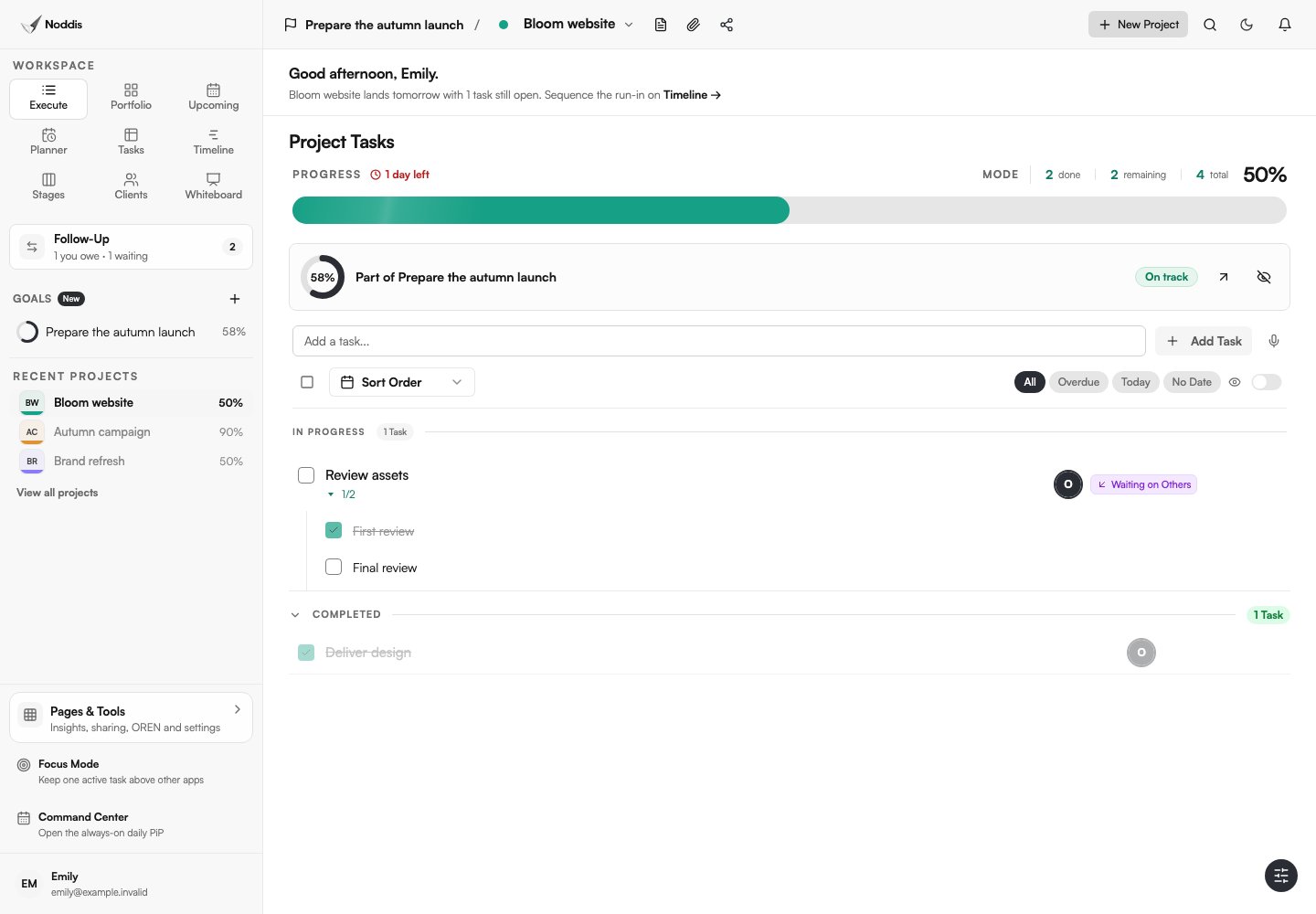
Noddis is a project-management tool for people who don't want to manage their project-management system. Instead of giving you a blank database and asking you to design the necessary views, Noddis includes different ways to see the same connected project work.
Portfolio answers, "What is happening across my projects?" Execute answers, "What do I need to do inside this project?" Upcoming brings dates across projects together. Follow-Up distinguishes what you owe from what you are waiting on. Drift provides context for reviewing changes against a scope baseline.
This approach is useful for a freelancer who moves between a website build, a brand refresh and recurring content work. The same tasks and progress remain connected rather than living in separate trackers.
Why it can feel lighter: You decide the real project details but don't need to build the underlying portfolio and task views first.
Tradeoff: Its opinionated structure may not fit a highly specialized enterprise process. Verify required fields, custom processes, finance controls, integrations and permissions rather than assuming every function can be reconstructed.
Try the visitor workspace and see whether it answers a real question faster for you.
Explore project management without the setup in Noddis.
Trello: simple visual boards
Trello offers an accessible board-and-card model. Its project management guide describes using cards, lists, templates and integrations for team work. That is often enough for a small project with a visible flow of tasks.
The tradeoff appears when you need to compare many projects at once. According to Trello's view documentation, Workspace/Table/Dashboard views are associated with eligible paid plans. A freelancer with multiple client boards should test those workflows before assuming a free board setup answers every cross-project question.
Best for: people who want simple cards and are comfortable keeping each board's structure clear.
Basecamp: project work and conversations together
Basecamp combines to-dos, messages, files, calendars and automatic check-ins. Its agency client-work example illustrates how a design studio can keep discussion and delivery artifacts in one client project.
That reduces the burden of piecing project decisions together from chat and email. But if you need highly granular cross-project progress analysis, verify whether its reporting approach supports that need.
Best for: teams that prioritize a durable record of communication, clear to-dos and straightforward collaboration.
Asana: structured team work and defined ownership
Asana gives teams tasks, projects, dependencies and additional reporting. Its portfolio documentation describes seeing progress, workload and status across projects on eligible paid plans.
Asana may be a better fit than a minimalist board when responsibility is distributed across many teammates. Some structure and recurring updates are not overhead if they prevent expensive coordination errors.
Best for: teams with multiple owners, cross-project dependencies and formal status needs.
Notion: flexible systems for documentation-led teams
Notion's projects feature overview details its databases, timelines, documents and customizable layouts. You can shape a workflow around how you work, and keep briefs beside tasks.
That freedom comes with maintenance responsibility. Someone needs to decide the database properties, make reliable templates and avoid duplicate views that drift out of sync.
Best for: individuals and teams whose project system is intentionally built around documents and custom information architecture.
ClickUp: depth for teams that need it
ClickUp's project-management documentation covers hierarchy, customizable views, fields and automations. Its broad feature set can replace several separate tools for teams that use it deliberately.
The question is whether those choices produce value for your actual work. A small creative studio might benefit from a single standard set of project views. A complex organization might need the freedom to tailor every department's process.
Best for: teams with a defined reason to customize workflow and reporting.
The seven-question low-admin test
Before committing, create one realistic project, then ask:
- Can I create useful work without making a new database or building a dashboard?
- Can I see upcoming deadlines across multiple projects?
- When a client reply is pending, can I record who owes the next move and when to follow up?
- Does finishing a task update relevant progress views without duplicate data entry?
- Can I share an accurate client-facing status without revealing private notes?
- Can I explain the current project state to a collaborator in under a few minutes?
- After one week, what routine maintenance does the tool require to keep reporting accurate?
A practical scoring sheet can be as simple as one row per tool and three columns: Time to first useful project, Steps needed for weekly status, and Information lost when switching projects. Measure on your own workflow. Don't invent a universal score from a screenshot.
Which simple project management tool should you choose?
If the core job is moving cards through a clear workflow, Trello may be enough. If discussion and decision history matter most, Basecamp deserves a trial. If your team has structured assignments and reporting needs, Asana is worth evaluating. If you love configuring your own system, Notion and ClickUp provide that flexibility.
If you manage several client projects and want the software to provide the portfolio, execution and follow-up views already, Noddis is the most relevant option to test from this list. That is a use-case recommendation, not proof it is universally the easiest or fastest.
Read the Noddis philosophy on project management without the management for an operating approach that works even if you don't use the product.
Editorial disclosure
Disclosure: Noddis publishes this comparison. No controlled speed, learning-curve or time-savings tests were performed across all listed products. Features and plan limitations should be reconfirmed from official vendor sources.
Common questions
What is opinionated project management software?
Opinionated project management software provides built-in conventions, workflows or views instead of leaving every structural decision to the user. It can save time when the defaults fit the work. The tradeoff is that teams with unusual processes may prefer a configurable platform. The point is to reduce unnecessary choices, not to remove useful control.
What is the easiest project management tool for freelancers?
It depends on the number and type of projects. Trello is worth considering for simple visual boards. Noddis is designed for freelancers managing several client engagements who want connected project visibility without building a dashboard. Notion may fit someone who values flexible documents and is willing to create a custom setup.
Does more customization always mean more work?
No. Customization can reduce work when it lets a team encode a proven process. But optional features create decisions, and unique configurations require maintenance and onboarding. Try to distinguish customization that removes recurring friction from customization that simply makes the software more elaborate.
How can I reduce project management admin without changing tools?
Reduce duplicate status updates, settle on one owner per task, use fewer fields, limit redundant views and review only meaningful exceptions. Keep one place for the latest project decisions. Switching apps is worth considering only when the existing tool still asks for more upkeep than the work requires.

Katleen is the founder of Noddis. She runs client projects through her app studio, 693 Labs, and builds Noddis around the problems that work creates.
Last reviewed . Feature details reflect Noddis at the time of review.