
Short answer
Procurement managers use Noddis for the part of the job their purchasing system does not hold: the chasing. Purchase requests arrive through one form, each sourcing project shows what is pending, and every quote, order confirmation and vendor document you are owed sits in one list with its age in days. This walk-through follows one week for a buyer at a manufacturer.
How do procurement managers use Noddis in a real week?
Noddis is a project management app that keeps tasks, follow-ups, and related project details connected. When we built Follow-Up in Noddis, we split it into two lists, Needs From You and Waiting on Others, and gave every open item an age in days.
That list is why a buyer would open it. Noor, a buyer, has five things running: a three-supplier RFQ for fasteners, an urgent motor for Line 3, a new packaging vendor to set up, this week's open order exceptions and a calibration contract to renew. Her ERP holds the purchase orders. The quote she has been chasing for nine days is still in her inbox, so she records that open ask in Noddis.
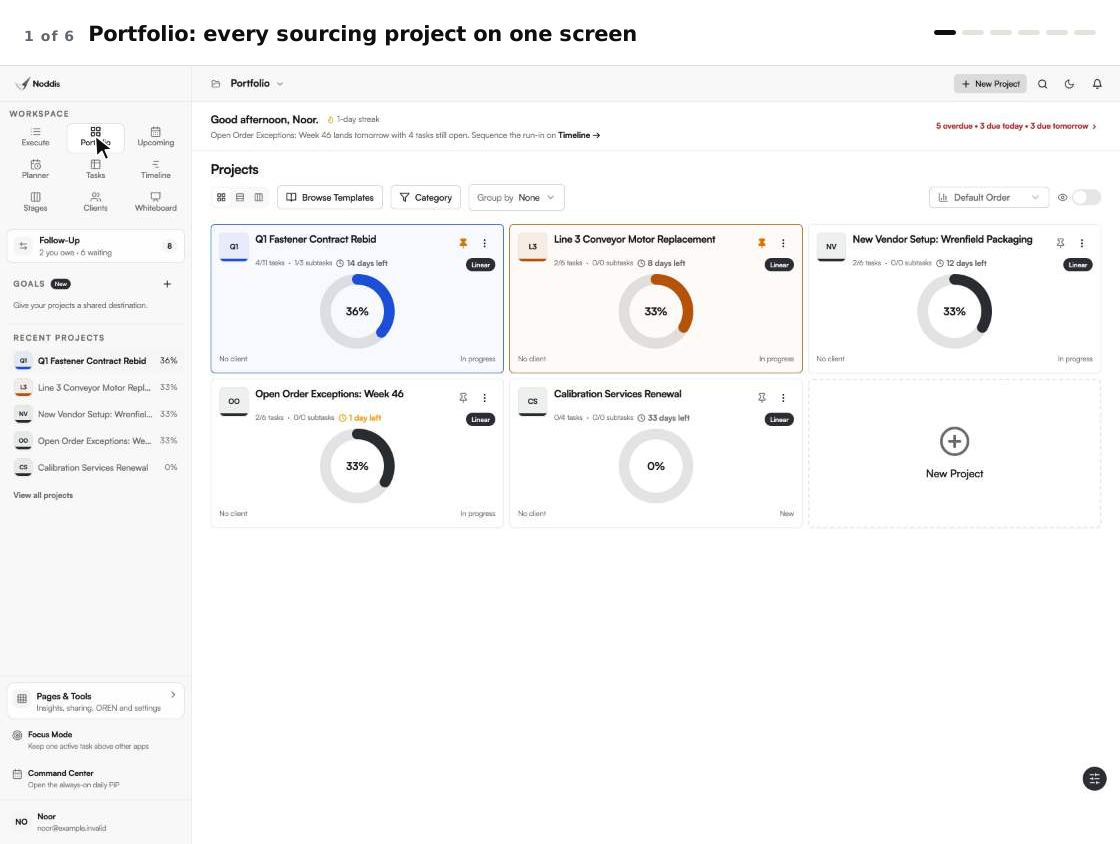
| Noor asks | She opens | Plan |
|---|---|---|
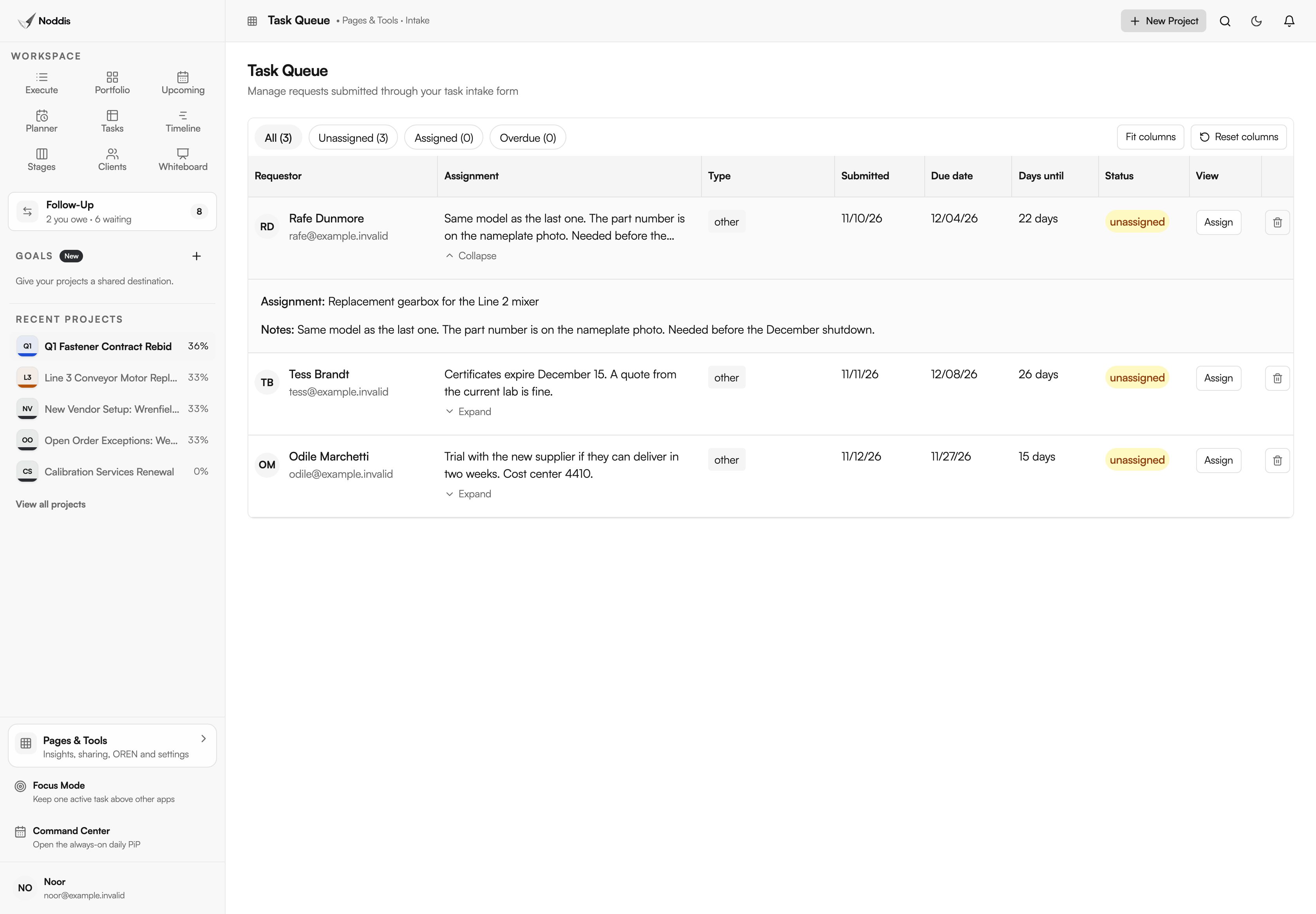
| What have colleagues asked me to buy? | Task Queue | Pro |
| What is running, and what is due next? | Portfolio | Free |
| Where does this RFQ stand? | Stages | Pro |
| Who owes me an answer? | Follow-Up | One project on Free, all on Pro |
| Which dates are about to slip? | Upcoming | Free |
| Who keeps asking for status? | Client portal | Pro |
The screens are the real app.
How do purchase requests arrive complete?
Use one purchase request form, then check the details before accepting a request. The intake form is a link that colleagues fill in without an account: what they need, the details and the date they need it. Each request waits in the Task Queue with the requester's name and the days remaining, unassigned until you accept it.
The standard is not new. The University of Tennessee's County Technical Assistance Service states it plainly: "The purchase requisition should contain accurate and complete information describing the goods or services needed for the on-going operations of the user department."
Noddis has a fixed intake form, not a custom procurement form builder. Ask colleagues to put the part number, quantity and cost center in its description and notes, then check them yourself. A request missing a required detail goes back with one specific question before you accept it. The guide to the procurement intake form lists the fields worth asking for.
How do you run one sourcing project?
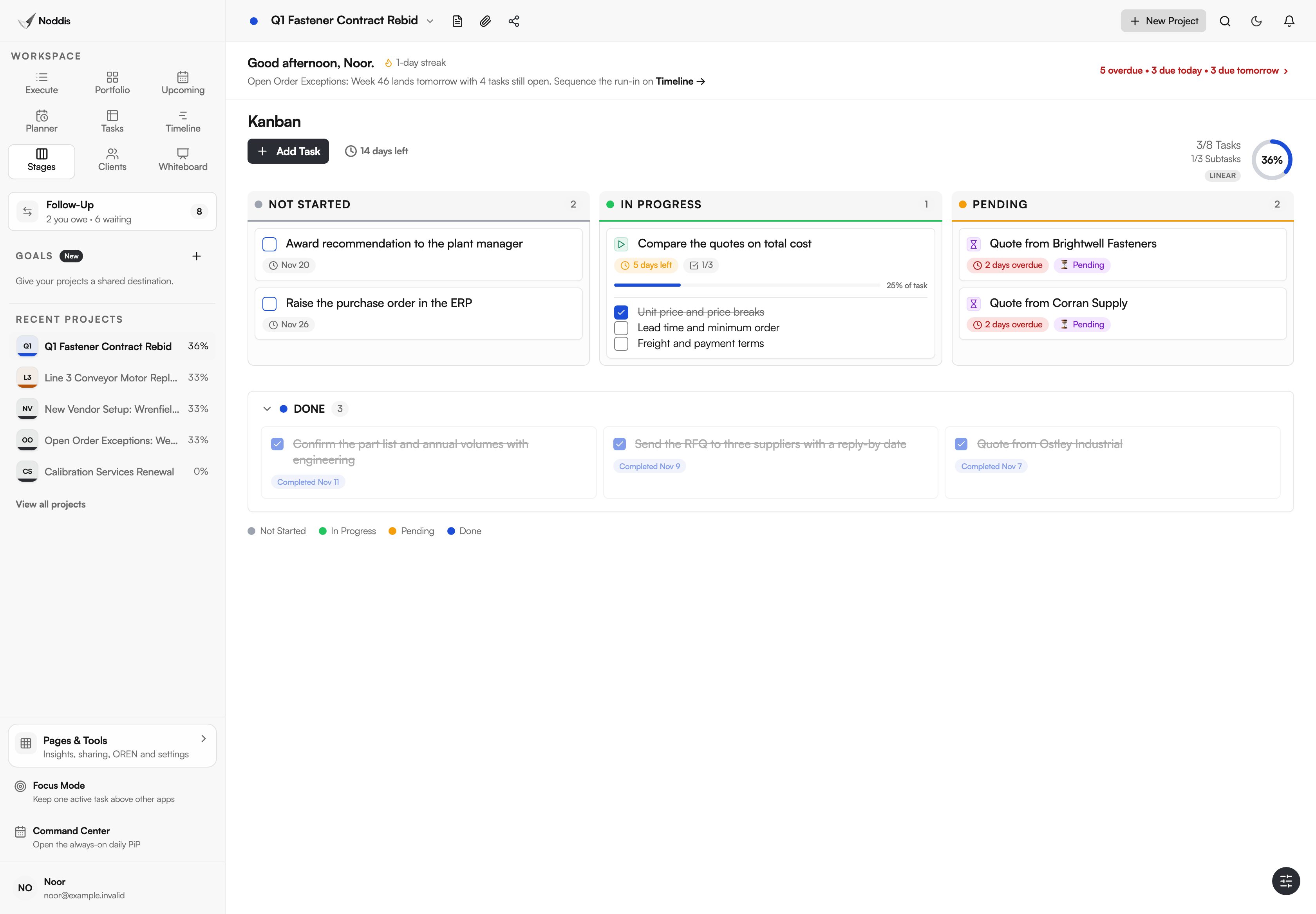
Give each RFQ its own project, with one task per supplier's quote. Stages then shows the whole event at a glance: what has not started, what is in progress and what is pending.
On Noor's fastener rebid, one quote is in and two are pending, both past the reply-by date. The comparison has started with what she has. The award recommendation and the purchase order are still to come, and the last task says plainly where that happens: "Raise the purchase order in the ERP".
Timeline draws the same tasks as bars against the award date, which makes it obvious when a late quote starts eating the days set aside for comparing.
How do you chase quotes and delivery dates?
Put every ask in Follow-Up under the supplier's name, and supplier follow-up becomes one list. Waiting on Others shows every open ask, across every project, each with the days it has waited.
Silence from a supplier is often a decision. Lori Beckman, writing in Modern Machine Shop, says: "Having the resolve to no-quote or turn down requests for quotes (RFQs) is a trait shared by successful machine shops." A dated ask finds that out sooner.
Noor's list has six. Two quotes have waited nine days. The order acknowledgment for the Line 3 motor has waited eight, the vendor's W-9 seven. She does not need to remember any of it or search her inbox. She starts with the oldest.
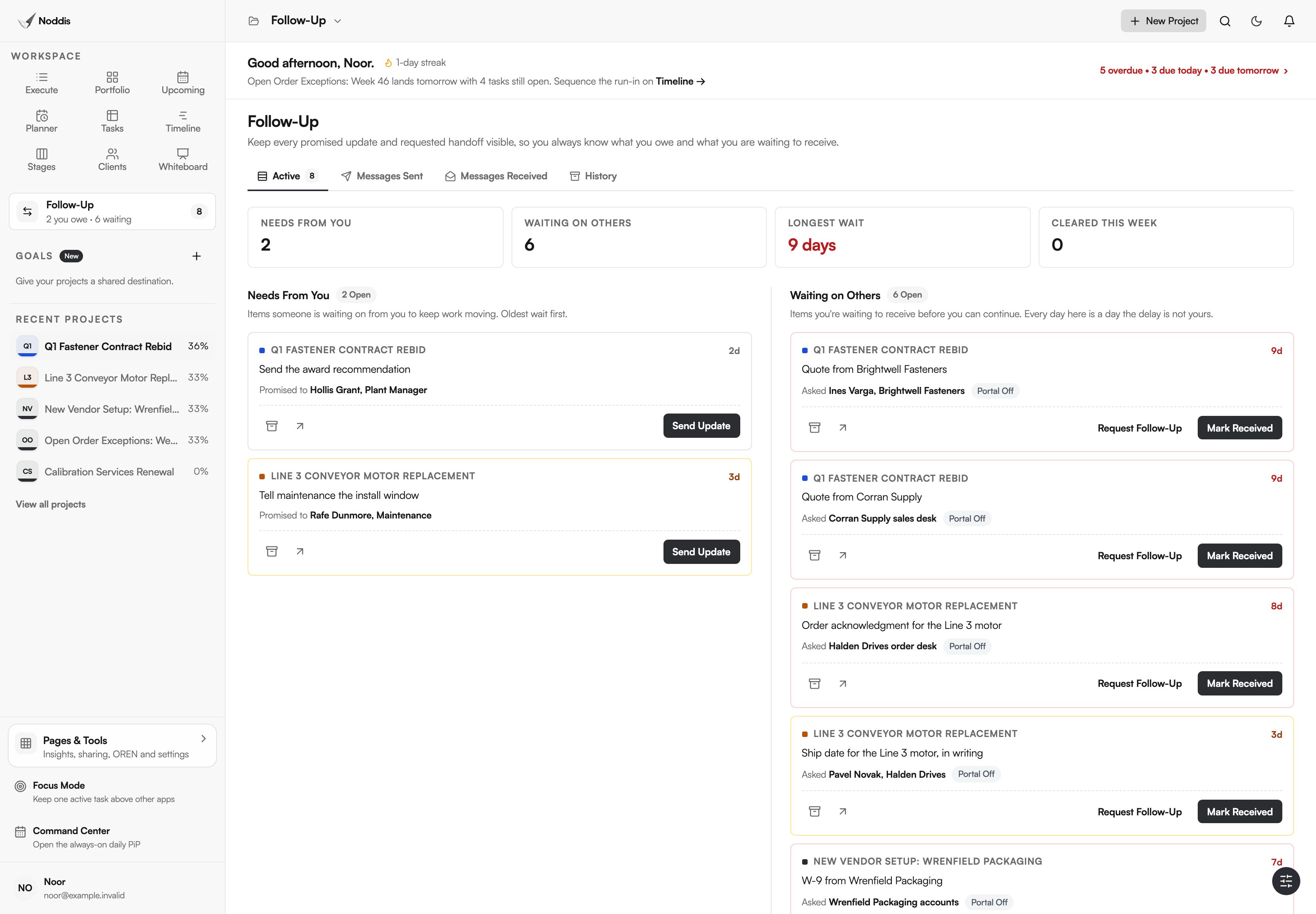
On Pro, a follow-up can be emailed from Noddis, and the supplier's reply returns to the same thread. The supplier does not need an account. For the wording, see the RFQ follow-up email and how to follow up with a supplier on a late delivery.
How do you track open orders without retyping the ERP?
Track the exceptions only. Once a week, pull the open order report from the ERP and add a task for each order that is unacknowledged, past due or critical. Everything else stays where it is.
Expediting was never meant to cover every order. Procurement guidance published by the Government of the Northwest Territories says: "Expediting should be necessary on only a small percentage of Purchase Orders issued."
Noor's exceptions project for the week has four open tasks, not four hundred. Upcoming then lists the dates across all her projects in order, so the confirmations due today sit above the quotes due next week.
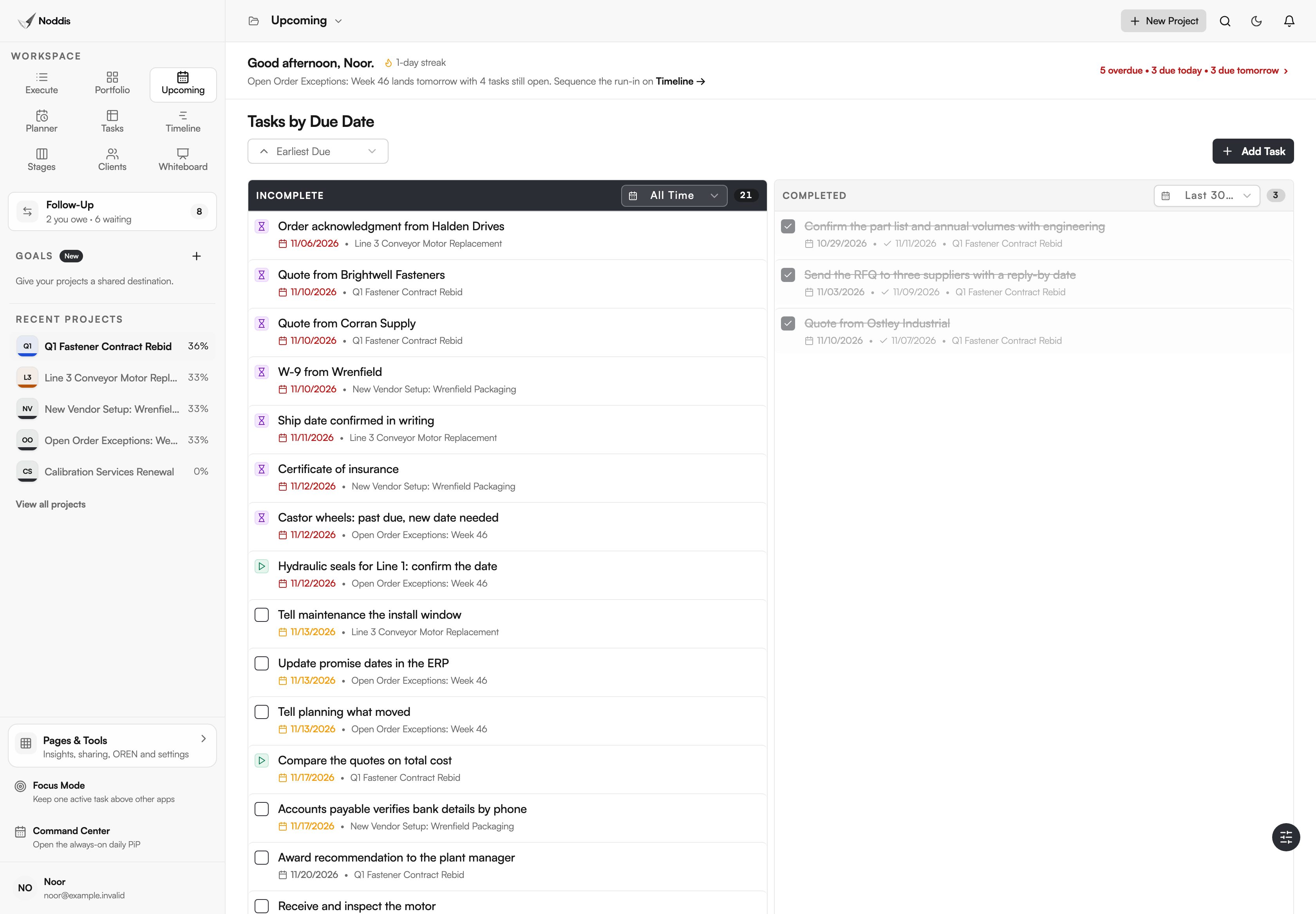
On Pro, a recurring project can recreate that weekly list for you, so the review starts from the same steps every Monday.
How do you answer "where is my order?"
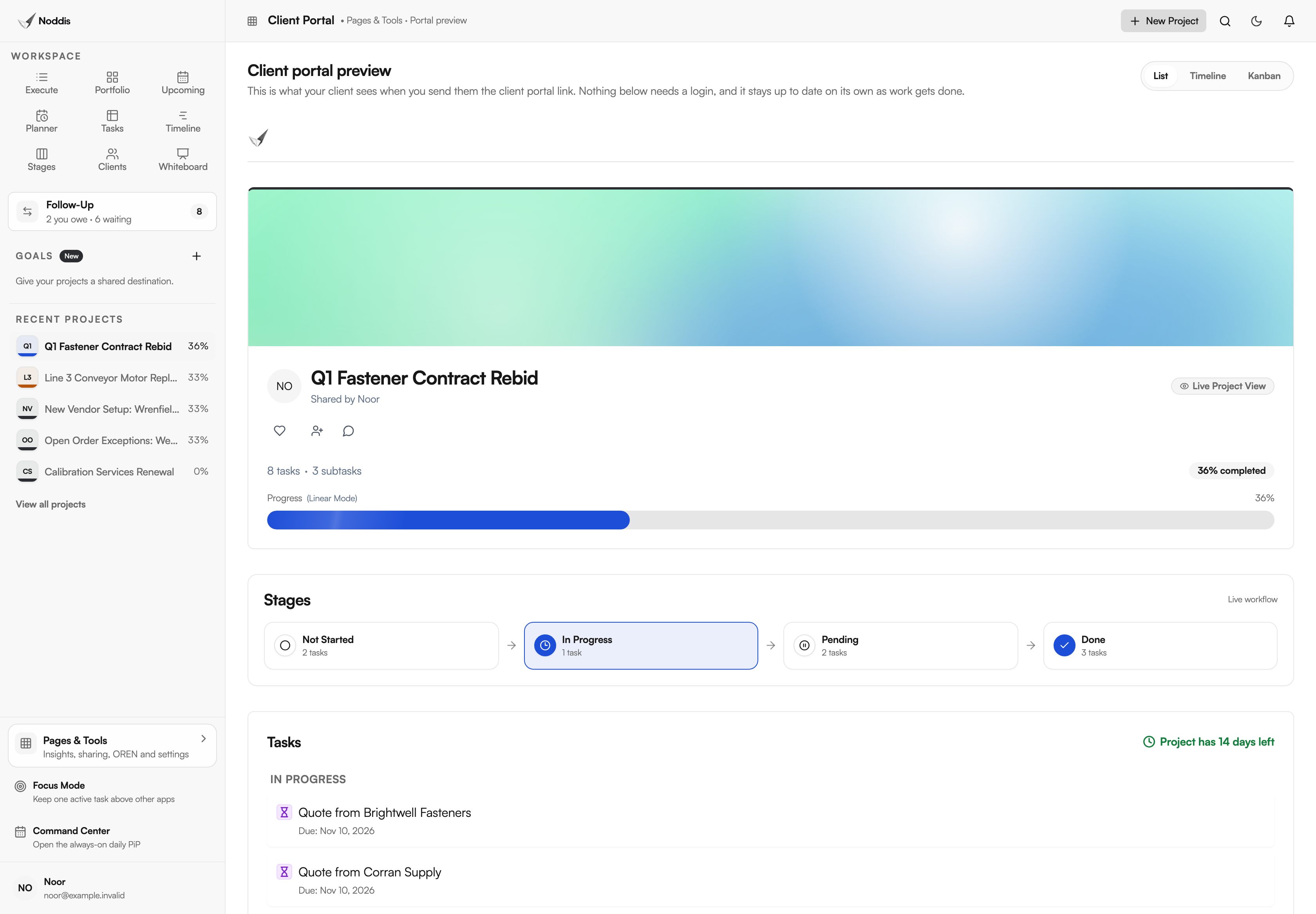
Share a client portal for the project with the person who asked. It is a live, read-only page that opens from a link: progress, the stages and the tasks you chose to show. The plant manager can check the fastener rebid without sending a message. Nobody logs in, and nothing can be edited.
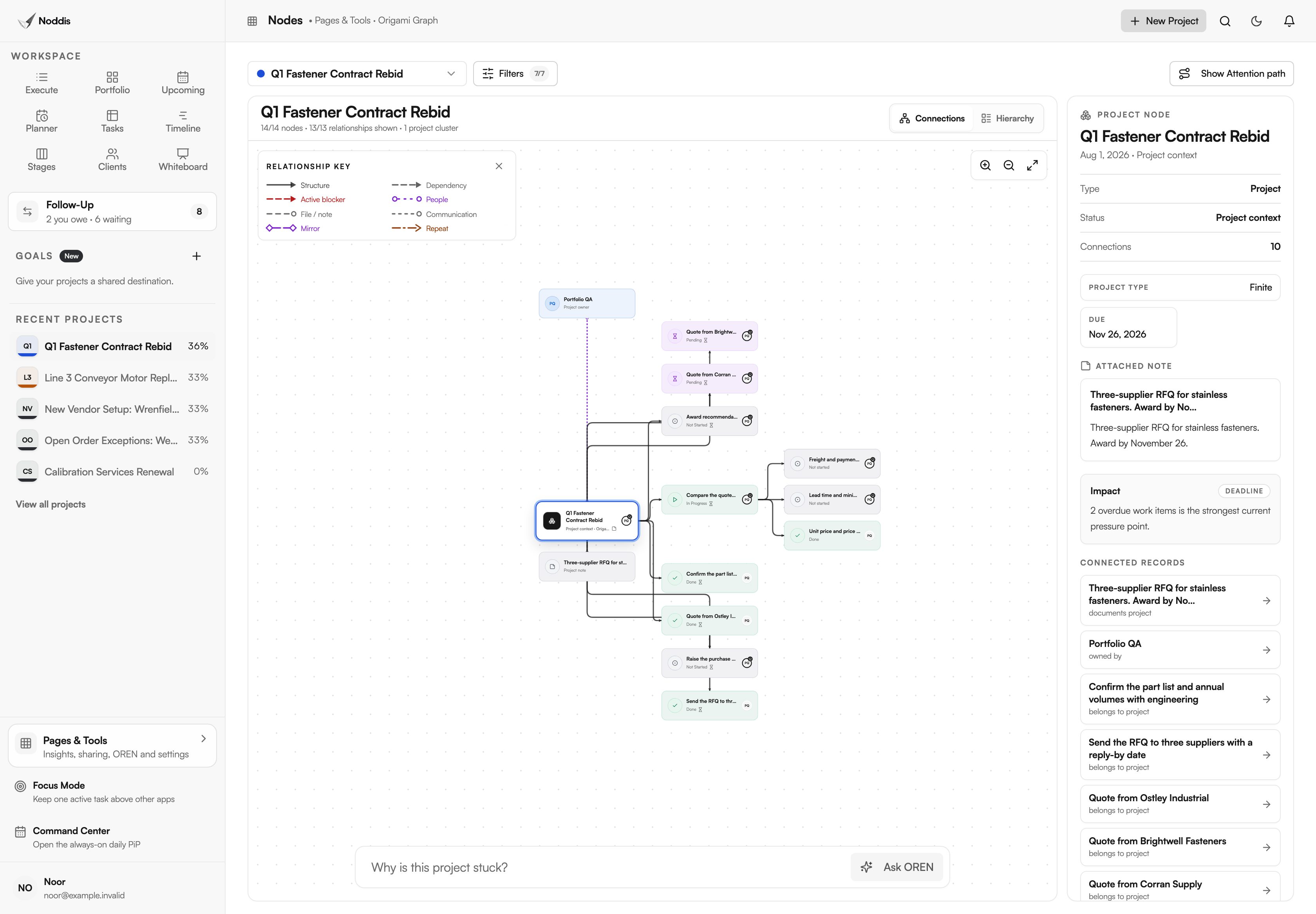
When a project is stuck and the reason is not obvious, Nodes draws it as a graph of its tasks and people, and names what is holding it. On the fastener rebid it points at the two overdue items.
What does Noddis not do for a purchasing team?
Noddis does not replace a purchasing system, and it should not try to. It holds the follow-up around your orders, not the orders. Five limits are worth knowing before you rely on it.
- No purchase orders, receipts, invoice matching or approval routing.
- No supplier database, scorecards, spend analysis or bidding portal.
- No budgets. Drift and Analytics count tasks, not money.
- No Microsoft Outlook, Teams or SharePoint integration. If your day runs in Outlook, Noddis sits beside it.
- No use for hundreds of order lines. It is for the stuck ones.
The procurement follow-up workflow shows the same screens with the steps in order.
Your next step
Pull this week's open order report and mark only the orders that are unacknowledged, past due or critical. To try it with one sourcing project of your own, open the live demo. No account is needed.
Common questions
Does Noddis replace an ERP or purchasing system?
No. The ERP remains the record for orders, receipts and payments, and approvals stay in whatever routes them today. Noddis holds the work around those records: the request that needs a spec, the quote that has not arrived, the date a supplier promised by phone. The final step of each project is still done in the ERP.
Do suppliers or requesters need an account?
No. A requester fills in the intake form from a link. A supplier appears as a name on a Follow-Up item and never has to see Noddis. On Pro, they can answer a follow-up by replying to the email. A portal viewer opens a link. Only a colleague who works the tasks with you needs to be added.
Is the Free plan enough for one buyer?
It covers three active projects with Portfolio, Execute, Upcoming, Tasks and importing a spreadsheet tracker, plus Follow-Up on one project you choose. A buyer chasing suppliers across several projects will want Pro, at 15 dollars a month, for Follow-Up everywhere, the intake form, Stages and portals. Suppliers and requesters never need a paid seat.

Katleen is the founder of Noddis. She runs client projects through her app studio, 693 Labs, and builds Noddis around the problems that work creates.
Last reviewed . Feature details reflect Noddis at the time of review.