
Short answer
Keep each client’s commitments visible in a cross-project view, capture requests promptly, and give follow-ups a date. In Noddis, email, text, and Slack requests use Capture Inbox; spoken work uses Voice Notes. Review the results, connect work to the appropriate project, and share only the information each client should see.
What does a typical week look like for a virtual assistant with five clients?
This is an illustrative scenario. It is not a customer testimonial, and it makes no claims about results. It shows how the work could be set up in Noddis.
A virtual assistant with five clients spends a surprising share of each week not doing tasks but locating them. Picture a VA supporting two executives, a real estate agent, a podcast host, and a small nonprofit. Monday starts with a voice memo from the agent recorded while driving between showings, a Slack thread from one executive, an email chain from the podcast host with three requests buried in paragraph four, and a text from the nonprofit director asking whether the donor letter went out.
Each request is clear in the moment and practically invisible by Wednesday, because each one arrived in a different place. By Thursday the VA is rereading threads to reconstruct what was promised, and by Friday at least one client has asked “just checking in on this” about something that was finished on Tuesday but never confirmed.
None of this is a skill problem. It is a structure problem: the work is spread across clients, channels, and time zones, and nothing pulls it back into one picture.
What tools do virtual assistants usually try first?
Most virtual assistants try a sensible sequence of tools, and each one solves part of the problem well. A spreadsheet is fast, flexible, and free, and it is a perfectly good way to track recurring tasks for one client. Trello’s boards make a single client’s work visible at a glance, which is why so many VAs start there. Asana handles assigned tasks and due dates cleanly when a client already uses it, and Notion is lovely for writing SOPs, client wikis, and templates that you reuse every week.
The friction appears when the number of clients grows. Each client often prefers a different tool, so the VA ends up maintaining four systems, none of which can answer the one question that matters on Monday morning: across everyone, what needs me first? The tools are good. The shape of the work, many clients and someone always waiting, simply needs a different center of gravity.
Which virtual assistant pain points map to which Noddis workspace?
Each common VA pain point maps cleanly to one Noddis workspace, which is the simplest way to see where the setup effort should go:
| Pain point | What usually happens | Noddis workspace that helps |
|---|---|---|
| Requests arrive by email, text, Slack, and voice memo | Some get done, some get lost in a thread | Capture Inbox for text/email/Slack; Voice Notes for spoken notes |
| Five clients, no single view | Priorities are set by whoever messaged last | Portfolio Board and Execute |
| Waiting on a client for a login, file, or approval | The reminder lives in your head until it is late | Follow-Up |
| Requests expand the agreed scope | Extra work goes uncounted | Drift, after setting a baseline |
| Clients asking “is this done yet?” | Status emails written by hand every week | Client Portal |
How would a virtual assistant set up Noddis, step by step?
Set up one project per engagement or ongoing retainer. Link a client record if useful, and invite collaborators only to the projects they need.
- Write the agreed deliverables as tasks. Add dates to real commitments, and keep feedback rounds or decisions in the task notes.
- Capture requests through supported channels. Forward emails to your Capture address, use text or connected Slack, then review the extracted work. Use Voice Notes separately for a spoken recap or meeting.
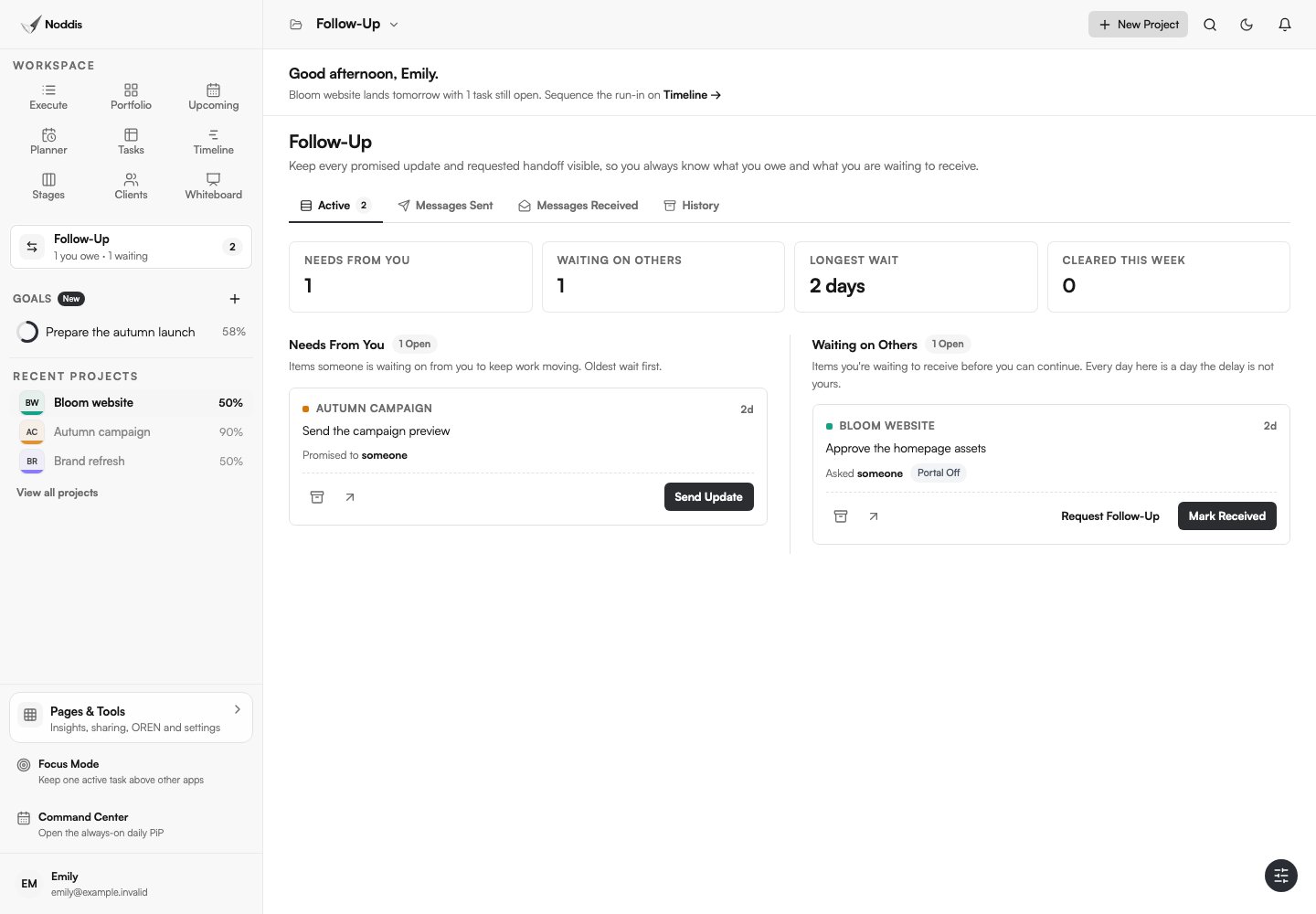
- Record the next move in Follow-Up. Link a commitment to its task, choose who owes it, and set an expected date.
- Plan across projects, then focus. Compare work in Portfolio, Upcoming, or All Tasks; select one project in Execute for the work block.
- Configure the client view. On Pro, enable a portal, choose visible tasks and sections, preview it, then send the link. Keep sensitive internal material out.
Whiteboard can hold visual notes and live project cards. Drift can compare scope additions with an agreed baseline. These are tools you choose to set up, not automatic side effects of adding a project. Review plan availability before building a workflow around them.
What should a virtual assistant’s daily routine look like across multiple clients?
Start with a short Portfolio review and check dated Follow-Up commitments. Choose a project in Execute and work in a protected block. Batch similar small tasks across clients when that helps.
Before stopping, review incoming captures and leave a next-step note. Each week, check project deadlines and blockers, then use Drift to review additions to the agreed scope. Inactivity alone does not make a project pending or prove it is in trouble.
How can a virtual assistant show clients progress without sending constant updates?
A virtual assistant can show progress without constant updates by giving each client a read-only link that reflects the work as it happens. In Noddis, the Client Portal opens without an account, so an executive who would never remember a password can still check, on their phone, whether the travel itinerary is booked and the board deck is formatted.
Keep a short weekly note anyway, because clients appreciate a human voice, but let the link carry the detail. The no-login portal guide explains what to put on it and what to keep internal.
Where does OREN fit into a virtual assistant’s workflow?
OREN uses available Noddis project context to answer questions and propose next steps. The name stands for Observational Reasoning and Evidence-based Navigation. Ask a specific question, inspect the supporting work, and review any proposed action before applying it: an AI answer is not a guarantee that the project data is complete.
The full OREN workspace is a Pro feature. Free users can ask questions in Nodes for their selected Connected Intelligence project.
What should you check before using this workflow?
In Noddis, client portals and Whiteboard require Pro. Email and Slack Capture also require Pro; Voice Notes is a separate workflow. Choose the tasks and sections to share, configure access, and preview the portal before sending its link. An unrestricted link can be forwarded. See current pricing for other limits.
Common questions
What is the best project management app for virtual assistants?
The best app for a virtual assistant is the one that shows every client in one place and makes capturing requests fast. Look for a cross-client view, a way to turn emails and messages into tasks, dated follow-ups, and a simple way for clients to see progress without logging in.
How do virtual assistants manage multiple clients?
A practical approach is to give each engagement a project, capture requests the same day, run a morning sweep across clients, and batch similar tasks. Choose a system that makes commitments visible rather than relying on memory.
Should a virtual assistant use the client’s tools or their own?
Use the client’s tools where the client requires it, but keep your own single view of every commitment. That way switching between a client’s Asana and another client’s Trello does not mean losing track of what you promised each of them.
How do I stop clients asking for status updates as a VA?
Give each client a link that always shows current progress, send a brief weekly note, and confirm finished work the same day. A current link gives them a place to check before asking.

Katleen is the founder of Noddis. She runs client projects through her app studio, 693 Labs, and builds Noddis around the problems that work creates.
Last reviewed . Feature details reflect Noddis at the time of review.