
Short answer
A work-in-progress (WIP) limit for freelancers is a self-imposed cap on how many deliverables you actively work on at once. Instead of starting every new client request immediately, finish or meaningfully advance existing work before pulling in another item. The limit protects focus while keeping urgent exceptions and genuine blockers visible.
Free resource
Download the blank wip experiment spreadsheet. No account is required. Save a copy before adding your project details.
What is a work-in-progress limit?
A WIP limit caps the number of items in a workflow stage such as “in progress.” The goal is to keep active work manageable, not to make a person's calendar appear empty. Atlassian's guide to Kanban WIP limits explains how limits help teams expose bottlenecks and focus on completion.
Freelancers can borrow the idea without adopting the entire Kanban method. A solo designer with six clients may have several projects underway but deliberately keep only two major deliverables in active production at one time. This is an illustrative experiment, not an evidence-based universal maximum.
How do you choose a sensible starting limit?
Start by counting the deliverables currently requiring deep work. Include active drafting, coding, design, and analysis. Do not count every future task in the backlog. Then choose a cap that makes meaningful finishing possible while protecting unavoidable client-response work.
For example, a freelance writer could try:
- Active deep work: up to two articles.
- Short administrative items: batched separately.
- Waiting on clients: visible in a separate column, with follow-up dates.
- Expedited exceptions: one-at-a-time, only after reprioritizing other work.
The purpose is to create a visible tradeoff: accepting a new urgent assignment requires finishing, pausing, or renegotiating something else. It is not another rule to ignore when a client emails.
A simple WIP board example
This fictional board shows how a freelancer might handle work across three clients.
| Ready | Active (limit 2) | Waiting on approval | Finished |
|---|---|---|---|
| Orbit Bikes product captions | Juniper homepage design | Juniper brand guide | Orbit Bikes campaign outline |
| Leo monthly newsletter | Leo landing-page copy | Orbit Bikes launch artwork | Leo content audit |
Two active items are already in progress. Before starting a third, ask whether one can be completed or deliberately paused. If client approval is truly the only next step, move the item to a waiting state and record the next check date. Do not hide active work in “waiting” merely to game the limit.
What happens when urgent client work arrives?
An urgent request should trigger a priority decision, not automatic expansion of the active column. Determine whether it is actually time-sensitive, whether it is within the agreed scope, and which commitment would move if it becomes the new priority.
A useful response is: “We can prioritize that by Friday, but it would move the [existing item] review to Monday. Would you like us to make that swap?” This avoids a private decision that surprises another client.
If everything appears urgent, examine the commitments and workload capacity rather than raising the WIP limit until it no longer constrains anything.
How do you measure whether WIP limits help?
Review the experiment after two or three weeks. Track completed deliverables, how many items remained half-finished, and how often work sat blocked. Pay attention to whether clients received meaningful outputs sooner, not just whether the board contained fewer cards.
If the limit is too restrictive, adjust it. If the same bottleneck appears every week, improve the handoff or review process rather than treating the number alone as the cause.
Use a brief weekly journal entry:
| Week | Active limit | Completed deliverables | Repeated bottleneck | Adjustment |
|---|---|---|---|---|
| 1 | 2 | 3 | Late client approvals | Earlier review requests |
| 2 | 2 | 4 | Unplanned small requests | Batch admin twice weekly |
These figures are a fictional illustration of how to monitor a trial, not a prediction of productivity gains.
Can Noddis support a WIP workflow?
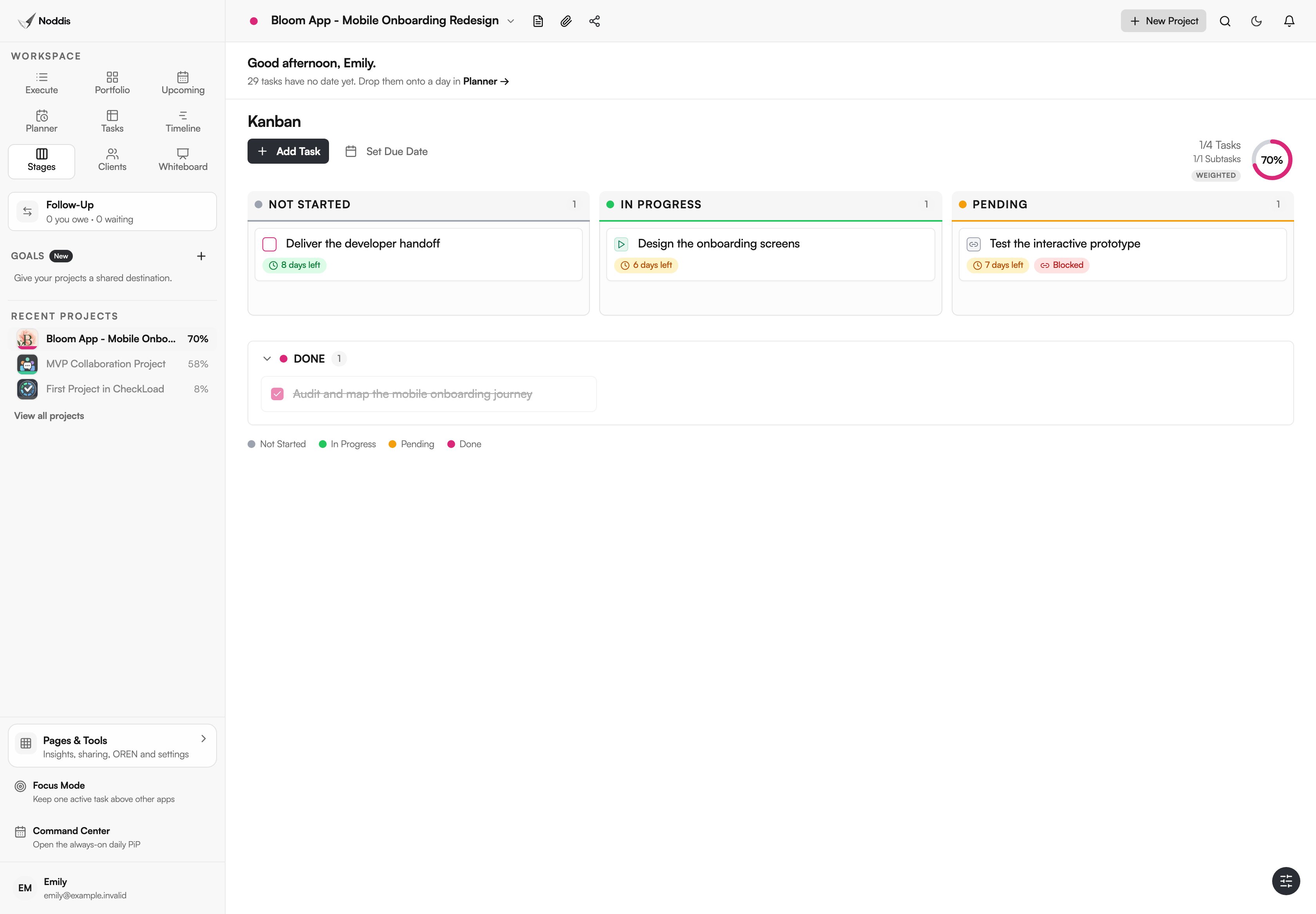
Noddis is a project management app with a Stages Kanban view and project-focused workspaces. Use Stages to see workflow status, and set a personal WIP policy. Noddis does not enforce a hard numerical WIP limit. Stages and Timeline are Pro workspaces for signed-in accounts; they can also be explored in the visitor demo. Portfolio can keep all clients visible while Execute focuses on one project. A Follow-Up commitment helps preserve client-owned waiting items without treating them as active production.
The guide to managing multiple projects covers cross-project visibility; try the live demo to see the relevant workspaces.
Your next step
Cap active deep-work deliverables for two weeks and record what actually finishes. Keep the experiment simple enough that you will maintain it on a busy day.
Common questions
Is a WIP limit the same as a client limit?
No. A client limit constrains how many engagements you accept. A WIP limit constrains how many pieces of work are actively in production at the same time. One client may have several deliverables, and one deliverable may require multiple review steps.
What about tasks waiting on a client?
Show them in a waiting state with an owner and follow-up date. They are not active production if you truly cannot advance them, but they are still obligations that may return and require capacity.
Does a WIP limit mean refusing urgent work?
Not necessarily. It means accepting urgent work deliberately, with a clear decision about what to pause, replace, or reschedule. Exceptions are possible; invisible exceptions defeat the purpose.

Katleen is the founder of Noddis. She runs client projects through her app studio, 693 Labs, and builds Noddis around the problems that work creates.
Last reviewed . Feature details reflect Noddis at the time of review.