
Short answer
Project management for freelance designers should track three things per client: the deliverable, the current feedback round, and the approval you are waiting on. Keep one project per client, turn every feedback email into dated tasks the same day, date every pending approval so you nudge on time, and share a read-only progress link so clients see the status without seeing your working files.
What does a freelance designer’s week look like with six active clients?
This is an illustrative scenario. It is not a customer testimonial, and it makes no claims about results. It shows how the work could be set up in Noddis.
A freelance designer with six active clients usually has two projects in deep work, two in feedback, and two waiting on something from the client. Picture a brand and web designer whose week includes a logo refinement, a landing page in its second review, a pitch deck that needs final copy, a packaging concept awaiting sign-off, a retainer client who sends “small tweaks” every few days, and a kickoff for a new website.
The design hours are the easy part to plan. The hard part is everything around them: three people at one client replying with conflicting notes, a sign-off that keeps slipping because the founder is traveling, a copy deck promised “by Friday” that has now been promised for three Fridays, and the retainer client’s tweaks quietly turning into a new page.
What tools do freelance designers usually use to manage clients?
Freelance designers usually combine a few good tools, each chosen for what it does best. Figma comments are excellent for precise, pinned feedback on a frame. Trello and Notion are popular for tracking projects because they are visual and flexible, and many designers keep a Notion workspace for proposals, briefs, and process documentation. Email remains the place where clients actually send most feedback, because it is the tool every client already knows.
The gap is not in any single tool. It is between them: the feedback is in email, the file is in Figma, the deadline is on a board, and the approval you are waiting on is in your head. With one client that is manageable. With six, the connective tissue becomes the job.
Which freelance design pain points does each Noddis workspace solve?
The recurring freelance design pain points each line up with a specific Noddis workspace:
| Pain point | What usually happens | Noddis workspace that helps |
|---|---|---|
| Feedback arrives as long emails with mixed requests | Revisions get missed, scope grows unnoticed | Capture Inbox for text/email/Slack; Voice Notes for spoken notes |
| Approvals that keep slipping | Deadlines move without anyone saying so | Follow-Up |
| Six clients at different stages | The loudest client gets the best hours | Portfolio Board and Execute |
| Early concepts and moodboards | Scattered across screenshots and folders | Whiteboard |
| Clients want to see progress | Inviting them into the workspace creates confusion | Client Portal |
| One approval holds up several deliverables | Hard to see why the whole project feels stuck | Nodes |
How would a freelance designer set up Noddis for client work?
Set up one project per engagement or ongoing retainer. Link a client record if useful, and invite collaborators only to the projects they need.
- Write the agreed deliverables as tasks. Add dates to real commitments, and keep feedback rounds or decisions in the task notes.
- Capture requests through supported channels. Forward emails to your Capture address, use text or connected Slack, then review the extracted work. Use Voice Notes separately for a spoken recap or meeting.
- Record the next move in Follow-Up. Link a commitment to its task, choose who owes it, and set an expected date.
- Plan across projects, then focus. Compare work in Portfolio, Upcoming, or All Tasks; select one project in Execute for the work block.
- Configure the client view. On Pro, enable a portal, choose visible tasks and sections, preview it, then send the link. Keep sensitive internal material out.
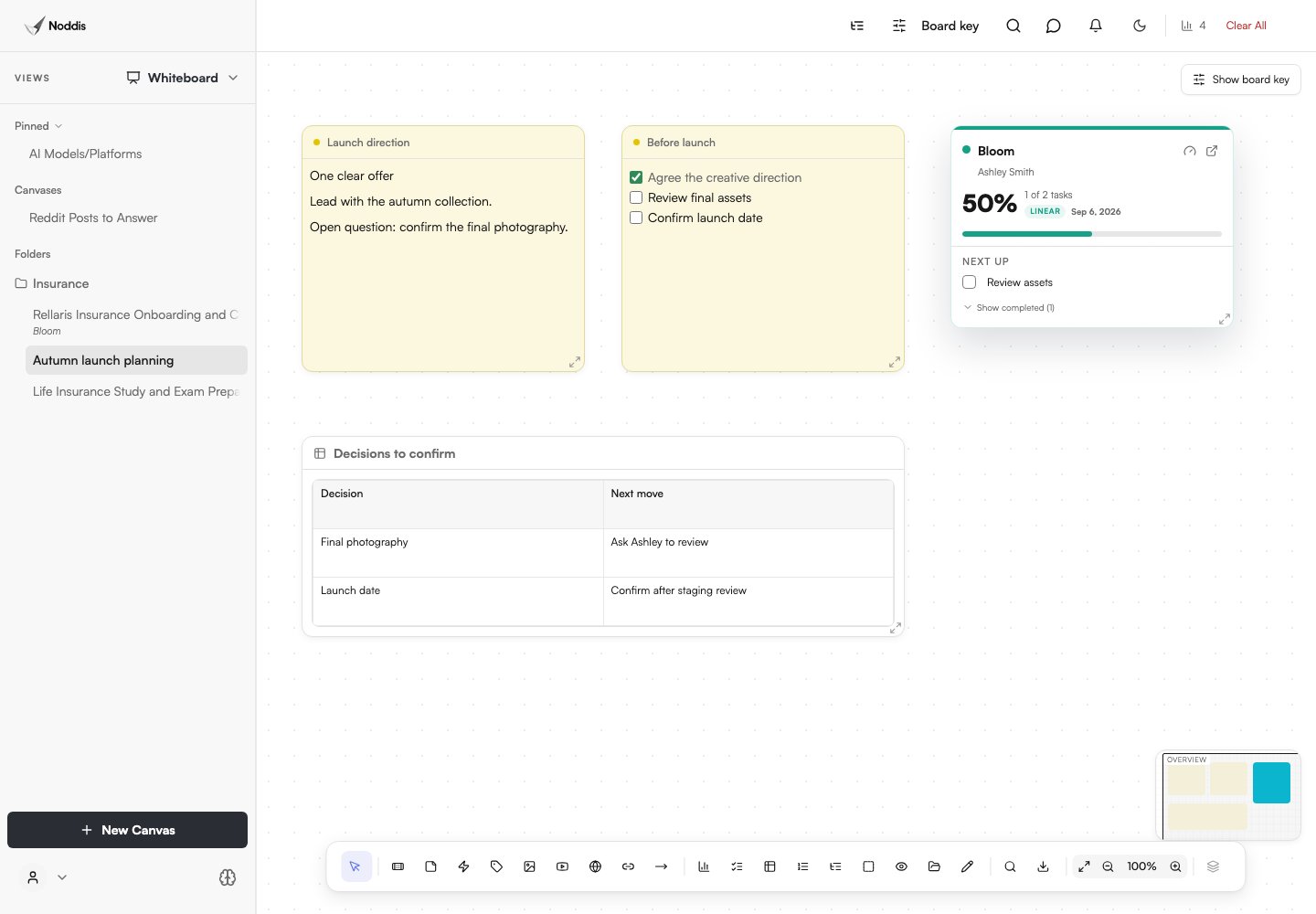
Whiteboard can hold visual notes and live project cards. Drift can compare scope additions with an agreed baseline. These are tools you choose to set up, not automatic side effects of adding a project. Review plan availability before building a workflow around them.
How should a freelance designer manage feedback rounds and approvals?
A freelance designer should manage feedback rounds by consolidating each round into one dated list and treating every approval as a commitment with a nudge date. Ask clients for one consolidated reply per round, then split that reply into individual revisions the moment it arrives. Anything that was not in the original brief gets named as new scope rather than quietly absorbed.
For approvals, write the request so it can be answered in one message: “Please choose direction A or B by Thursday so we keep Friday’s production slot.” Then put the nudge in Follow-Up. The reusable messages in the client follow-up guide work well here.
How should a freelance designer manage a retainer client’s ongoing requests?
Give the retainer its own project and capture each request as visible work. Review email, text, or Slack requests in Capture Inbox before applying them. Treat work outside the retainer as a scope conversation rather than silently accepting it.
Configure the portal to include suitable deliverables; tasks are not automatically published to clients simply because Capture created them. Establish a Drift baseline and classify additions to make the growing scope visible at renewal time.
What should a designer do when a project feels stuck but nothing is late?
Review the task status, the approval you need, and any explicit dependency. Nodes can help inspect stored relationships, while Follow-Up tracks an approval you have recorded as a commitment. Drift answers a different question: how much scope has been added since the baseline.
If one approval blocks several deliverables, record a precise request and date. Choose the next action from that evidence, not from a graph connection count alone.
What should you check before using this workflow?
In Noddis, client portals and Whiteboard require Pro. Email and Slack Capture also require Pro; Voice Notes is a separate workflow. Choose the tasks and sections to share, configure access, and preview the portal before sending its link. An unrestricted link can be forwarded. See current pricing for other limits.
Common questions
What is the best project management tool for freelance designers?
The best tool for a freelance designer tracks deliverables, feedback rounds, and pending approvals across every client in one place, and lets clients see progress without logging into your workspace. Pair it with your design tool’s own commenting for pixel-level feedback.
How do freelance designers handle client feedback?
Ask for one consolidated reply per round, split it into individual revisions as soon as it arrives, and name anything outside the brief as new scope. Keep each revision as a task with a date so nothing is missed.
How do you get clients to approve designs faster?
Make the decision small and specific, give a date and the reason it matters, and follow up on that date. “Choose A or B by Thursday so we keep Friday’s slot” gets answered faster than “Any thoughts?”
Should I give clients access to my project board?
Usually not. Most clients need deliverable-level progress and clear requests, not your working notes. A read-only progress link gives them confidence without the noise.

Katleen is the founder of Noddis. She runs client projects through her app studio, 693 Labs, and builds Noddis around the problems that work creates.
Last reviewed . Feature details reflect Noddis at the time of review.