
Short answer
A client portal is usually a better fit than a shared spreadsheet when clients need a clear, frequently updated view of project progress, milestones, approved files, and next steps. A spreadsheet can be enough when the project is small, the information is simple, and someone is willing to maintain it. The right choice depends on clarity, access, and upkeep.
Free resource
Download the blank client status channel scorecard spreadsheet. No account is required. Save a copy before adding your project details.
Which option works better for each need?
| Client need | Shared spreadsheet | Client portal |
|---|---|---|
| Few milestones, updated occasionally | Often sufficient | May be unnecessary |
| Frequent progress checks | Manual upkeep likely | Useful if linked to project data |
| Files and next steps together | Links can work | Can provide clearer presentation |
| Client-specific visibility | Requires careful permissions | Requires careful portal settings |
| One-time short engagement | Low setup | May be more setup than needed |
| Many active engagements | Multiple trackers can diverge | Central workflow may reduce duplication |
This comparison concerns operating approaches, not a claim that every portal has the same features or permissions.
When is a spreadsheet genuinely the better option?
A spreadsheet can be the right choice for a two-week assignment with three milestones, one approver, and infrequent updates. A client who already uses a shared Google Sheet may prefer a simple row showing milestone, owner, date, and status.
Use clear columns and protect internal details. Do not make the client reconstruct a task hierarchy to learn whether the agreed deliverable is ready. A useful project sheet might contain:
| Milestone | Status | Target date | Client action |
|---|---|---|---|
| Draft design | Complete | Nov 3 | Review v2 |
| Final approval | Awaiting client | Nov 5 | Confirm choice |
| Handoff | Scheduled | Nov 8 | None yet |
The example is fictional. Store confidential information elsewhere, with permissions suited to its sensitivity.
When does a portal become more valuable?
A portal becomes more valuable when clients ask the same status questions repeatedly, projects have multiple phases, or files and approvals need a predictable home. The benefit is not a fancy dashboard. It is reducing the effort needed for the client to understand what has changed and what they should do.
A portal should explain progress in ordinary language: current phase, next milestone, required client action, and approved resources. If it only displays an unexplained percentage, a well-written email may be more useful.
The client project status page guide explains what a clear client view should contain. The no-login progress guide discusses access friction.
What are the privacy and access tradeoffs?
Both approaches need a deliberate sharing policy. Check who can open the link, whether they can edit or download information, and whether internal details are visible. A public or easily forwarded link deserves particular care, even when protected by an optional password.
Use the minimum information necessary for the client to make decisions. Internal pricing, staff notes, confidential discussions, and unrelated clients' information should not appear in a client-facing view. General OWASP authorization guidance supports limiting access to authorized resources.
No-login access can lower friction, but it is not universally appropriate for sensitive engagements. Choose access controls based on the information being shared and the client's requirements.
How do you decide without rebuilding everything?
Run a simple test: ask someone unfamiliar with the project to find the current status, next date, and action required from the client in under a minute. Then inspect the process required to keep that view current. If maintaining it duplicates information already tracked elsewhere, that is a cost.
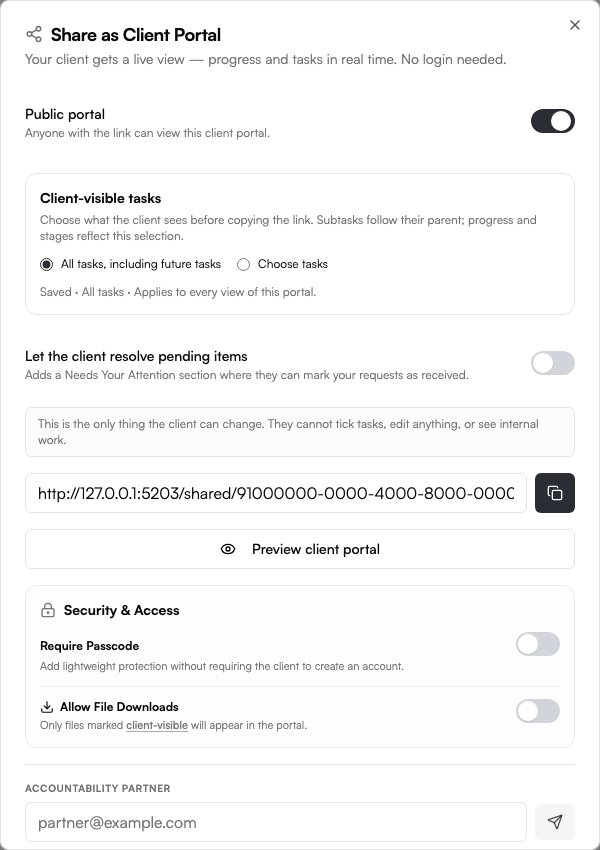
Noddis is a project management app with configurable Pro client portals for sharing selected project information. It also keeps project tasks and follow-ups connected. Preview the actual client-facing view and permissions before sending a link; the portal does not replace agreement on what is safe to share. Try the live demo.
Your next step
Choose one active client project and compare the client experience using a shared sheet and a configured portal. The clearer option with less duplicate upkeep is usually the stronger choice.
Common questions
Can I use a spreadsheet instead of buying portal software?
Yes. For simple client work, a clean shared sheet may be enough. The decision depends on how frequently it changes, how many clients you manage, and whether maintaining the sheet duplicates work.
Is a no-login portal always better?
No. Lower access friction can be useful for routine status updates, but sensitive projects may require stronger authentication and controls. Evaluate the actual information and sharing risk.
Should a portal show every internal task?
Usually not. Show the information the client needs to understand progress and make decisions. Keep internal planning, private discussions, and unrelated projects separate.

Katleen is the founder of Noddis. She runs client projects through her app studio, 693 Labs, and builds Noddis around the problems that work creates.
Last reviewed . Feature details reflect Noddis at the time of review.