
Short answer
A client assets request checklist prevents website and creative projects from stalling because the team is missing approved copy, brand files, imagery, account access, or legal disclosures. Organize requests by deliverable, name an owner for each item, state the required format, and track whether the asset is received, usable, and approved.
Free resource
Download the blank client assets checklist spreadsheet. No account is required. Save a copy before adding your project details.
Which client assets should you request for a website project?
The exact list depends on the scope, but most website projects benefit from five categories: brand materials, content, media, access, and approval information. Ask only for assets relevant to the deliverables agreed in the project, not every file the client has.
The following checklist is designed for a small business website refresh. A photo-heavy ecommerce shop or regulated business will need additional items, which should be added at kickoff.
| Category | Asset | Preferred handoff | What to verify |
|---|---|---|---|
| Brand | Primary and alternate logo | SVG or high-resolution source | Correct current version |
| Brand | Fonts, colors, usage guide | Brand guide or written approval | Usage permissions |
| Content | Page copy and headings | Editable document | Approved by content owner |
| Content | Product or service details | Current source document | Accuracy and version |
| Media | Photography | Original files or licensed library | Rights and resolution |
| Media | Video and captions | Source files and transcript | Accessibility needs |
| Access | CMS or hosting permissions | Role-based invitation | Least-necessary access |
| Approval | Legal and privacy copy | Client-approved final text | Named responsible reviewer |
| Approval | Final sign-off contact | Name and contact method | Authority to approve |
This is an inventory, not a license or legal review. The client should confirm rights to use supplied materials, and qualified professionals should review legally sensitive statements.
What is the difference between received and usable?
Received means the file or access arrived. Usable means the team can actually employ it for the agreed deliverable. A logo embedded in a low-resolution slide may be received but not suitable for a responsive website. A shared folder may be accessible yet contain outdated product details.
Use three checks before treating an asset as ready:
- Readable: Can the team open the correct format and access the file?
- Current: Is it the approved version for this campaign or project?
- Permitted: Is the client authorized to use it in the planned channel?
Use an explicit Needs replacement state when a file fails. Otherwise, the project may appear unblocked simply because the upload column contains a checkmark.
How should a client assets tracker work?
Track each requested asset with a clear owner, due date, status, and next action. Do not store passwords, authentication codes, or sensitive customer records in a general assets spreadsheet.
| Asset | Owner | Needed by | State | Next action |
|---|---|---|---|---|
| Approved homepage copy | Marketing lead | Nov 4 | Awaiting | Confirm review date |
| Primary logo SVG | Designer | Nov 2 | Received, usable | None |
| Staff photography | Operations lead | Nov 6 | Needs replacement | Request originals |
| CMS access | Website admin | Nov 3 | Not granted | Send role invitation |
Fictional project example. Add a direct reference to the approved source and a follow-up date. The handoff date is not necessarily the public launch date; the asset may be needed earlier to allow build and QA time.
How do you request access safely?
Use the service's built-in role or collaborator invitation wherever possible. Avoid asking clients to email passwords or paste secrets into a form. Limit privileges to what the project needs and remove access when the engagement ends.
For general web-access principles, see the OWASP guidance on authorization. The precise permission workflow depends on the CMS, design tool, or hosting provider.
An access checklist should distinguish invitation sent, invitation accepted, and permissions tested. Only the last one confirms that the team can do the work.
What do you say when assets are late?
Explain the dependency with the smallest useful ask. For example:
Hi [Name], we have the final logo and page structure, but we still need the approved service descriptions and staff photos. Those are required before we can complete the homepage review. Could you send them by [date], or confirm who on your team can supply them? If they arrive later, we may need to revisit the review schedule.
If an asset is optional, offer an explicit alternative such as a temporary approved placeholder. Never substitute unlicensed stock imagery or invent business claims just to keep a date intact.
How does Noddis help organize these requests?
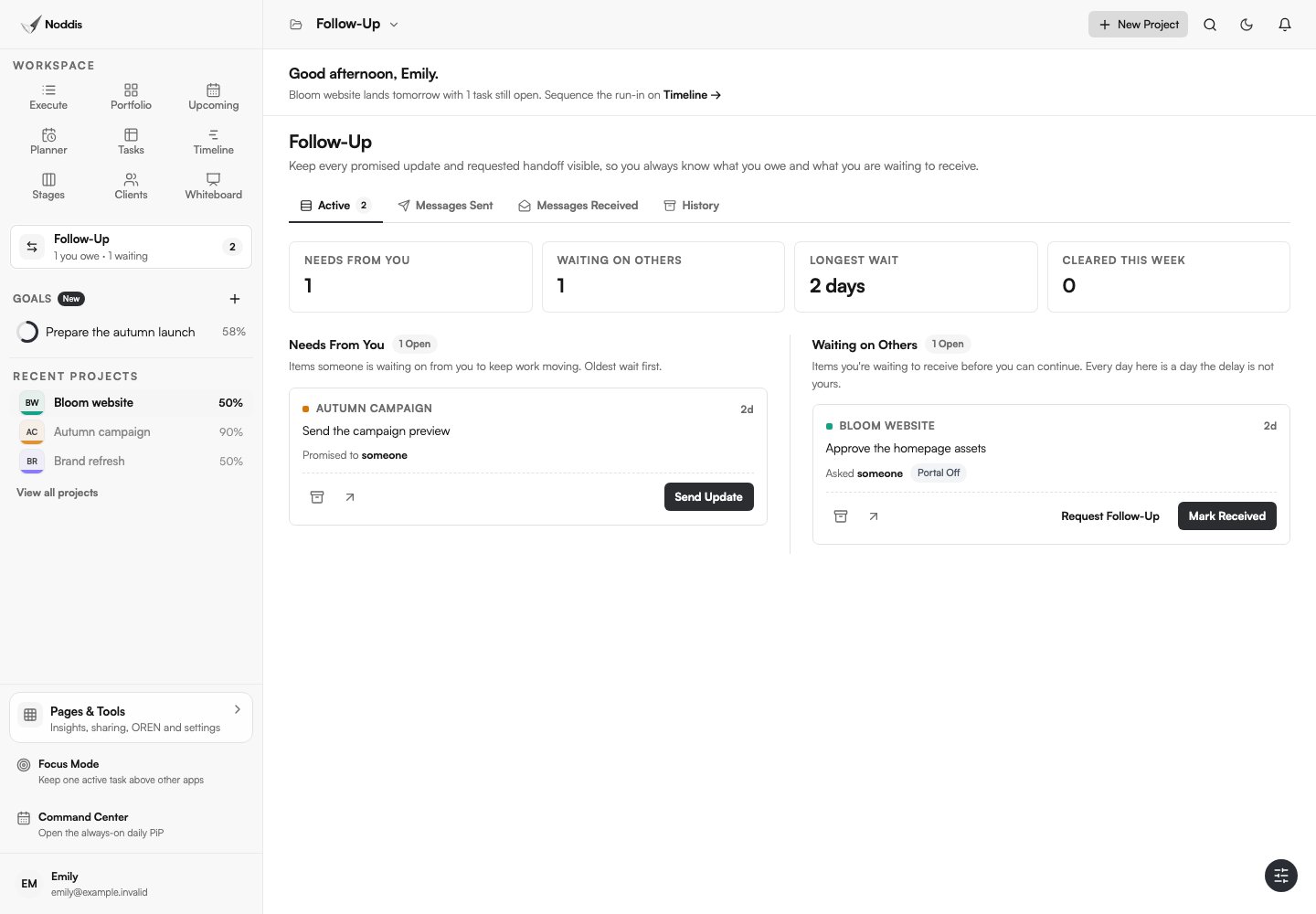
Noddis is a project management app for keeping project work, follow-ups, and context connected. Use tasks for asset verification steps, store the relevant asset links with the work, and use Follow-Up to record which items are waiting on clients. The client onboarding checklist explains the broader kickoff process, while the client project tracker guide shows how these dependencies appear in an overall project view.
Your next step
Send the client the checklist as an asset inventory, not a long open-ended request. Mark every line as usable, awaiting, or needing replacement before work depends on it.
Common questions
Should I request every asset before a project begins?
Request critical inputs before starting the work that depends on them. Some assets can arrive in phases, provided owners, dates, and schedule impacts are explicit. A complete inventory at kickoff helps plan the order without pretending every item is needed on day one.
What if the client does not have a brand guide?
Ask for the current approved logo, colors, typefaces, and two or three representative materials. Record which decisions still need approval. A missing brand guide may itself be a scope decision if the engagement requires creating one.
Where should source files live after launch?
Store deliverables in the agreed client-owned location with a clear folder structure and access policy. Record where the final files live and who retains administrative access in the project closeout notes.

Katleen is the founder of Noddis. She runs client projects through her app studio, 693 Labs, and builds Noddis around the problems that work creates.
Last reviewed . Feature details reflect Noddis at the time of review.