
Short answer
Choose one working record when two project trackers ask for the same update. Give the other audience a view or a short exception report. Test one real deliverable from completion to client update before moving the whole spreadsheet, and ask the client which decision they can now make from the shared record.
Why do two project trackers ask for the same update?
On Reddit, project manager u/Flow-Chaser described “updating like five different tools just to say the same thing.” The detail worth paying attention to is the audience. A project team wants to know what it can work on today. A client wants to know whether they can announce a launch date. Both have a legitimate question. Two separately maintained copies of every task are an expensive way to answer them.
Follow one item, such as the approval of a landing-page proof. List every place somebody types that it was approved, from the working board to a spreadsheet for the Friday call. Beside each copy, write the name of the reader and the decision they make from that information.
What does an exception report look like?
Suppose the client’s sheet tracks twenty deliverables. Nineteen are on course and the twentieth needs a product photograph by Thursday. Instead of copying nineteen unchanged statuses, send the shared progress link and one sentence naming the missing photo, who can supply it and what happens if it arrives on Friday.
Ask the client to use that report on the next call. Did they still need to open the old sheet? Write down the question that sent them back. It might be as small as a milestone name that only exists in the spreadsheet. Add that context to the shared project and try the same check again.
| Fact | Who maintains it |
|---|---|
| The approved proof is ready | The person who receives the client’s approval. |
| Friday’s launch is still feasible | The delivery owner who can verify outstanding work. |
| The invoice is due next week | The owner of the billing record. |
Which tracker should own the status?
Choose the place where the change can be recorded closest to the work. If the designer closes the revision in the project as soon as the client approves it, make that task the working record. If the account manager alone receives approval, agree where they will place the reply so the designer can close the task with confidence.
Keep other information where it serves its own purpose. A finance spreadsheet can own a calculation. A client directory can own a billing contact. Neither needs a manually maintained copy of every subtask just to answer whether a proof is ready.
How do you retire the duplicate without losing history?
Choose a cutoff with everyone who updates either tracker. Before that date, finish one complete reporting cycle from the working project. After it, make the previous sheet a dated reference copy so a teammate returning from vacation knows where new updates belong. Keep access to historic approvals, formulas and invoices for the people who rely on them.
Give readers a short change note. “Starting Monday, the delivery link is where to check current progress. The October sheet is still available for past decisions. Send outstanding approvals to Ren.” A clean cutoff is easier to follow than a week in which both trackers appear to be current.
How can you test one handoff in Noddis?
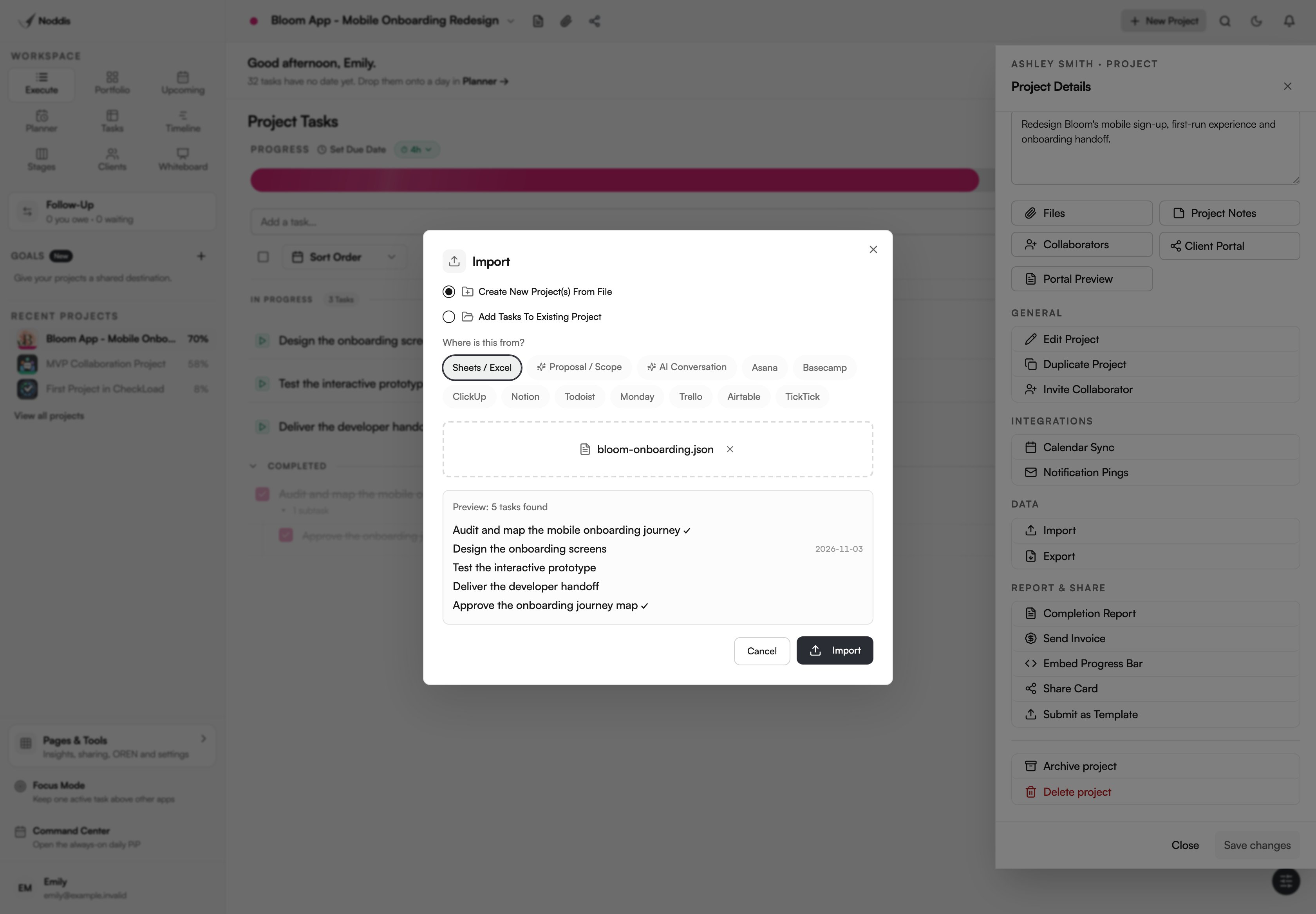
Take a copy of the source sheet and choose a small project you know well. In the import preview, select the task table and check the title, due date and parent of a real deliverable. If the workbook also lists people or equipment, keep those tables outside the selected task rows. Save the original workbook anywhere its formulas will still be useful.
In Execute, complete one agreed item. Open the client-facing view with the sharing settings you intend to use. Ask whether that view tells the client what they need for their next decision. A task checked off internally does not mean the client approved a launch. Record that separate decision if it matters.
For the next step, see How to Migrate Client Projects Without Losing Context and Project Dependency Tracker Template for Client Work.
Sources and field notes
A project manager described the time spent repeating updates across tools. The landing-page project here is a worked example. Read the original source.
Project managers also discuss keeping customer records aligned with delivery work.
Common questions
Do I have to migrate every worksheet?
Start with the table of actual work. Keep reference lists, financial calculations and historic reporting separate until you know who uses each one. For a first move, compare a known task count and an actual client deliverable against the imported project. Keep the original file available for formulas or resource data.
Which update should we test first?
Choose a real deliverable that changes hands. Follow an approval from the person who receives it to the person who acts and the client who needs to see the result. Pick an item that is due soon enough for both audiences to use it in the next reporting cycle.
What if the client insists on their spreadsheet?
Agree on the smallest set of facts they need and a reporting cadence. Give one person responsibility for that report, link to the working project and stop copying internal steps the client never uses. Try the arrangement for one reporting cycle and ask which question, if any, still requires the full second tracker.

Katleen is the founder of Noddis. She runs client projects through her app studio, 693 Labs, and builds Noddis around the problems that work creates.
Last reviewed . Feature details reflect Noddis at the time of review.