
Short answer
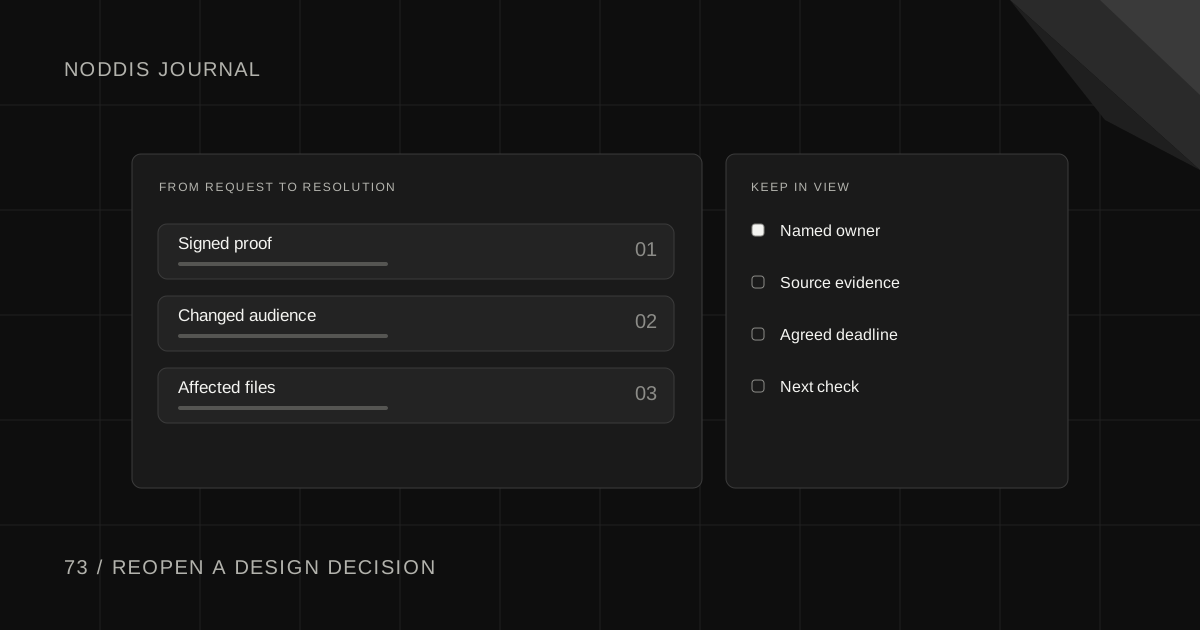
Design sign-off gives you a place to start when a new stakeholder asks for changes. Retrieve the version the client approved, ask what business requirement has changed and identify the outputs it affects. Give the decision owner an estimate for reopening those outputs before the team starts revising them.
What happens to design sign-off when a new reviewer joins?
A marketing director approves the packaging layout. A new sales lead sees it three days later and asks for a different headline hierarchy. The design file now contains two valid opinions, but production still needs one instruction.
Save the approved file version, its date and the person who approved it. Ask the new reviewer whether the change corrects a factual error, meets a requirement that was missed, or introduces a new preference. Each answer affects the next step differently.
Which part of the approval still holds?
Say a director sees a conference brochure after the print files have gone to preflight. She asks for a new headline because the business now serves hospitals as well as clinics. Find the approved proof and check how far that new audience reaches. The cover headline may change, while the contact details and print specification still stand.
Pull the affected files into a short list. In this case the digital cover, printer’s PDF and social announcement all repeat the headline. Give each one a named check. The person who asked for the change may never have seen the print deadline.
| Requested change | What to check |
|---|---|
| Headline for a new audience | Which approved print and digital pieces contain the old headline? |
| A different cover photo | Have rights, image resolution and the final proof been checked? |
| A new print deadline | Can the printer still accept a revised, approved file? |
Price the decision in work
Trace the change to real outputs. The headline appears on the front label, a retailer sheet and a web thumbnail. Changing its size may require three exports and another proof. The ingredient panel and shipping carton can stay on their current path.
Write down the proposed decision in language the owner can approve. “Use the larger headline on the label and retailer sheet. Keep the web thumbnail as approved. Move the printer proof to Wednesday.” Send that statement with the current file version.
How do you invite the new reviewer in without starting over?
Send the approved version with one sentence explaining the original objective. Ask the new reviewer to mark the place where it misses the updated requirement. Looking together at page one is a much shorter conversation than asking for general thoughts on the whole brochure.
A client-facing reply might say, “I can update the cover and digital proof to include hospitals. Changing the print file means another preflight. Is that audience change required in the print run, or can the digital edition lead?” Give them enough detail to choose what they are buying with the extra day.
When does a design change need a fresh estimate?
Trace the request to the last deliverable it touches. A change to a shared component can travel through print, mobile and an email template even when the original comment mentioned one page. Put the revision, checks and any handoff time in the estimate. A small copy edit might only need the original reviewer to confirm the new proof.
If the client elects to keep the original print run, close the print change with that decision and leave the digital revision open. Months later the two versions will look different on purpose. Make that reason legible to the next person who maintains them.
Keep the change narrow in Execute
In Noddis, retain the original decision in Project Notes. Open a parent task for the new review and add a child task for each affected output. Leave the already approved work complete so the project history still makes sense.
Record who will send the final answer in Follow-Up. Once the owner decides, date the relevant tasks in Execute and check the new proof date in Upcoming. The project can move again without reopening every piece of work that happens to share the same client name.
For the next step, see Client Decision Log Template: Keep Approvals and Reasons and Scope Change Log Template for Client Projects.
Sources and field notes
Natalie Coombe describes a new stakeholder appearing after sign-off in a client engagement. Read the original source.
Designers describe opposite directions from reviewers on the same work.
Common questions
Who should approve a late design change?
Ask the client to identify the person authorized to decide between reviewers. Record their name beside the decision and the specific version it covers. A late reviewer can describe what needs changing. Ask the accountable owner to accept the effect on the estimate and delivery date before restarting production.
Does every late request require a new project?
A bounded change can fit inside the current project. A new direction affecting the entire deliverable may need a separate scope and schedule. Record a bounded change in the current project if the owner can approve it there. Create a separate estimate when the request introduces a distinct deliverable.
What if the original approver has left the company?
Ask the client to name a successor who can make this decision. Send the successor the approved version and the open question together so they can confirm both the authority and the change. Include any cutoff for print or development so the successor knows when you need their answer.

Katleen is the founder of Noddis. She runs client projects through her app studio, 693 Labs, and builds Noddis around the problems that work creates.
Last reviewed . Feature details reflect Noddis at the time of review.